40
OPERATION/ALARM LOG
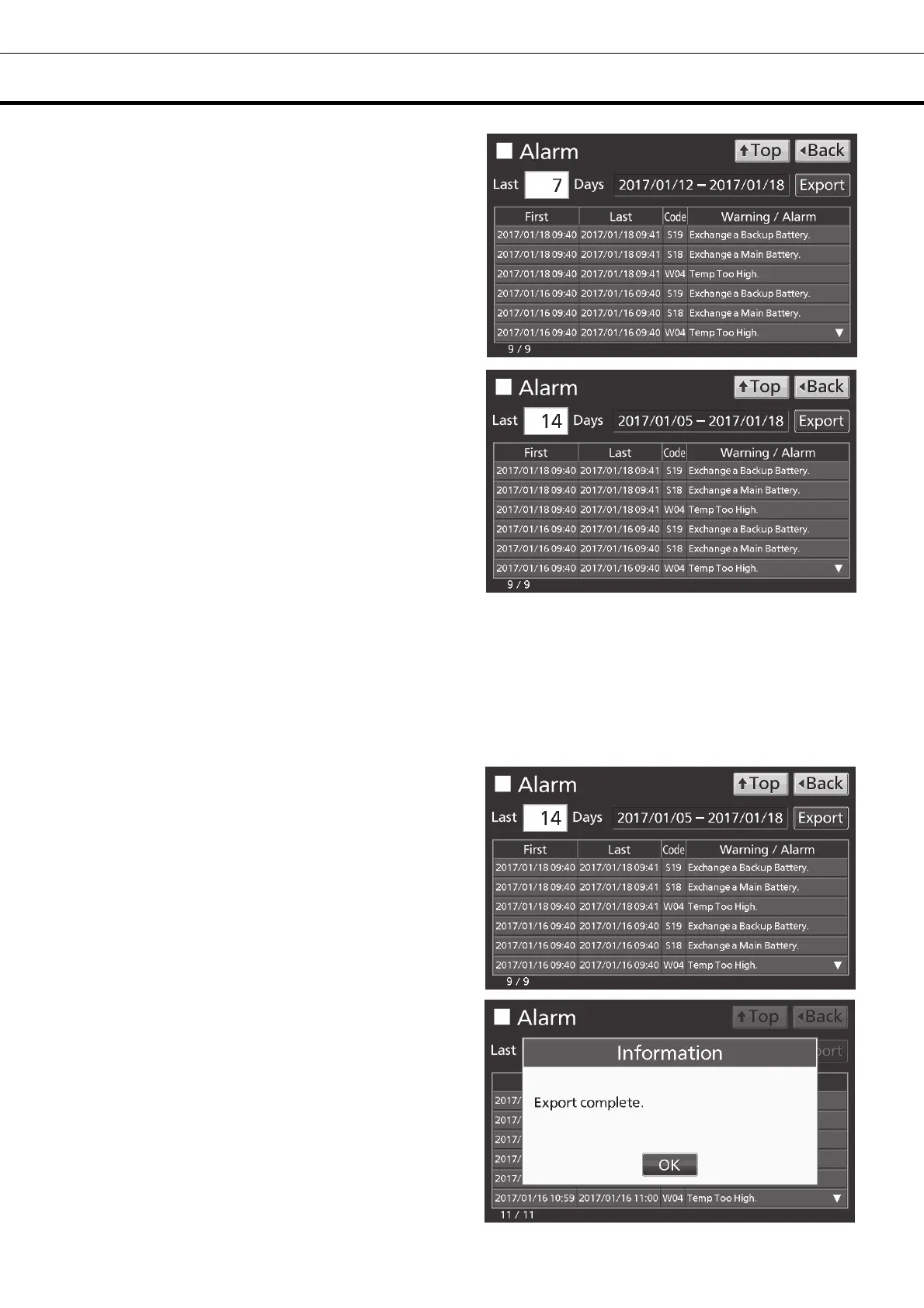
4. On the Alarm screen, the newest 7 days’ alarm
logs (containing that day) are displayed.
Note: When the number of applicable alarm log is
6 or more, by pressing the top (▲) or the bottom
(▼) log, the log table currently displayed scrolls
and hidden alarm logs can be seen.
• Press Back key to return to the Log screen.
• Press Top key to return to the Top screen.
5. On the Alarm screen, by inputting days into the
Last XX Days input box, alarm logs for specified
days (containing that day) are displayed.
Settable range: 1 day~45 days.
Note: The error of about 1 minute may be
observed during 1 month. Refer to page 44 for the
procedure of setting time.
• Press Back key to return to the Log screen.
• Press Top key to return to the Top screen.
●On the Alarm screen of procedure 4 or 5, alarm log data can be exported in CSV format to the USB
memory inserted into the USB port.
6. Insert the USB memory into the USB port.
Note: It is not possible to use a USB memory with security functions that requires entering password.
7. Press Export key.
8. When the export is complete, Information
dialog box is displayed. Press OK key. Refer to
pages 42 and 43 for the details about abnormal
export or exported file name.
9. Press Top key to return to the Top screen.











 To Next Page