27
RUNNING OPERATION (MENU/Set)
Key lock release function
Table 7. Procedure for key unlock setting (Change from Lock to Unlock) (Factory setting of PW is
“0000”.)
Description of operation Key operated Indication after operation
1 -----
Top screen is displayed.
2
Press the MENU button.
MENU
The menu window is indicated. And the
“set” is highlighted.
3
Press the ENTER key.
ENTER
Temp. Setting screen is indicated. And
set value of temperature is highlighted.
4
Select Key Lock by pressing shift
key (downward).
The set value 1 of the key lock (Key Lock)
is highlighted.
5
Press the figure input key 0. And
press the ENTER key.
Key lock (Key Lock) is changed from 1 to 0.
And the password input column is indicated
on the right of “0”.
(Refer to the following.)
6
Figure input key is pressed in order
to 0000. And press the ENTER
key.
"****" is indicated in the password input
column (Password). (An input password is
not indicated with a number.)
7
Press the MENU button.
MENU
The menu window is indicated. And the
“OK” is highlighted.
8
Press the ENTER key.
ENTER
Key lock is canceled, and a top screen is
indicated.
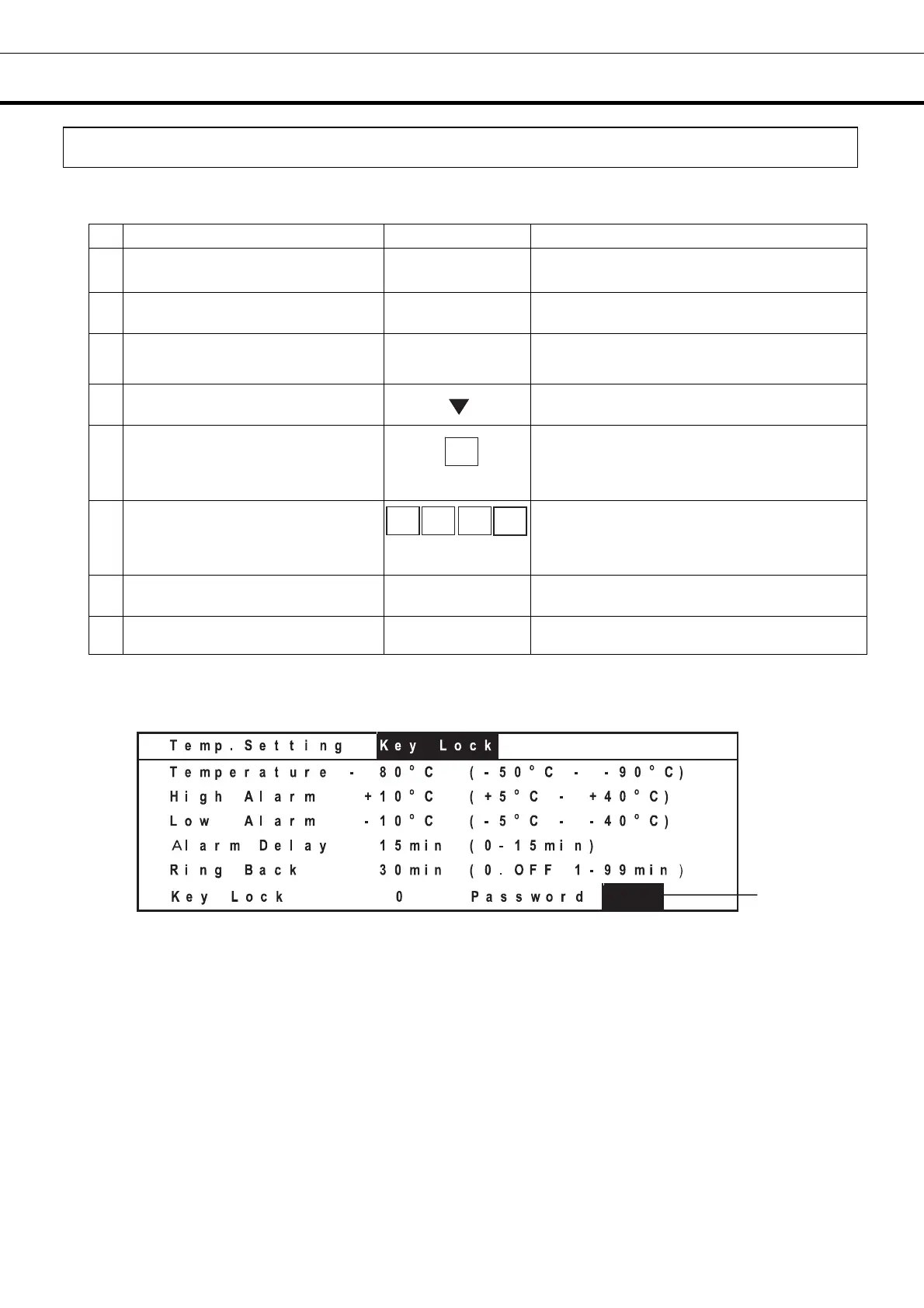
The following screen is indicated when a password is required during the key lock release operation.
(The process 5 of the table 7)
1. Password (Password) input column: When inputting 0 to release the key lock function, this column is
indicated. Input the password into the password (Password) input column by the figure input keys.
Note:
The buzzer sounds if a password is wrong. Again, input a password. A user should manage a
password with all of the members. Factory setting is 0000. Refer to page 37.
Contact our sales representative or agent at the time when a password is forgotten.
1
0
0 0
0
ENTER
0
ENTER




 To Next Page