31
1
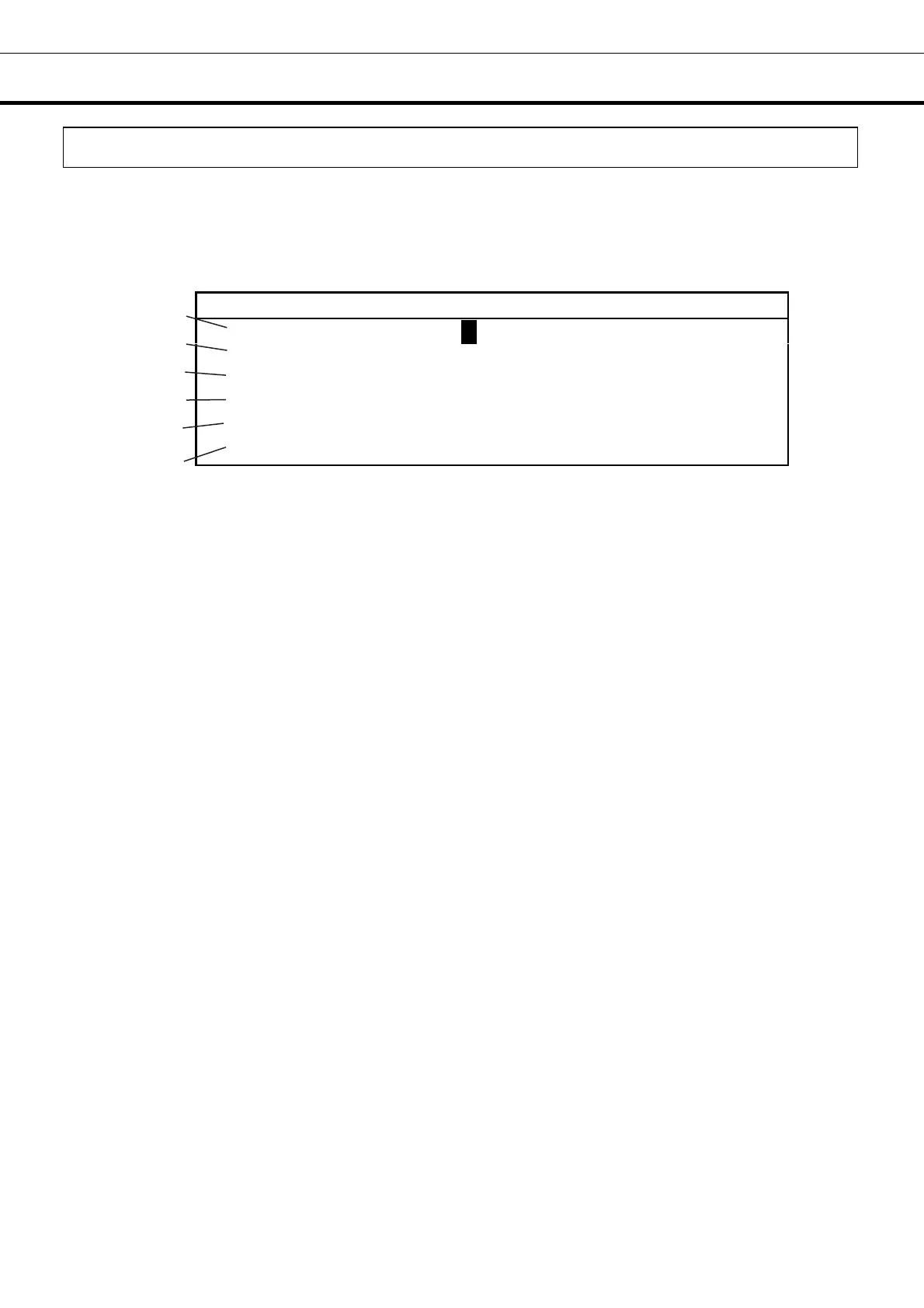
D e f a u l t S e t t i n g
3
L C D B a c k C o l o r
1 ( 1 . B l u e 2 .
h i t e )
D A Q S p e e d 0 ( 0 . 2 4 0 0 2 . 9 6 0 0 )
4
D A Q I D 0 ( 0 . O F F 1 - 2 5 0 )
5
D A Q M o d e 0 ( 0 . L o c a l 1 . R e
o t e )
R e
o t e A l a r
1 ( 0 . O F F 1 . A c t i v e )
6
C o n t r o l 0 ( 0 . N o r
a l 1 . E C O )
VARIOUS SETTING (MENU/Tools)
Initialization (Tools/Default Setting)
1. Choose initialization (Default Setting) with a shift key in the Select Tools screen (Select Tools). An
initialization screen is indicated when a menu button (MENU) is pressed and made to indicate a menu
window and OK is chosen and an enter key (ENTER) is pressed. Each parameter is set up under this
condition. (Each parameter on this screen is the factory setting.)
2. After setting, press the menu button (MENU), select “OK” and press the enter key (ENTER). The
setting is memorized.
Note: When the interface board of the option is installed on the product, the function of 2 to 4 of each
following parameter setting range is used. Contact our sales representative or agent at the time of
installation of the optional parts.
Each parameter setting range:
1. LCD Back Color : Setup of the back light (1. Blue 2. White) (Factory setting is 1.Blue at the factory.)
2. DAQ Speed, 3. DAQ ID, 4. DAQ Mode: Their parameters are only for the data acquisition system
MTR-5000 user. Any other user does not need to set them.
5. Remote Alarm: ON-OFF of the remote alarm contact at the time of the alarm can be set up. (Factory
setting is 1.)
6. Control: 0. Normal (Normal) is the mode of the normal operation. (Factory setting is 0.) 1.
Eco-mode (ECO) is the mode which it drives in with saving energy without using the operation of the
compressor as much as possible. A state of operation is indicated in the operation indication of the
Temp. Setting screen. When it is compared with the normal mode, about 5 % is effective in the
eco-mode (ECO) in the year on saving energy.
Note: The period of temperature of the chamber may become irregular in case of the eco-mode (ECO).
The normal mode (Normal) is recommended when a temperature recorder is installed on this product.
1
2
4
5
6
3




 To Next Page