37
VARIOUS SETTING (MENU/Tools)
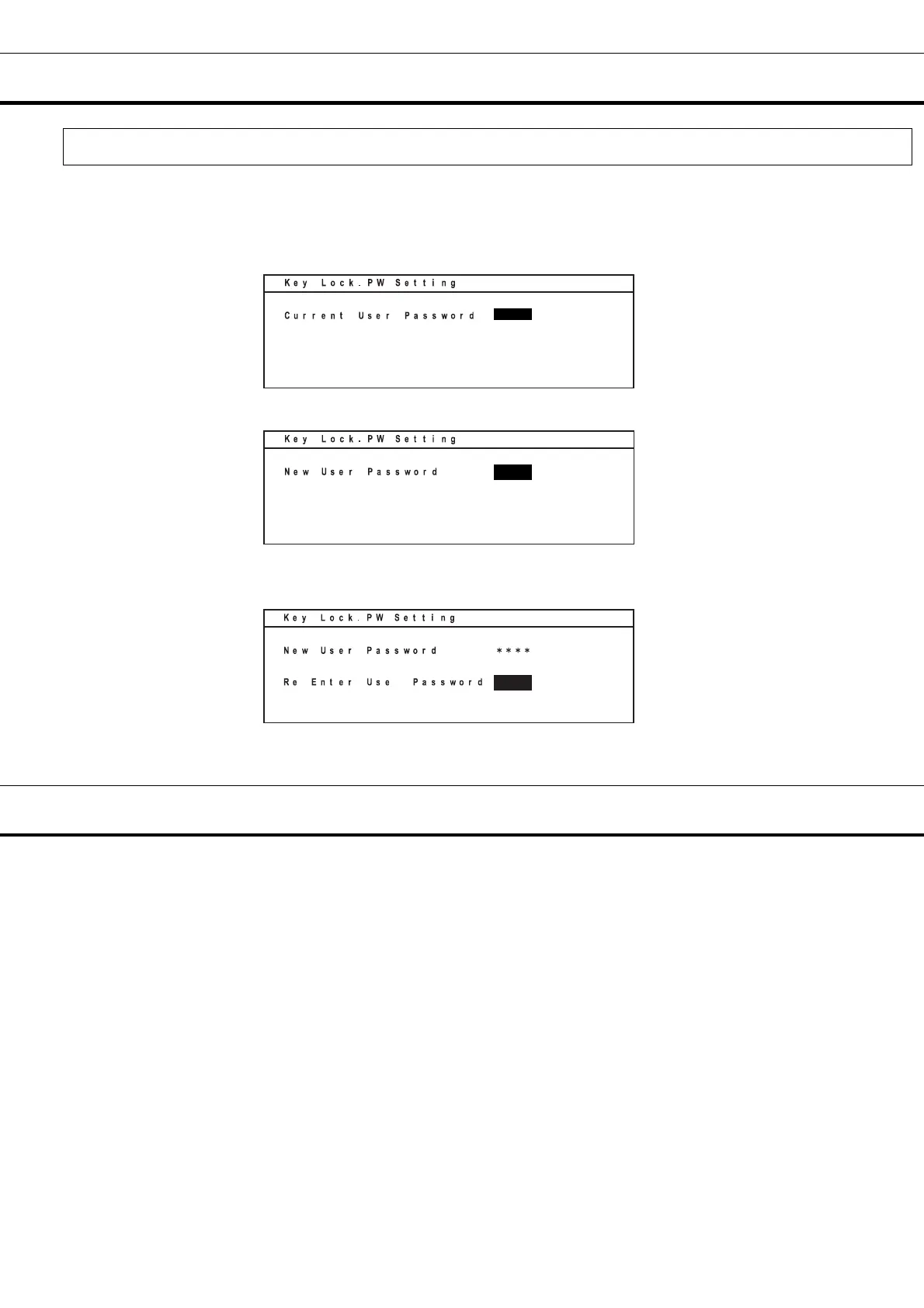
Set of key lock password(Tools/Key Lock PW Setting)
1. On the setting screen (Select Tools), select “Key Lock PW Setting”, select “OK” and press the enter
key (ENTER). Input the present password (4 digits), select “OK” and press the enter key (ENTER).
(Factory setting is 0000.)
2. Input a new password, select “OK” and press the enter key (ENTER).
3. Input the password again, select “OK” and press the enter key (ENTER).
ALARM BUZZER
●Temperature alarm buzzer (intermittent tone)
When the high temperature alarm (High Alarm) or the low temperature alarm (Low Alarm) is activated,
the buzzer sounds after the alarm delay time (Alarm Delay) has elapsed.
Push buzzer stop key (BUZZER) to stop the alarm. The buzzer sounds again if an alarm is not solved in
the time when it is set up with Ring Back. When alarm sounds, a remote alarm is activated, too.
●Door alarm buzzer (intermittent tone)
It is informed with the intermittent tone if it is the condition that the door opens beyond the time when it is
set up with Door Delay. It stops if a door is closed.
*: Buzzer stops if the buzzer stop key (BUZZER) is pushed when an alarm occurs and a buzzer sounds.




 To Next Page