Mechanical Instructions
EN 7LCD CMO 2K7 4.
4.2.2 Inverter Board
Disassembly
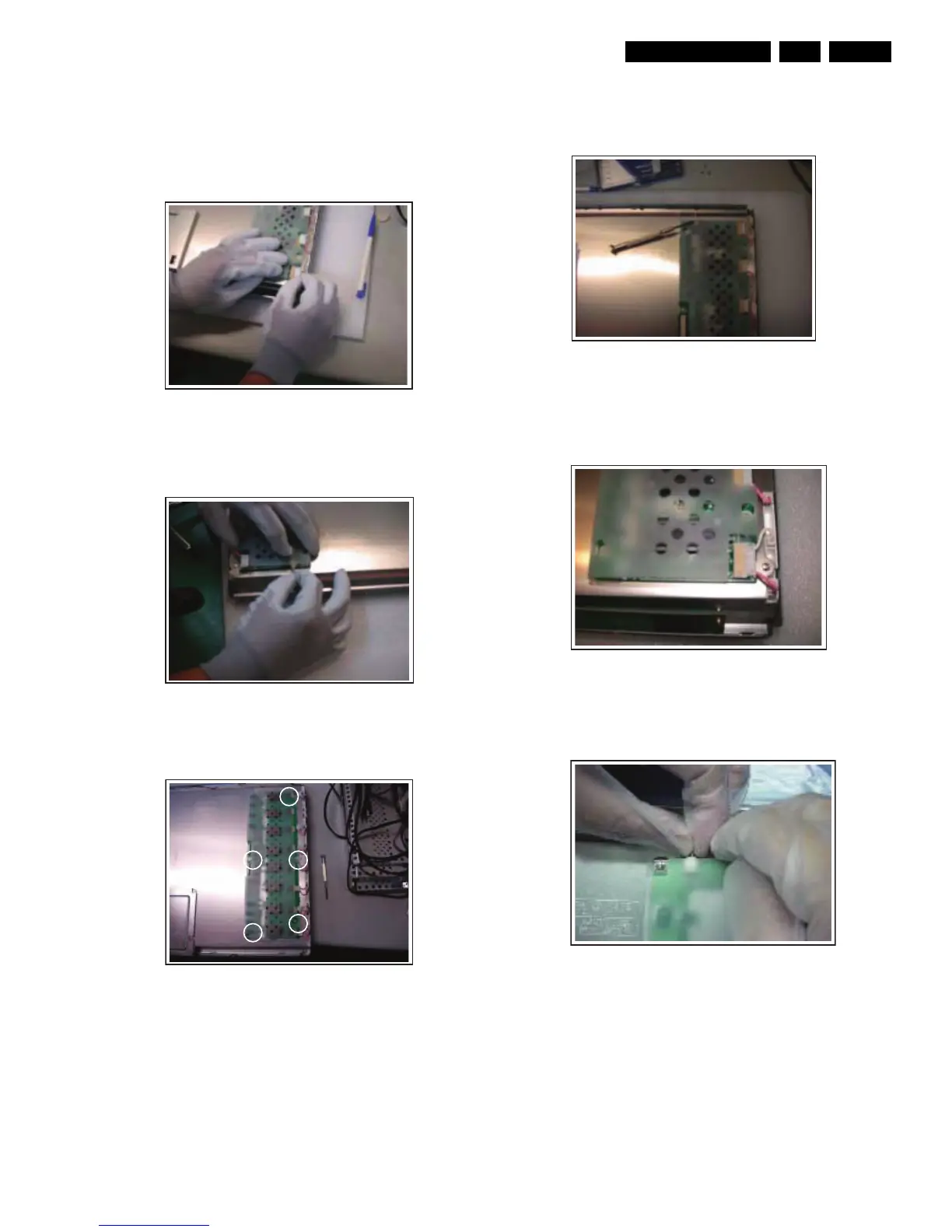
1. Place the panel on the foam bars.
2. Remove the connectors attached to the inverter. Start at
the top, and be careful not to pull and drag the wires.
Figure 4-9 Remove connectors
3. Withdraw the grounding wire from the inverter. Be careful
not to pull and drag the wire.
Figure 4-10 Release grounding wire
4. Remove the five fixation screws as indicated.
Figure 4-11 Remove fixation screws
5. Remove the Inverter Board.
Reassembly
1. Place the panel on the foam bars, and place the Inverter
Board on the panel via the alignment pins.
Figure 4-12 Alignment pins
2. Insert the connectors. Be sure to place the round spot
upwards. Important: Connectors should be well
connected, to avoid electrical sparks!
Figure 4-13 FFC insertion
3. Place the grounding wire to the Inverter Board. Check if
placed correctly.
Figure 4-14 Grounding wire placement
H_16920_002.eps
060407
H_16920_006.eps
060407
H_16920_007.eps
060407
H_16920_010.eps
060407
H_16920_011.eps
060407
H_16920_012.eps
060407







 To Next Page