43
e COMMON INTERFACE
Slot for a Conditional Access Module
(CAM).
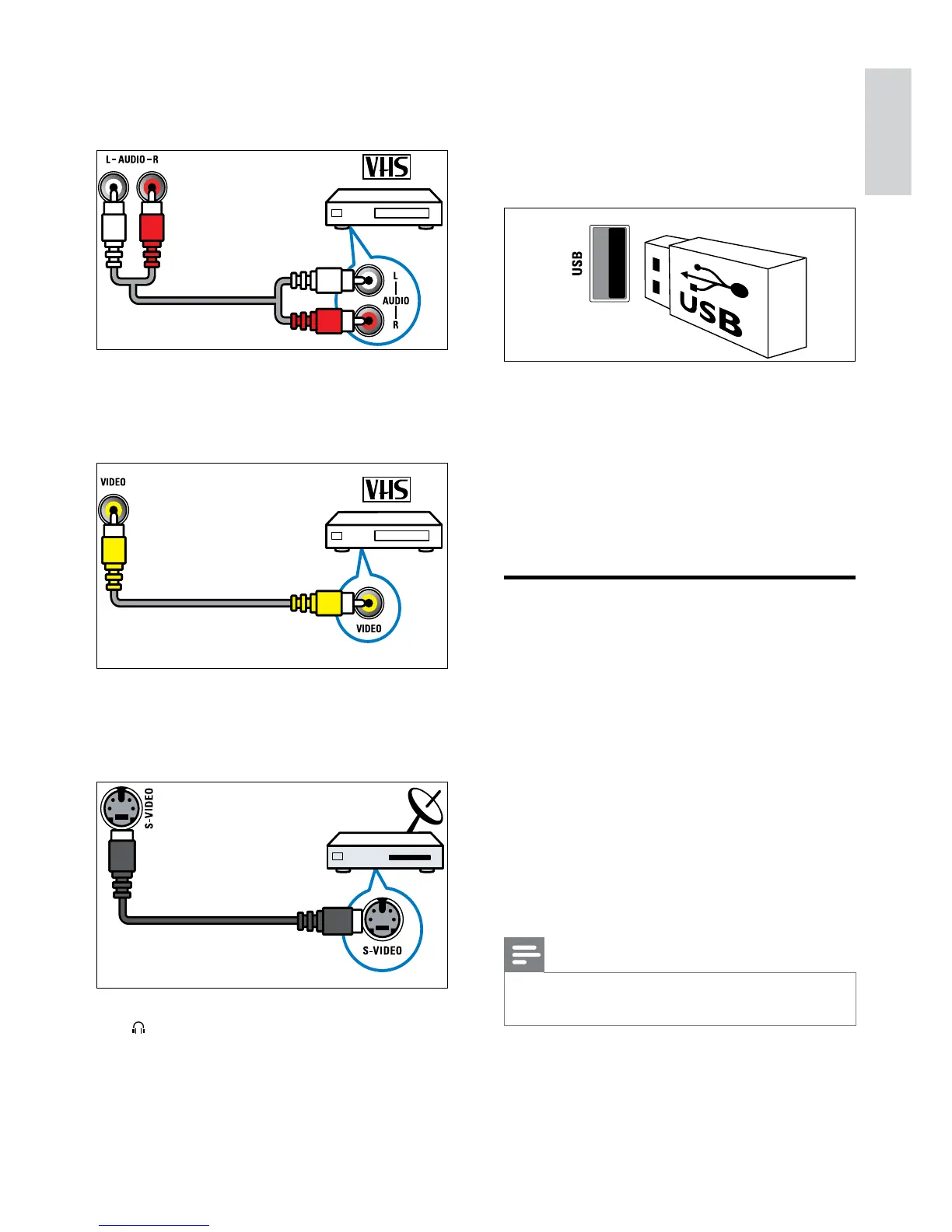
f USB
Data input from USB storage devices.
g HDMI
Digital audio and video input from high-
denition digital devices such as Blu-ray
players.
h SERV. U
For use by service personnel only.
Connect a computer
Before you connect a computer to the TV:
Set the screen refresh rate on your •
computer to 60Hz.
Select a supported screen resolution on •
your computer.
Enable • [PC mode] in the [Picture]menu
(see ‘Manually adjust picture settings’ on
page 17), and set the picture format to
[Unscaled].
Connect a computer with one of the
following connectors:
Note
Connections via DVI or VGA require an •
additional audio cable.
a AUDIO IN L/R
Audio input from analogue devices
connected to VIDEO or S-VIDEO.
b VIDEO
Composite video input from analogue
devices such as VCRs.
c S-VIDEO
Video input from analogue devices such
as satellite receivers.
d
Stereo audio output to headphones or
earphones.
English
EN



 To Next Page