Service Modes, Error Codes, and Fault Finding
EN 14 EJ2.0U LA5.
• To view operation hours.
• To display (or clear) the error code buffer.
How to Activate SAM
Via a standard RC transmitter: key in the code “062596”
directly followed by the “INFO” button. After activating SAM
with this method a service warning will appear on the screen,
you can continue by pressing the red button on the RC.
Contents of SAM:
• Hardware Info.
– A. VIPER SW Version. Displays the software version
of the VIPER software (main software) (example:
EJ20U-1.2.3.4_12345 = AAAAB_X.Y.W.Z_NNNNN).
• AAAA= the chassis name.
• B= the region: A= AP, E= EU, L= Latam, U = US.
• X.Y.W.Z= the software version, where X is the
main version number (different numbers are not
compatible with one another) and Y.W.Z is the sub
version number (a higher number is always
compatible with a lower number).
• NNNNN= last five digits of 12nc code of the
software.
– B. SBY PROC Version. Displays the software version
of the stand-by processor.
– C. Production Code. Displays the production code of
the TV, this is the serial number as printed on the back
of the TV set. Note that if an NVM is replaced or is
initialized after corruption, this production code has to
be re-written to NVM. ComPair will foresee in a
possibility to do this.
• Operation Hours. Displays the accumulated total of
operation hours (not the stand-by hours). Every time the
TV is switched "on/off", 0.5 hours is added to this number.
• Errors. (Followed by maximal 10 errors). The most recent
error is displayed at the upper left (for an error explanation
see paragraph “Error Codes”).
• Defective Module. Here the module that generates the
error is displayed. If there are multiple errors in the buffer,
which are not all generated by a single module, there is
probably another defect. It will then display the message
“UNKNOWN” here.
• Reset Error Buffer. When you press “cursor right” and
then the “OK” button, the error buffer is reset.
• Alignments. This will activate the “ALIGNMENTS” sub-
menu. See also paragraph 8.
• Dealer Options. Extra features for the dealers.
• Options. Extra features for Service. See also paragraph 8.
• Initialize NVM. When an NVM was corrupted (or replaced)
in the former EMG based chassis, the microprocessor
replaces the content with default data (to assure that the
set can operate). However, all preferences and alignment
values are gone now, and option numbers are not correct.
Therefore, this was a very drastic way. In this chassis, the
procedure is implemented in another way: The moment the
processor recognizes a corrupted NVM, the “initialize
NVM” line will be highlighted. Now, you can do two things
(dependent of the service instructions at that moment):
– Save the content of the NVM via ComPair for
development analysis, before initializing. This will give
the Service department an extra possibility for
diagnosis (e.g. when Development asks for this).
– Initialize the NVM (same as in the past, however now it
happens conscious).
Note: When you have a corrupted NVM, or you have replaced
the NVM, there is a high possibility that you will not have picture
any more because your display option is not correct. So, before
you can initialize your NVM via the SAM, you need to have a
picture and therefore you need the correct display option. To
adapt this option, use ComPair. The correct HEX values for the
options can be found in the table below.
Changing the display option code via a standard RC:
Key in the code “062598” directly followed by the “MENU”
button and “XXX” (where XXX is the 3 digit decimal display
option code as mentioned in the first column of the next table).
Make sure to key in all three digits, also the leading zero’s. If
the above action is successful, the front LED will go out as an
indication that the RC sequence was accepted.
After the display option is changed in the NVM, the TV will go
to the Stand-by mode.
If the NVM was corrupted or empty before this action, it will be
initialized first (loaded with the default values). This initializing
can take up to 20 seconds.
When you have keyed in the wrong display option code, it is
possible that the TV will not start up properly. In some cases
the TV will go to standby again. In this case you need to re-
program the NVM via ComPair.
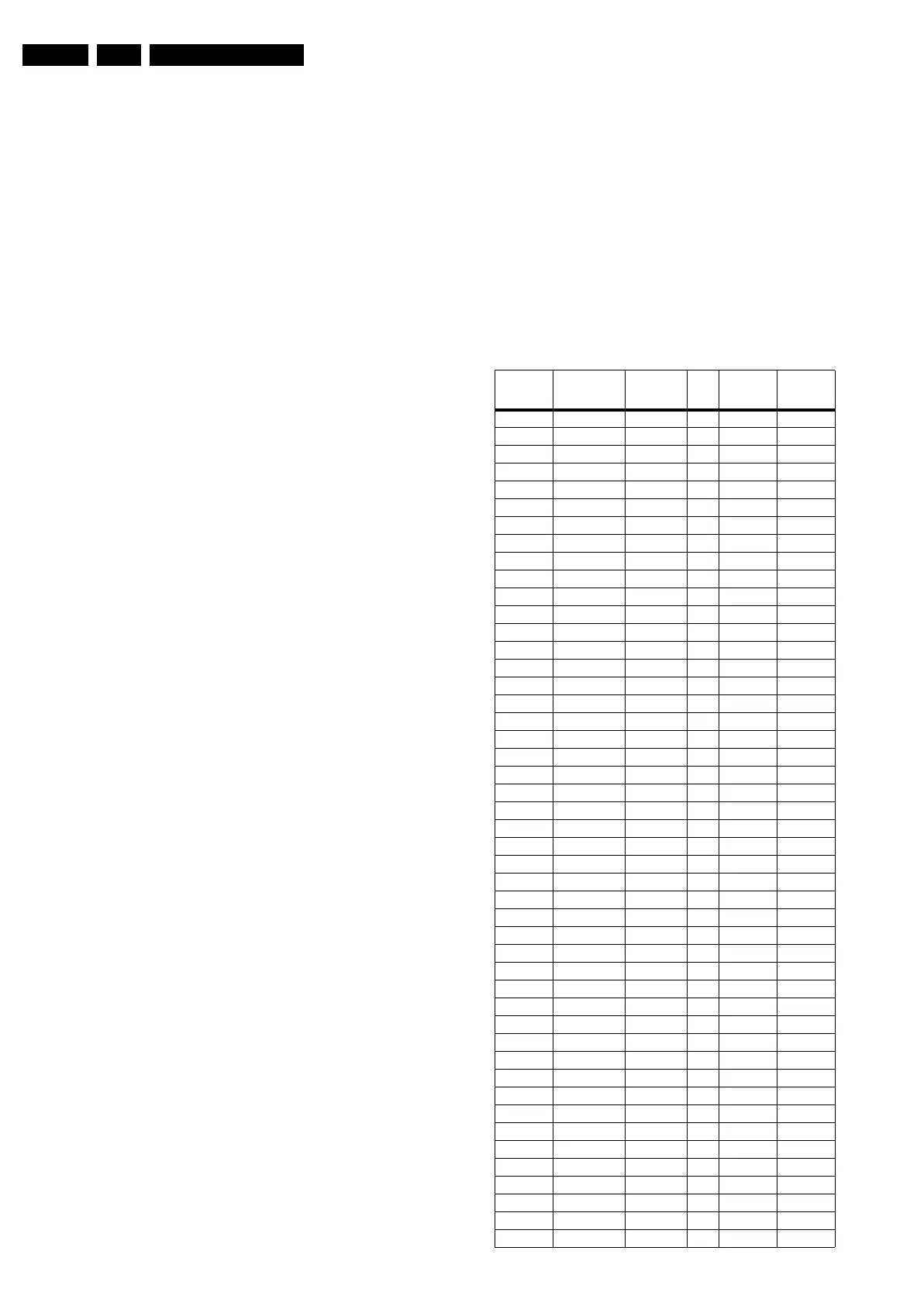
Table 5-2 Display option code overview (all FTV chassis)
Display Op-
tion (Dec.)
Technology Display
Make &
Type
Size Vertical
Resolution
Horizontal
Resolution
000 PDP SDI V3 42” 768p 1024
001 PDP SDI V3 50” 768p 1366
002 PDP FHP A1 42” 1024i 1024
003 LCD LPL A3 30” 768p 1280
004 LCD LPL A6 37” 768p 1366
005 LCD LPL A6 42” 768p 1366
006 LCD Sharp 32” 768p 1366
007 PDP SDI V3 42” 480p 852
008 PDP FHP A1 37” 1024i 1024
009 LCOS XION - - 720p 1280
010 LCD AUO 30” 768p 1280
011 LCD LPL A6 32” 768p 1366
012 LCD AUO V0.1 32” 768p 1366
013 LCD Sharp 37” 768p 1366
014 LCD LPL SL01 42” 1080p 1920
015 PDP SDI 37” 480p 852
016 PDP FHP 37” 1080i 1024
017 PDP FHP 42” 1080i 1024
018 PDP FHP 55” 768p 1366
019 LCOS VENUS - - 720p 1280
020 LCOS VENUS - - 1080p 1920
021 LCD LPL SL01 26” 768p 1366
022 LCD LPL SL01 32” 768p 1366
023 PDP LG 42” 480p 852
024 PDP SDI V4 42” 480p 852
025 PDP SDI V5 42” 768p 1024
026 PDP FHP A2 42” 1024i 1024
027 PDP SDI V5 50” 768p 1366
028 LCD Sharp 37” 1080p 1920
029 LCD AUO V0.1 32” 768p 1366
030 LCD Sharp 37” 1080p 1920
031 LCD Sharp 37” 1080p 1920
032 LCD LPL SL0.1 20” 768p 1366
033 LCD QDI 23” 768p 1366
034 ECO PTV - 52” 1080i 1366
035 ECO PTV - 55” 1080i 1366
036 ECO PTV - 61” 1080i 1366
037 PDP FHP A3 42” 1024i 1024
038 DLP - 50” 720p 1280
039 DLP - 60” 720p 1280
040 LCD Sharp 2.3 32” 768p 1366
041 LCD LPL SLA1 42” 768p 1366
042 PDP SDI V4 63” 768p 1366
043 LCD Sharp 3.0 37” 768p 1366
044 LCD Sharp 2.3 37” 768p 1366
045 LCD LPL SLB2 26” 768p 1366
046 LCD LPL SL06 32” 768p 1366



 To Next Page