9
English
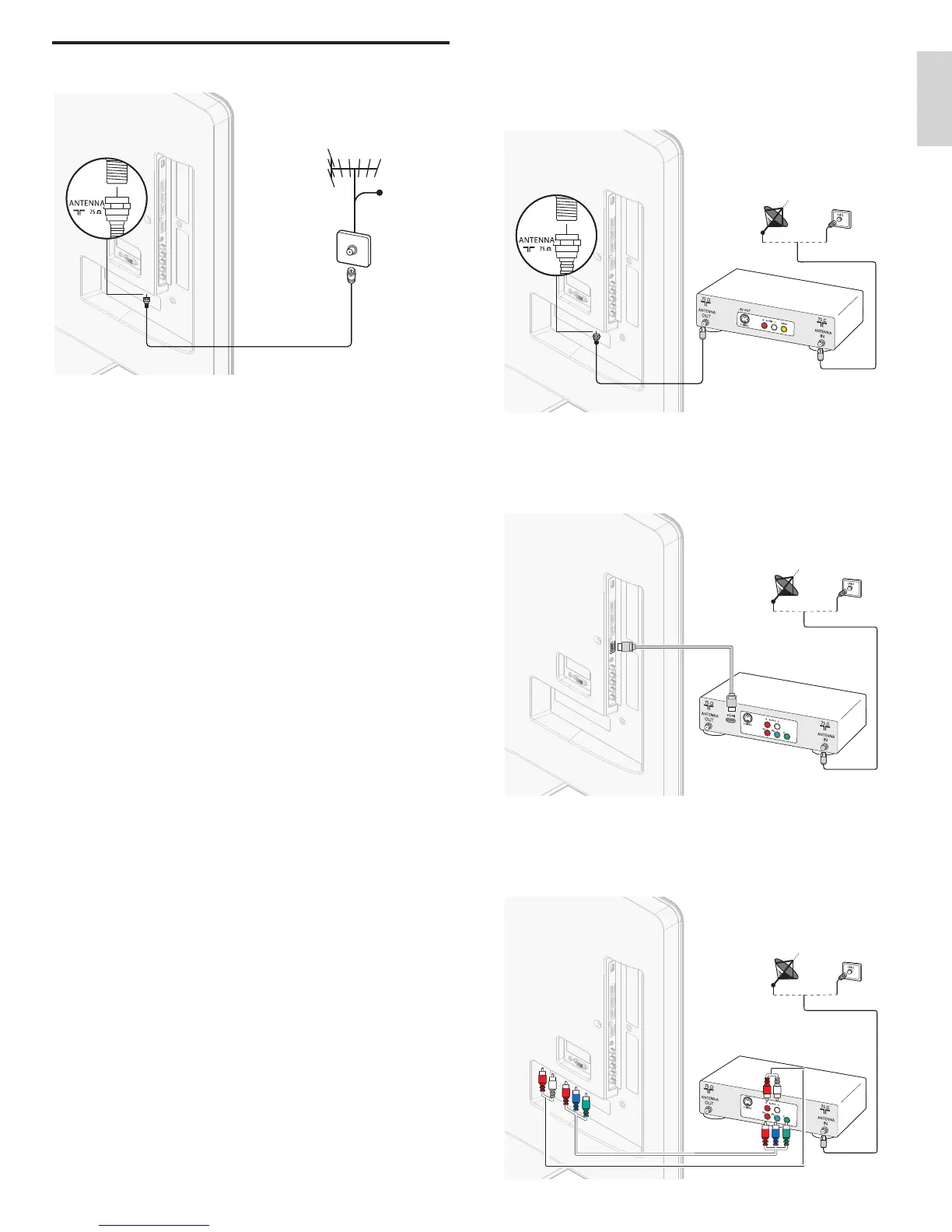
If you connect a set-top box through RF IN / OUT
If the TV is connected to a cable box or satellite set-top box via a
oaxial connection
set the TV to channel 3 or 4
or to the channel
specifi ed by the service provider.
If you connect a set-top box through HDMI
If the TV is connected to a cable box or satellite set-top box via HDMI
ma
e sure you se
ect t
e correct
source
y us
ng SOURC
on t
s
nit
s remote control
If you connect a set-top box through component video inpu
If the TV is connected to a cable box or satellite set-top box via
omponent v
eo
nput, ma
e sure you se
ect t
e correct component
eo source
y us
ng
OURC
on this unit
s remote control
Connecting the antenna or cable
Cable
If you connect to an antenn
ny DTV programs that are broadcast in your area can be received fo
free through an antenna connection
ontact
our local content
rovider or
our local electronics retailer i
ou are unsure a
out w
at
ro
rams are ava
a
e
n
our area
Broadcasters are transitioning from analog to digital TV. This means that
a g
ven
roa
caster can
ave c
anne
s ava
a
e e
t
er
n ana
og or
n
g
ta
, or
ot
ana
og an
g
ta
at t
e same t
me
he TV produces stereo sound only if a stereo signal is broadcast
If you connect to a cable
When your TV is connected to the cable socket, you might receive free
igital and high defi nition programs (depending on your cable provider)
he channel number for digital and high defi nition channels includes a
ot “.”. For example, 11.1, 46.30, 108.201. Contact your cable provide
for more information
If you connect to a DBS (Direct Broadcast Satellite)
here are two main DBS s
stems : DirecTV and DishNetwork. These
s
stems re
u
re a se
arate,
ro
r
etar
set-to
ox to
eco
e s
na
s
and send them to the TV. The set-to
box contains a di
ital TV tuner fo
receivin
off-air di
ital broadcasts
ontact your local DBS provider for more information about the
onnect
ons an
t
e
c
anne
s
If you connect to a set-top box
cable box or satellite set-to
box can be connected to the TV
hrou
h the followin
connections
NT
/V (Composite Video and Audio)
YPbPr (Component Video Input)
or information about how to connect a set-to
box, see the Quick
tart
rovided
EN











 To Next Page