31EN
English
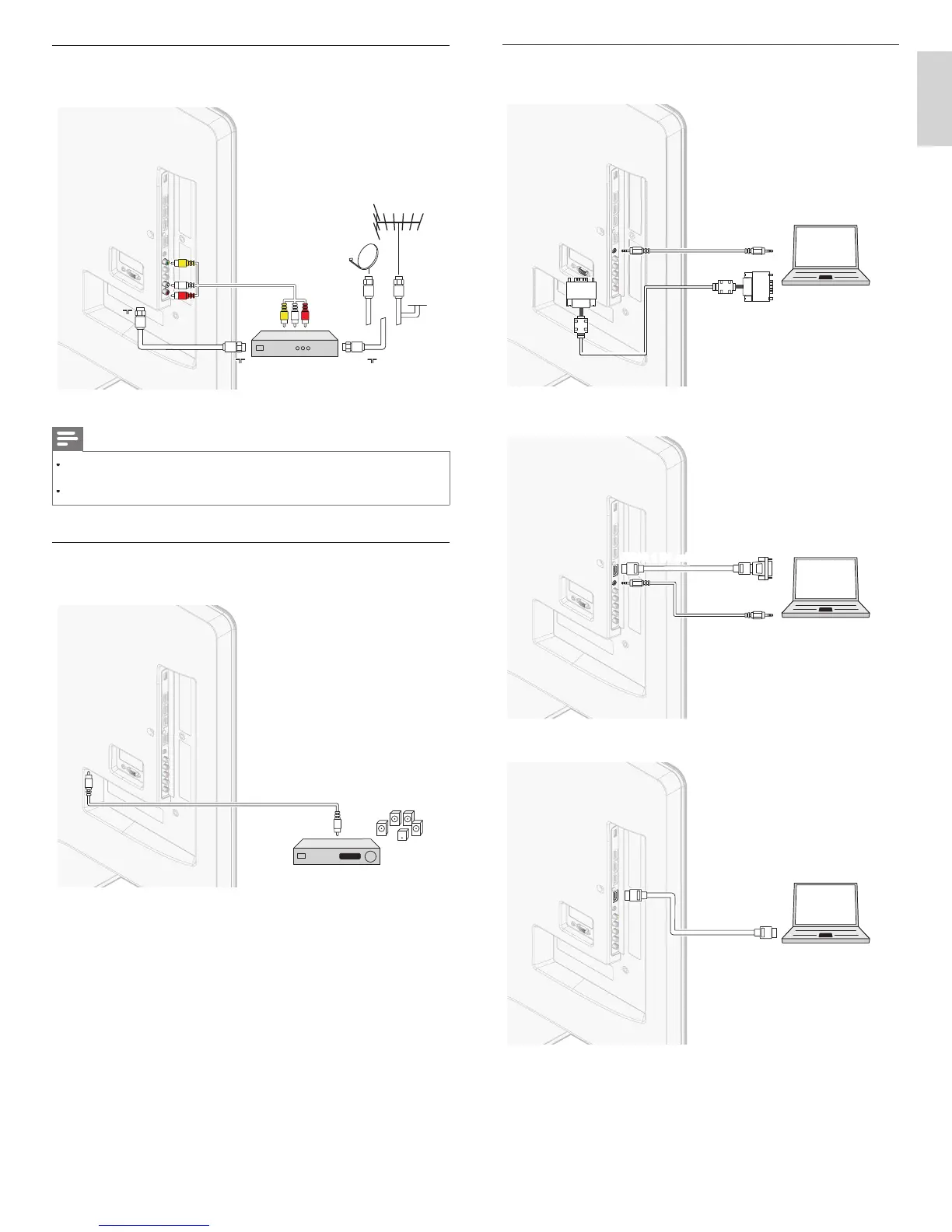
Connecting a PC
If you connect a PC with a VGA connector at the back
AUDIO
OUT
AUDIO
IN
AUDIO
IN
PC
OUT
IN
IN
VGA
VGA
If
ou connect a PC with a HDMI-DVI connecto
.
AUDIO
OUT
AUDIO
IN
AUDIO
IN
DVI OUT
PC
If you connect a PC with an HDMI connecto
.
PC
OUT
IN
IN
HDMI
HDMI
Connecting a set-top box via a composite connector and
analog audio
RF IN
AUDIO L/R + VIDEO
OUT
IN
IN
RF IN
RF IN
RF OUT
RF OUT
AUDIO L/R + VIDEO
Note
nly the left loudspeaker reproduces sound for mono equipment. Use a mono to
stereo adapter (not supplied) for sound reproduction via all internal loudspeakers
en you connect ca
es, matc
t
e ca
e co
ors to t
e connectors on t
e
Connecting a digital home theater amplifi er and
digital audio
DIGITAL AUDIO
IN
OUT
OUT
digital home theater amplifierdigital home theater amplifier
or legal reasons, the digital audio signal can be muted fo
opy-protected PCM audio qualities on accessory devices connected
roug
EN











 To Next Page