26
Weak channel installation
his function lets you add the channels that were not added by the
autoprogram
ue to t
e recept
e con
t
on at t
e
n
t
a
setup
ress
on t
e remote contro
an
en use
/
/
/
to se
ect
Setu
>
nsta
atio
>
hannel
>
ea
c
anne
nsta
ation
2
se
or
o se
ect
anne
nput
ox, t
en use
o
to se
ect
a c
anne
you want to memor
ze
se
o
o se
ect
Search
, t
en press
s
a
w
e c
an
e
to
Store
from
Search
w
en t
e c
anne
s found, then
ress
ress
to ex
t
Note
n most cases,
g
ta
c
anne
s are not
roa
cast on t
e
c
anne
on w
c
t
ey
appear on your
.
o a
g
ta
c
anne
s you nee
to
now t
e
c
anne
on w
c
he digital channel is being broadcast. E.g. If there is a digital channel 9.1 which is being
roadcast on RF channel 25, you need to enter 25 while performing a weak channel
nstallation. To fi nd out the RF channel on which a particular digital channel is being
roa
cast, p
ease contact your
oca
serv
ce prov
e
.
nsta
ng
g
ta
c
anne
s us
ng
ea
c
anne
insta
ation
might not work for direct
able connections and if the digital signal is too weak for the TV to process
Installation mode
ress
on t
e remote contro
an
t
en use
/
/
/
o
se
ect
etu
>
nsta
ation
>
hannel
>
nsta
ation mo
e
2
se
o
o se
ect, t
en press
ress
to ex
t
Uninstall channels
ose c
anne
s can st
e se
ecte
w
t
e
um
er
utton
ress
on t
e remote contro
an
t
en use
/
/
/
o
se
ect
etu
>
nsta
ation
>
ninsta
c
anne
2
se
o
to se
ect t
e c
anne
you want to remove, t
en press
ou w
not
e a
e to se
ect t
e c
anne
aga
n us
ng
H + / −
o react
vate a remove
c
anne
use
o
an
t
en press
ress
to ex
t
Return your settings to default values
When
ou return
icture and sound settin
s to their default values the
hannel installation settin
s are not affected
ress
on t
e remote contro
an
t
en use
/
/
/
o
se
ect
etu
>
nsta
ation
>
Reset
V setting
>
Start no
2
ress
to reset t
e p
cture an
soun
sett
ngs
ress
to ex
t
7 Install channels
he fi rst time
ou set u
our TV,
ou are
rom
ted to select a menu
anguage and to install TV and digital radio channels (if available). This
hapter provides instructions on how to reinstall and fi ne-tune channels
Selecting your menu language
ress
on t
e remote contro
an
t
en use
/
/
/
o
se
ect
Setu
>
nsta
ation
>
anguage
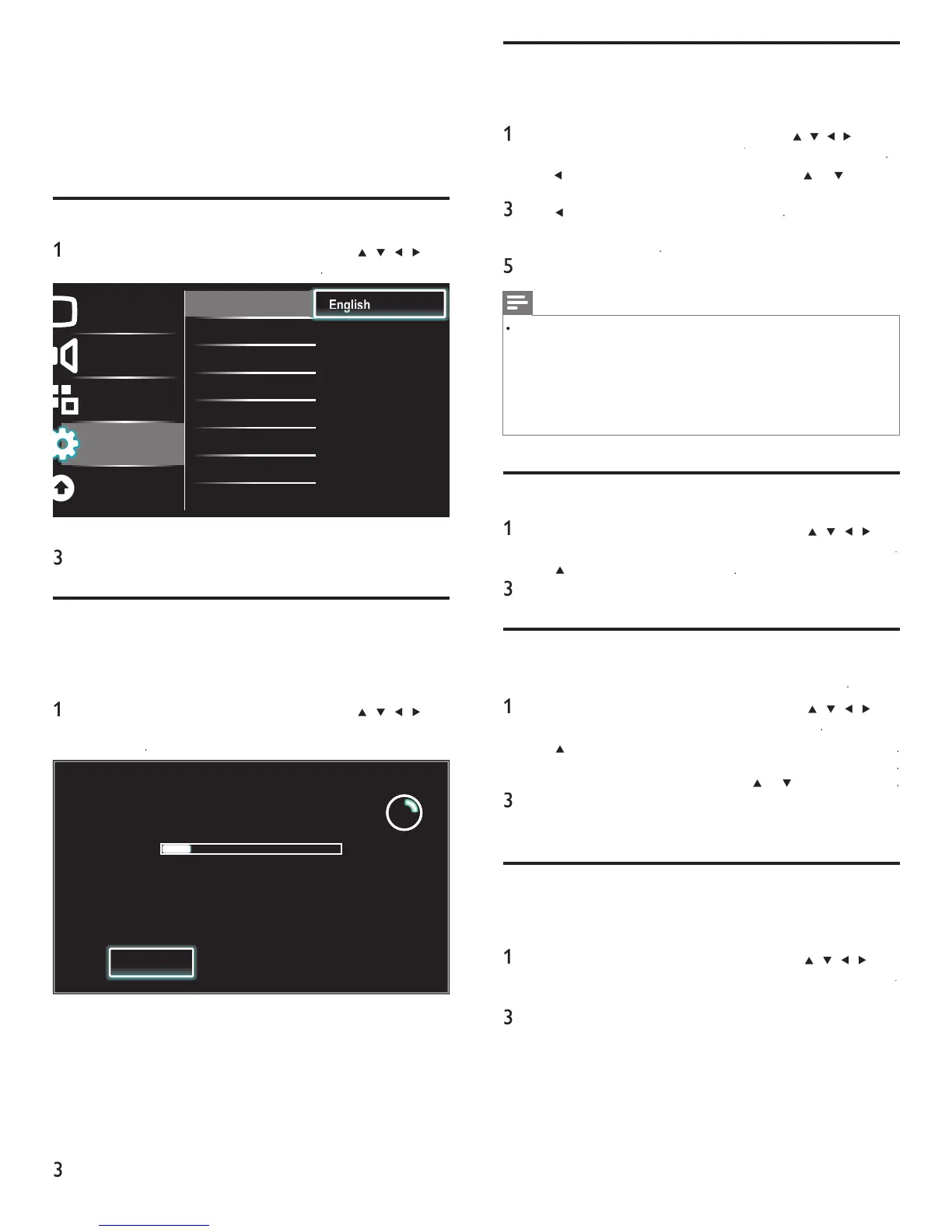
Picture
Sound
Features
Installation
Software update
Language English
Channels Français
Preferences Español
Clock
Reset AV settings
2 Select a language and then press
to confi rm your choice
ress
to ex
t
Autoprogram
If you switch wires (e.g., between antenna and CATV) or if you move
he unit to a different area after the initial setting, you will need to
perform autoprogram
ress
on t
e remote contro
an
t
en use
/
/
/
o
se
ect
Setu
>
nsta
ation
>
hannel
>
utoprogram
>
Start no
System searching. Please wait...
Digital channels found: 0
Analog channels found: 0
Auto programming may take more than
20 minutes to complete.
Stop
2
ress
to start t
e
nsta
at
on
If you run
utoprogram
w
en you
ave
oc
e
c
anne
s, a
message appears as
ng to enter your
.
nter your
n or
e
o comp
ete t
e
nsta
at
on
If you have forgotten your PIN, reset it as described in ‘Changing
your PIN’ on page 19.
en autoprogramm
ng
s comp
ete, t
e
owest memor
ze
c
anne
w
e
s
a
e
o
ow t
e on-screen
nstruct
ons to comp
ete t
e
nsta
at
on
EN











 To Next Page