16
For 4:3 (480i, 480p) video signal
utomatic
Super zoom
Movie expand 16:9
4:3
i
e screen
Movie expand 14:9
utomatic
Enlarges the picture automatically to best fi t the screen. The
su
t
t
es rema
n v
s
e
Super zoom
Dis
la
a 4:3
icture at a 16:9 size; the
icture is stretched
horizontall
and verticall
and its left and ri
ht ed
es are enlar
ed
his cro
s out the to
and bottom of the
icture
4:3
Display a 4:3 picture at its original size. Sidebars appear on both
edges of the screen
Movie expand 14:9
Display a 4:3 picture at a 14:9 size; the picture is stretched
horizontally and vertically. This crops out the top and bottom of the
picture. Sidebars appear on both edges of the screen
Movie expand 16:9
Dis
la
a 4:3
icture at a 16:9 size; the
icture is stretched horizontall
and verticall
. This cro
s out the to
and bottom of the
icture
i
e screen
Display a picture that is stretched out of proportion to fi ll the screen
For PC input signal
4:3
i
e scree
nsca
e
4:3
Display a proportionately stretched picture. Sidebars appear on
both edges of the screen
i
e screen
Display a picture that is stretched out of proportion to fi ll the
screen
nsca
e
s
a
a
cture
n
ts or
na
s
ze
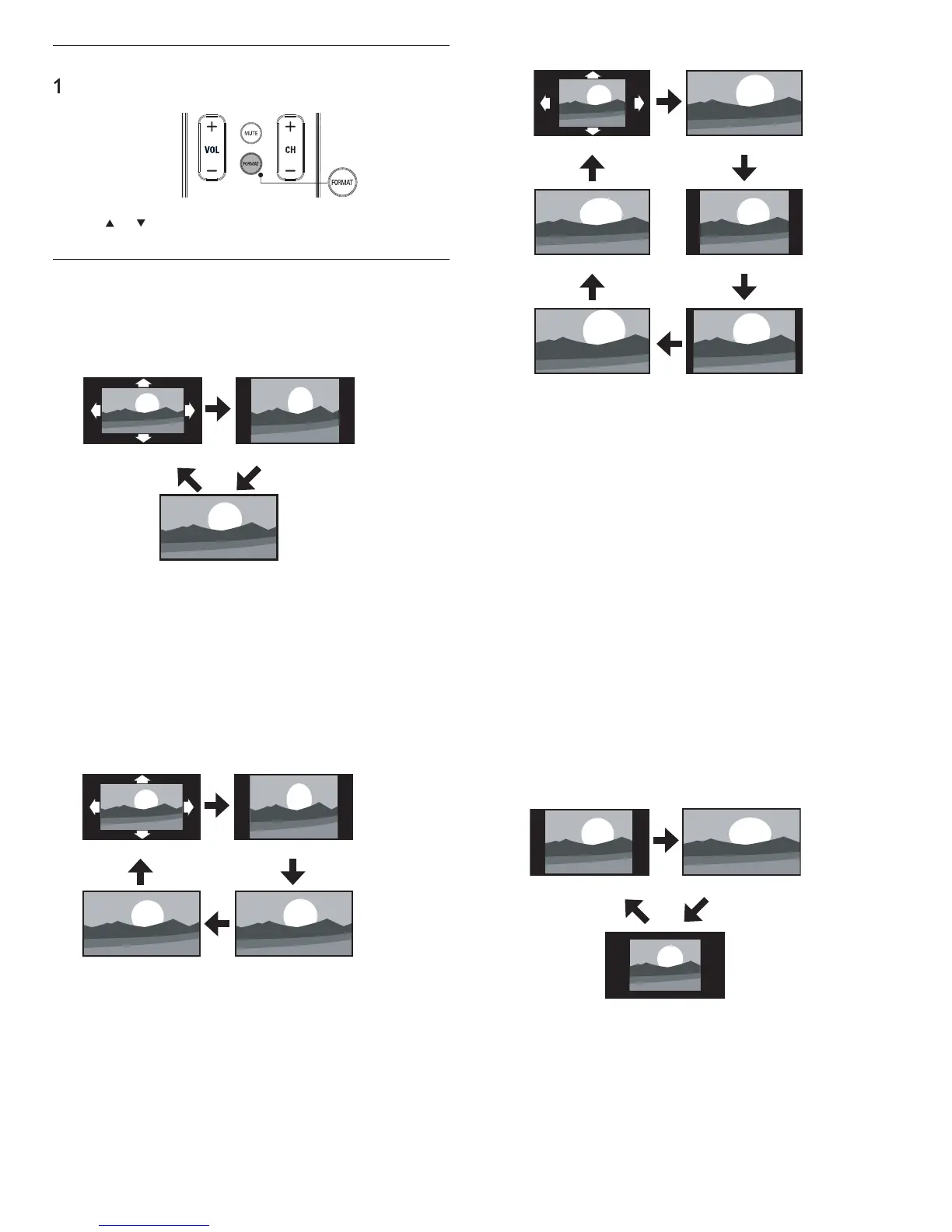
Changing picture format
ress FORMAT on t
e remote contro
se
o
to select a
icture format and
ress
to confi rm
our c
o
ce
Summary of picture formats
s
a
mo
es can
e se
ecte
w
en t
e
roa
cast
n
stat
on
s sen
n
6:9 or 4:3 video si
nal. And 3 t
es of dis
la
modes can be selected
for PC in
ut si
nal
For 16:9 (480i, 480p, 720p) video signal / 4:3 (720p) video signal
4:3
i
e screen
utomatic
utomatic
Enlarges the picture automatically to best fi t the screen. The
su
t
t
es rema
n v
s
e
4:3
Display a 16:9 picture at a 4:3 size; the picture is shortened
horizontally. Sidebars appear on both edges of the screen
i
e screen
s
a
a
cture t
at
s stretc
e
or
zonta
an
vert
ca
For 16:9 (1080i, 1080p) video signal / 4:3 (1080i, 1080p) video signal
utomatic
nsca
e
4:3
i
e screen
utomatic
Enlar
es the
icture automaticall
to best fi t the screen. The
su
t
t
es rema
n v
s
e
4:3
Display a 16:9 picture at a 4:3 size; the picture is shortened
horizontally. Sidebars appear on both edges of the screen
i
e screen
sp
ay a p
cture t
at
s stretc
e
or
zonta
y an
vert
ca
y
nsca
e
Dis
la
a 16:9
icture at its ori
inal size
EN











 To Next Page