19
P
ress the
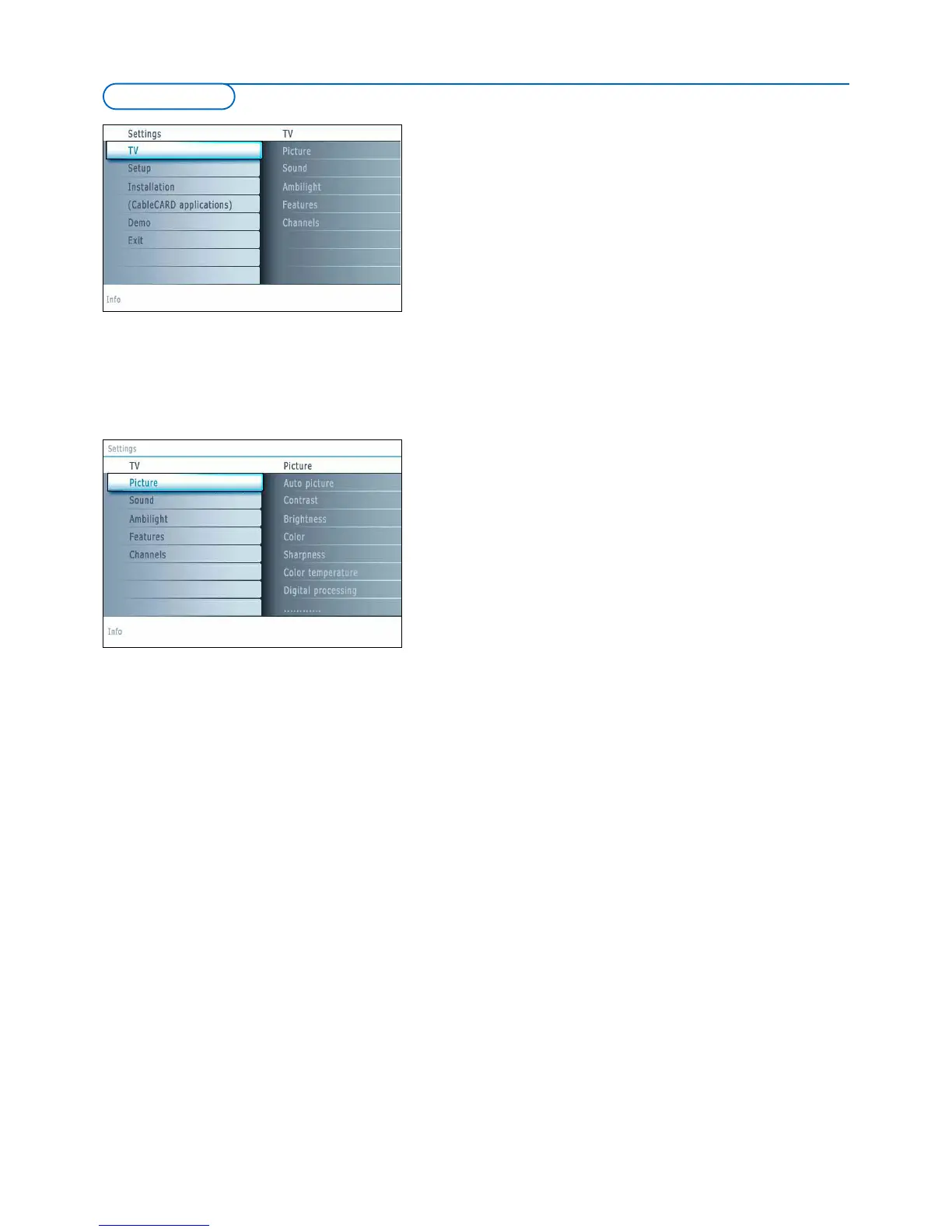
MENU b
utton on the remote control to summon the Settings menu.
T
he TV menu gives you an overview of the menus you can select.
Note: Depending on the input signal, one or more menu items may not be selectable.
Picture menu
Note: Some menu items are not available in case of HD sources.
& P
ress the cursor right to select
Picture.
é Press the cursor right again to enter the Picture menu.
“ Select the menu items with the cursor up/down.
‘ Adjust the settings with the cursor left/right or enter the list of submenu
items with the cursor right. Select a submenu item with the cursor
up/down.
Auto picture
Select Auto picture to display a list of predefined picture settings, each
corresponding with specific factory settings.
P
ersonal
refers to the personal preference settings of picture in the
picture menu.
Note:This Philips TV has been set at the factory to look best in bright store
environments which typically use fluorescent lighting. As your home will likely not be
as well lit as a store, we recommend that you cycle through the various auto
picture modes to find the one that best suits your own viewing conditions. Most
consumers will find that
Natural is the correct choice.
Contrast
This will adjust the intensity of bright parts in the picture but keep the dark
parts unchanged.
Brightness
This will adjust the light output of the complete picture, which will mainly
affect the darker areas of the picture.
Color
This will adjust the saturation level of the colors to suit your personal
preference.
Sharpness
This will adjust the sharpness of fine details in the picture.
Color temperature
This will increase or decrease Warm (red) and Cool (blue) colors to suit
personal preferences.
Select
Cool to giv
e the white colors a blue tint,
Normal to giv
e the white
colors a neutral tint,
W
arm
to give the white colors a r
ed tint.
Digital processing
• Standard = line doubling eliminates the flicker.
•
Pixel Plus = for everyday viewing. Pixel Plus is the most ideal setting, as it
fully processes the image to make every single pixel the best it can be,
impro
ving contrast, sharpness, picture depth, and color reproduction and
brilliance from every source, including High Definition.
Standard mode is recommended only for very noisy or poorly mastered
sour
ces or f
or those who find the smoothness of Pix
el Plus (which
eliminates judder in the pictur
e) unsettling.
TV menu




 To Next Page