29
T
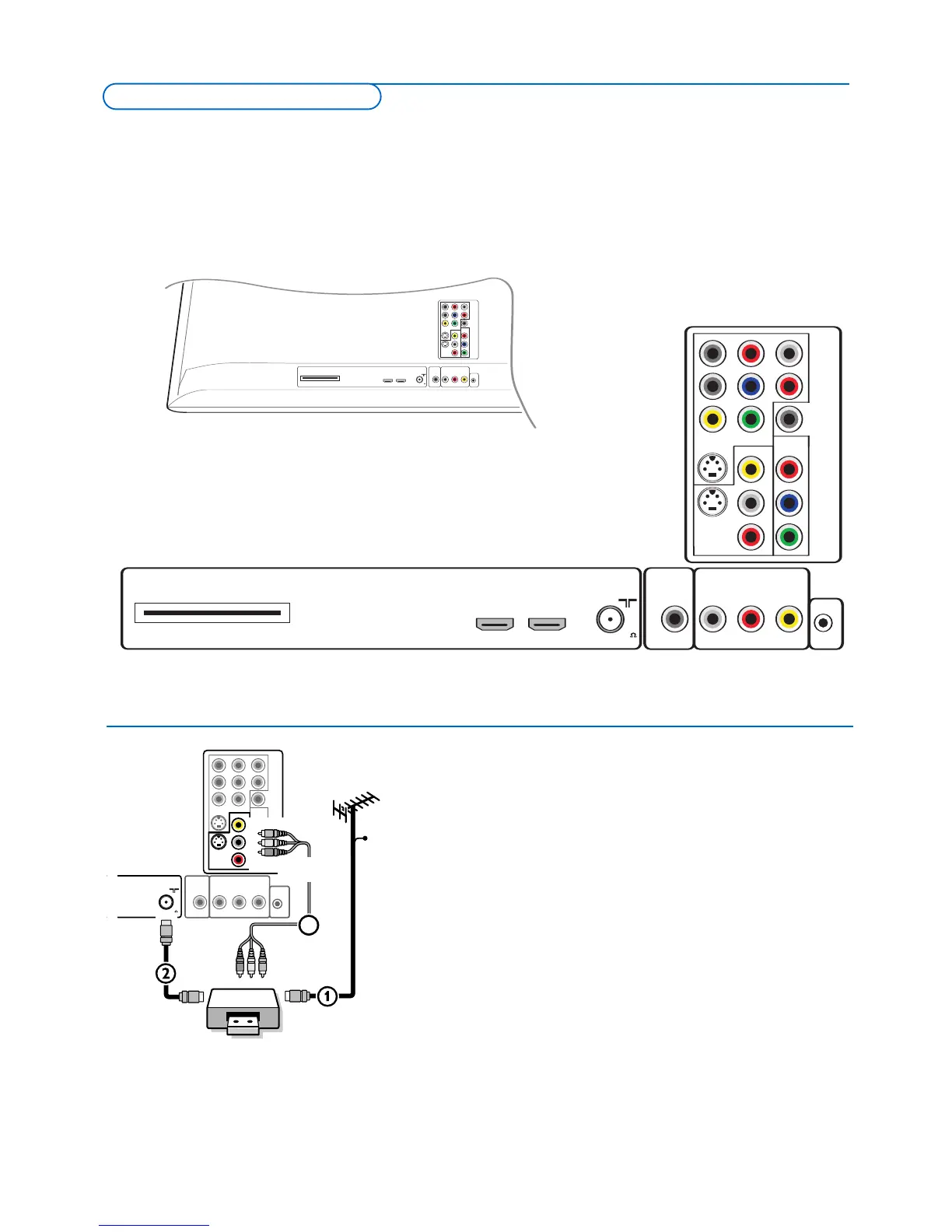
here is a wide range of audio and video devices that can be connected to your TV.The following connection diagrams show you
h
ow to connect them to the TV.
AV1 can handle YPbPr, S-VIDEO, RGB + HV or VIDEO and L/R Audio,
AV2 VIDEO or S-VIDEO and L/R Audio,
AV3 YPbPr and Digital Audio,
Side VIDEO or S-VIDEO and L/R Audio.
all conn us st-entr05-glink.eps
L
PrH
RPbV
D
IGITAL
AUDIO
IN
Y
Pr
P
bL
Y
R
S-VIDEO
S
-VIDEO
AV2
A
V3
AV1
VIDEO
V
IDEO
Cable CARD INTERFACE HDMI HDMI
1 2
ANTENNA
CABLE /
75
C
able CARD INTERFACE HDMI HDMI
1 2
ANTENNA
C
ABLE /
L
PrH
RPbV
Y
R
L
P
r
P
bL
Y
R
S-VIDEO
S-VIDEO
A
V2
AV3
MONITOR OUT
A
V1
V
IDEO
IR OUT
VIDEO
DIGITAL
AUDIO
O
UT
VIDEO
75
D
IGITAL
AUDIO
I
N
LPrH
R
PbV
I
NY
Pr
PbL
Y
R
S-VIDEO
S-VIDEO
AV2
AV3
AV1
VIDEO
V
IDEO
Cable CARDINTERFACE HDMI HDMI
1 2
ANTENNA
75
R
L
VIDEO
IROUT
D
IGITAL
OUT
AUDIO
MONITOROUT
R
L
MONITOROUT
VIDEO
IROUT
DIGITAL
AUDIO
OUT
Recor
der (
VCR-D
VD
+R
W
)
Note: Do not place your recorder too close to the screen as some recorders may be
susceptible f
or signals from the display
. Keep a minimum distance of 20” from the
screen.
& Connect the RF Antenna or Cable TV cable (eventually via an optional two-
way signal splitter and/or Cable TV converter box)
1 to the RF IN socket
of y
our recorder.
é Connect another RF cable 2 fr
om the output
OUT of y
our recor
der to
the TV’s
CABLE/ANTENNA 75 Ω x jack.
“ Better pla
yback quality can be obtained if you also connect the Video,Audio
Left and Right (only for stereo devices) AV cables
3 to the VIDEO,
AUDIO L and R input jacks of AV2.
If your recorder has an S-VHS video jack:
F
or impr
o
ved picture quality, connect an S-video cable with the
S-VIDEO
input instead of connecting the recorder to the VIDEO jack of AV2.
S-Video does not provide audio, so audio cables must still be connected to
provide sound.
Connect Accessory Devices










 To Next Page