24
C
hannels menu
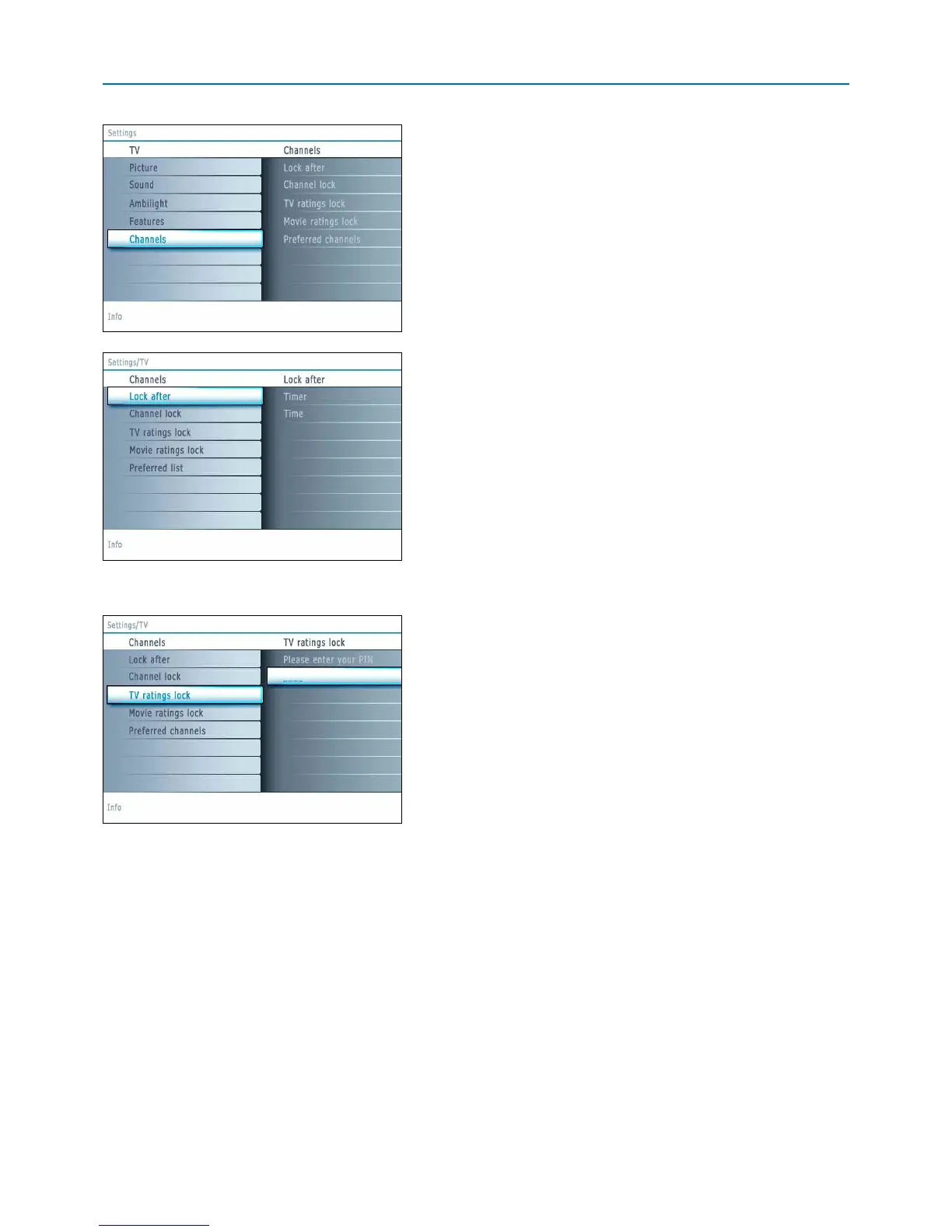
This menu can control special functions for the TV channels.
& S
elect
Channels i
n the TV settings menu with the cursor up/down.
é Press the cursor right to enter the channels menu.
“ Press the cursor up/down to select a channels menu item.
L
ock after
Note: Lock after is only selectable if time and date are known. See Setup, Clock
menu, p. 17.
This allows you to prevent the viewing of the selected channel after a
selectable time delay. Locked channels can still be tuned, but the picture is
blanked and the audio is muted.
& P
ress the cursor right and select
Timer On o
r
Off.
When set to
O
n
this allows you to set the clock.
When having selected
Timer On, you will be summoned to enter your PIN
(See Set/Change PIN, p. 15). Follow the instructions on screen.
é Select Time and press the cursor right.This allows you to set the time
after which the lock is set.
“ Select AM or PM to select the correct period of the day.
‘ Enter the time with the digit or the cursor buttons.
Channel lock
This allows you to completely lock a certain TV channel or external source.
Select the channels or subchannels you want to lock.
TV ratings lock
Your TV is equipped with a V-chip.This allows you to control access to
individual programs based on their movie and TV ratings. All settings apply
to all AV inputs, except HDMI.The program content advisory data are sent
by the broadcaster or program provider.
& Select TV ratings lock with the cursor down. A list appears, showing the
age-based TV ratings and a corresponding content-based ratings list.
é Press the cursor right to enter the list.
“ Select an age-based TV rating with the cursor up/do
wn,
and enter, if
present, the list with content-based ratings with the cursor right, and select
one content-based rating.
‘ Pr
ess
OK to activate/de-activate the selected rating.
Y
ou are asked to enter
your PIN-code (see Set/Change PIN, p. 15). If the code is correct, the TV
ratings lock menu reappears.
( Select another content-based rating if you like and press OK again.
You need only enter your PIN-code once while the menu is active.
Y
ou can lock/unlock any number of ratings on the list without re-entering your
code.
Each ratings item has a bo
x-gra
phic in front of it to indicate whether or not
programs car
rying that rating are currently locked:
• a y
ellow-colored box: all items in the contents-based list are locked as well;
• a blue-colored box: the item is unselected;
• a half blue, half yellow-colored box: some content-based ratings are
selected/unselected.












 To Next Page