é Basic connections to the TV
Your integrated digital TV automatically decodes and displays the four basic
D
TV picture resolution standards.
-
SDTV (Standard Definition TV) are broadcast as 480i (480-line interlaced)
o
r 480p (480-line progressive scan) video.
- HDTV (High-Definition TV) are broadcast either in the 1080i or 720p
formats, always with a widescreen picture.
Note: Progressive scan video (p) is more like that you see in a movie theater.
Images are much more distinct and free of flicker, and motion is smoother.
Your TV has an integrated HDTV tuner which receives and decodes
t
errestrial ATSC and unscrambled cable (QAM) signals and displays them.
T
here are 2 ways to get HDTV content:
-
via cable,
- via antenna.
N
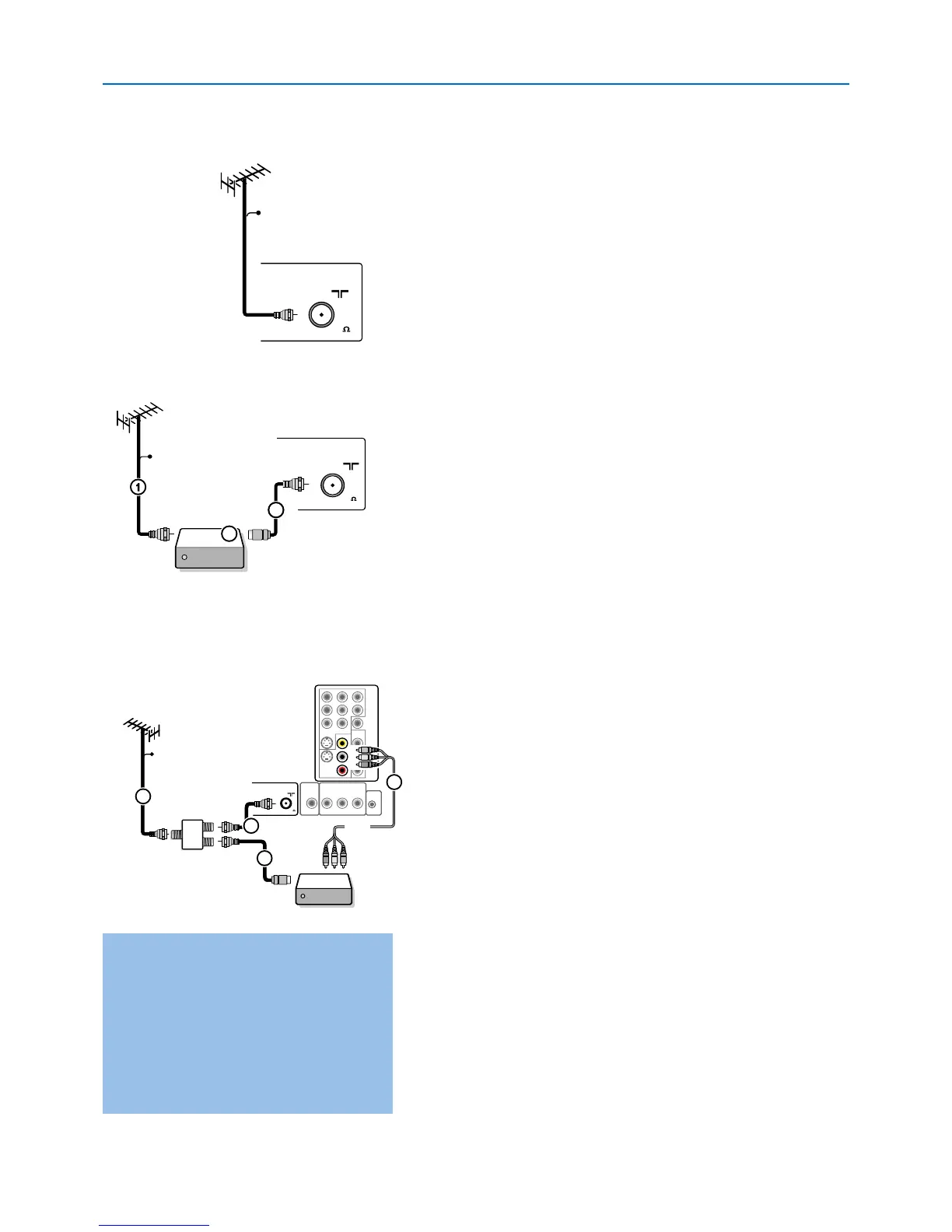
ote:This drawing is used wherever you can connect cable or antenna.
- Cable TV
Connect the cable TV signal to the CABLE/ANTENNA 75 Ω x jack at
the bottom of the TV. See page 10 for details on using Autoprogram to
store channels in the TV’s memory.
Note: this connection will supply stereo sound to the TV if it is being broadcast by
the station you are watching.
- Cab
le box with
RF IN/OUT
• Connect the incoming cable TV signal to the cable IN jack 1 on the
back of the cable box.
• Connect a coaxial cable (not supplied) from the
TO TV jack on the
back of the cable box to the
CABLE/ANTENNA 75 Ω x jack 2 at
the bottom of the TV.
Note:Your cable box may have a different label for the TO TV jack, such as
OUTPUT or OUT.
• Set the OUTPUT CH switch 3 of the cable box to CH 3 or 4
(whichever is correct for your cable box), then tune the TV to the
corresponding channel.
Once tuned, change channels at the cable box, not the TV.
Note:This connection will not supply stereo sound to the TV.The reason is that
the RF output on a cable box - labeled
TO TV, OUT or OUTPUT for example -
will not send a stereo signal to the tuner (VHF/UHF) input on a TV.
-
Cable box with A/V outputs
• Connect the incoming cable TV signal 1 to a signal splitter (not
supplied).
The signal splitter enables you to a
void having to use the TO
TV jack on the back of the cable box.This jack will not supply stereo
sound to the TV.
Note:Your cable box may have a different label for the TO TV jack, such as
OUTPUT or OUT.
• Connect a coaxial cable (not supplied) to a connector on the signal
splitter and to the
CABLE/ANTENNA 75 Ω x jack 2 on the TV.
• Connect another coaxial cable (not supplied) to a connector on the
signal splitter and to the cable
IN jack 3 on the back of the cable
box.
• Connect A/V cables (not supplied) to the
VIDEO and AUDIO L and R
outputs on the back of the cable box and to the AV2 video (labeled
VIDEO) and A
UDIO
(labeled L and R) jacks 4 on the back of the
TV
.
• To view programs from your cable box, first press the
AV+ button on
the remote control.
• Press the cursor down or up buttons until the
AV2 signal source is
selected.
•
Pr
ess the
OK button to confirm y
our selection.
The
A
V2
input sour
ce
becomes cur
rent for the viewing of cable TV programs through your
cable box.
Note:
If your cab
le bo
x
Audio/V
ideo outputs will not supply video and stereo
audio to the TV, you will need to make the connection shown above in the
example “cable box with
RF IN/OUT.










 To Next Page