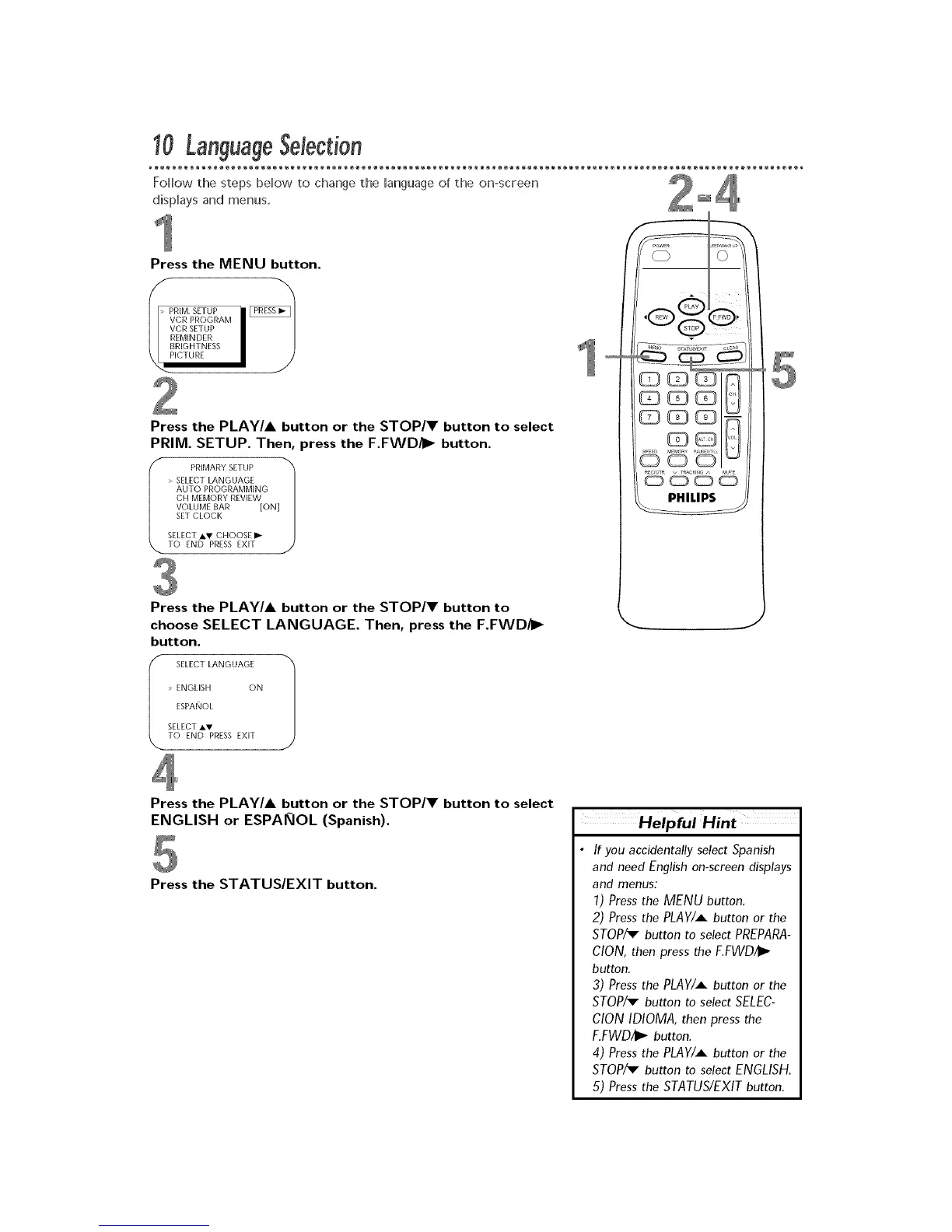
Press the MENU button.
Press the PLAY/A button or the STOP/V button to select
PRIM. SETUP. Then, press the F.FWD/I_ button.
Press the PLAY/A button or the STOP/V button to
choose SELECT LANGUAGE. Then, press the F.FWD/I_
button.
I SELECT AV> ENGLISHToESPANoLSELECTLANGUAGEEND PRESS EXITON 1
J
Press the PLAY/A button or the STOP/V button to select
ENGLISH or ESPAKIOL (Spanish).
Press the STATUS/EXIT button.
Helpful Hint
• If you accidentally select Spanish
and need English on-screen displays
and menus:
1) Press the MENU button.
2) Press the PLAY/A button or the
STOP/v button to select PREPARA-
CION, then press the F,FWD/i_
button.
3) Press the PLAY/A button or the
STOP/v button to select SELEC-
CIONIDIOMA, then press the
F.FWD/I_ button.
4) Press the PLAY/A button or the
STOP/_ button to select ENGLISH.
5) Press the STATUS/EXIT button.











 To Next Page