TurningOntheTV/VCR9
• mmeeeoome= :::::::::::::::::::::::: :::::::::::::::::::::::: :::::::::::::::::::::::: :::::::::::::::::::::::: =mmo
Before you turn on the TV/VCR, make sure batteries are in the
remote control and the TV/VCR is hooked up correctly
The instructions on this page work only when you turn on the
TV/VCR for the first time
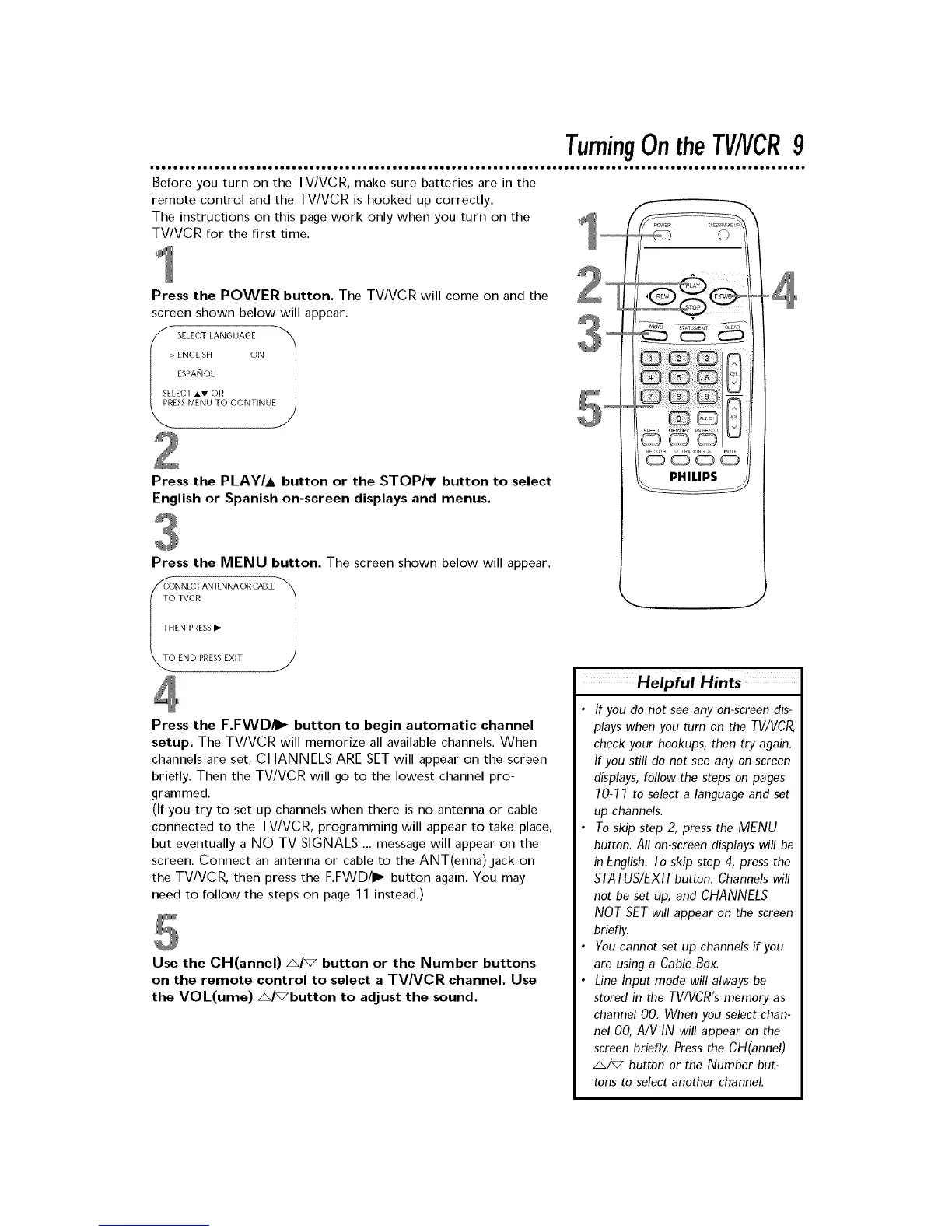
Press the POWER button. The TV/VCR will come on and the
screen shown below will appear.
SELECT LANGUAGE El
> ENGLISH ON
ESPANOL
SELECT Ai,V OR
SSMENU TO CONTINU
Press the PLAY/A button or the STOP/T button to select
English or Spanish on-screen displays and menus.
Press the MENU button. The screen shown below will appear.
ToC_NNECTTvcRANTENNA ORCABLF_'_
THEN PRESSI_
END PRESSEXIT
Press the F.FWD/I_ button to begin automatic channel
setup. The TV/VCR will memorize all available channels. When
channels are set, CHANNELS ARESET will appear on the screen
briefly. Then the TV/VCR will go to the lowest channel pro-
grammed.
(If you try to set up channels when there is no antenna or cable
connected to the TV/VCR, programming will appear to take place,
but eventually a NO TV SIGNALS ... message will appear on the
screen. Connect an antenna or cable to the ANT(enna) jack on
the TV/VCR, then press the F.FWD/I_ button again. You may
need to follow the steps on page 11 instead.)
Use the CH(annel) A/_ button or the Number buttons
on the remote control to select a TVNCR channel. Use
the VOL(ume) A/_button to adjust the sound.
• If you do not see any onscreen dis
plays when you rum on the TV/VCR,
check your hookups, then try again
If you still do not see any onscreen
displays, follow the steps on pages
70-77 to select a language and set
up channels
• To skip step 2, press the MENU
button All onscreen displays will be
in English To skip step 4, press the
STATUS/EXIT button Channels will
not be set up, and CHANNELS
NOT SETwill appear on the screen
briefly
• You cannot set up channels if you
are using a Cable Box
• Line Input mode will always be
stored in the TWVCRs memory as
channel O0 When you select chan-
nel 00, A/V IN will appear on the
screen briefly Press the CH(annet)
A/_ button or the Number but
tons to select another channel











 To Next Page