28 Reminder
oooomml mmmooooooeemmQQQooooomml mmmooooooeemmQQQooooomml mmmooooooeemmQQQooooomml mmmooooooeemmQQQooooomml mmmooo
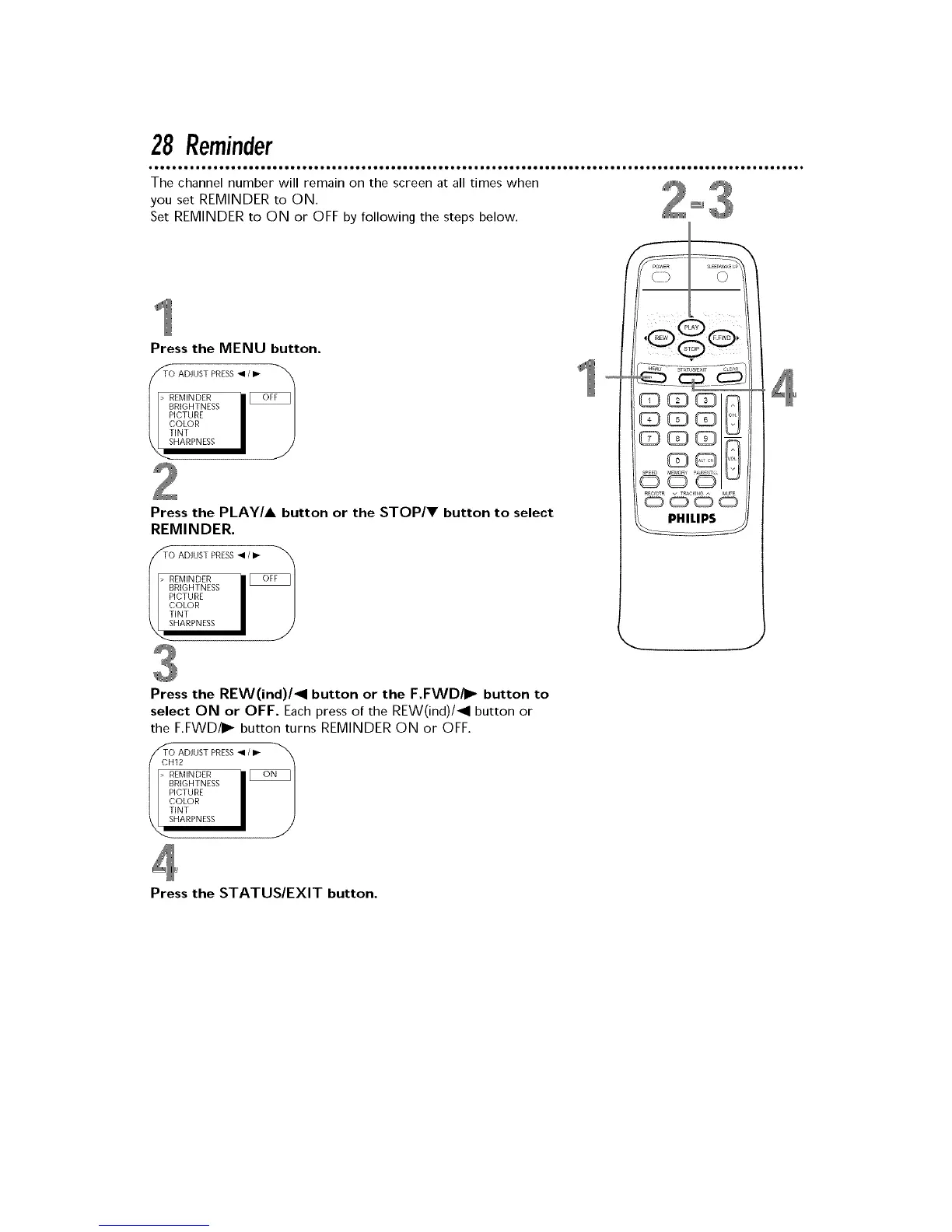
The channel number will remain on the screen at all times when _
you set REMINDER to ON. _ 4
Set REMINDER to ON or OFF by following the steps below.
Press the MENU button.
/_TTO ADJUST PRESS • / ID-
> REMINDER
PICTURE
COLOR
TINT
Press the PLAY/A button or the STOP/V button to select
REMINDER.
z_T¢) ADJUST PRESS • IID- _'_
> REMINDER
PICTURE
COLOR
TINT
Press the REW(ind)/_l button or the F.FWD/I_ button to
select ON or OFF. Each press of the REW(ind)/_l button or
the F.FWD/I_ button turns REMINDER ON or OFF.
O rJUSTPRESS•'"
> REMINDER
PICTURE
COLOR
TINT
Press the STATUS/EXIT button.











 To Next Page