DefeatRecording37
Follow the steps below to prevent accidental recording,
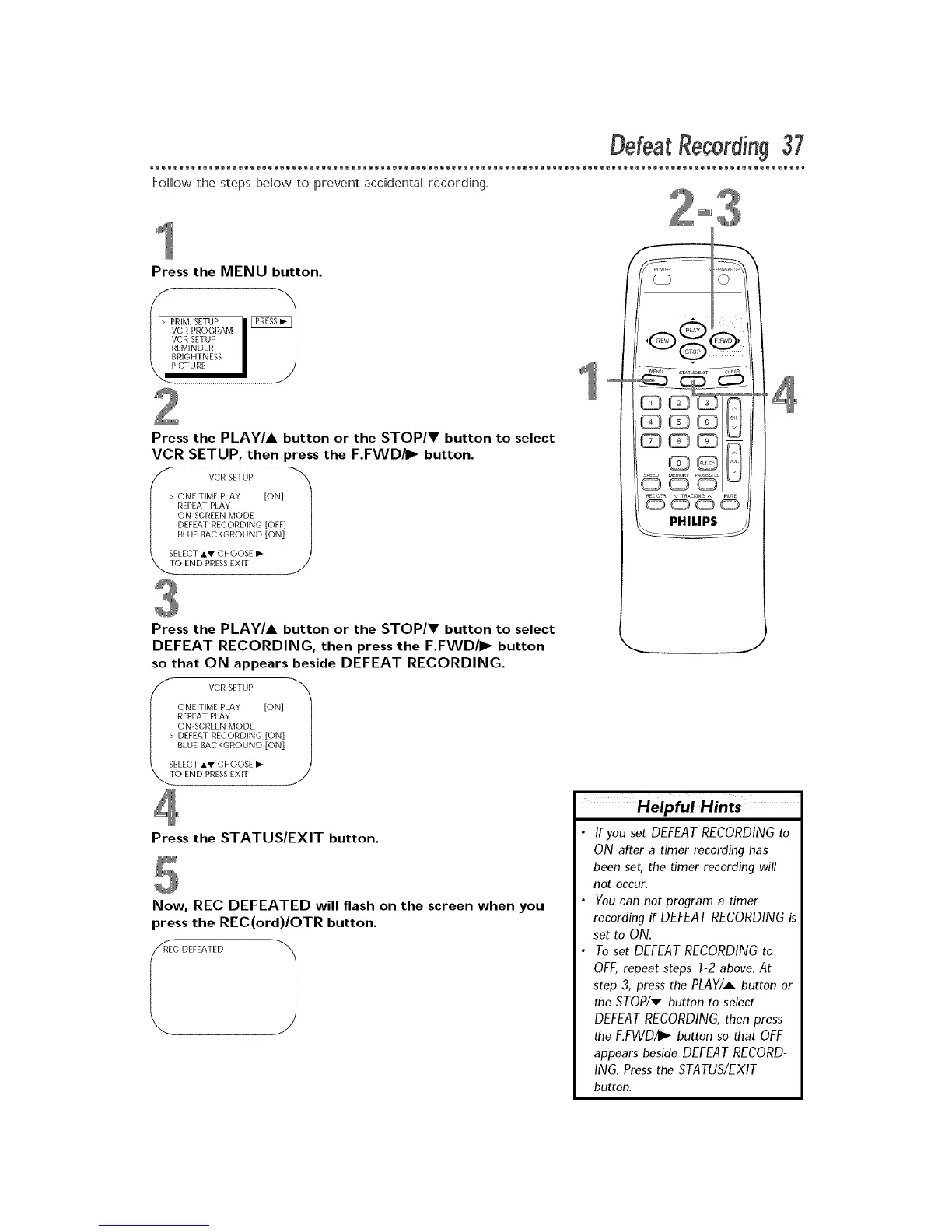
Press the MENU button.
VCR PROGRAM
VCR SETUP
REMINDER
BRIGHTNESS
ICTURE
Press the PLAY/A button or the STOP/V button to select
VCR SETUP, then press the F.FWD/I_ button.
> VCR SETUP 1
|
BLUE BACKGROUND [ON]
Press the PLAY/A button or the STOP/V button to select
DEFEAT RECORDING, then press the F.FWD/I_ button
so that ON appears beside DEFEAT RECORDING.
VCR SETUP 1
I BLUE BACKGROUND [ON]
\mS' E rE°,VE"
Press the STATUS/EXIT button.
Now, REC DEFEATED will flash on the screen when you
press the REC(ord)/OTR button.
'_REC DEFEATED 1
If you set DEFEAT RECORDING to
ON after a timer recording has
been set, the timer recording will
not occur.
You can not program a timer
recording if DEFEAT RECORDING is
set to ON.
To set DEFEAT RECORDING to
OFF, repeat steps 1-2 above. At
step 3, press the PLAY/A button or
the STOP/_ button to select
DEFEAT RECORDING, then press
the F.FWD/I_ button so that OFF
appears beside DEFEAT RECORD-
ING. Press the STATUS/EXIT
button.











 To Next Page