AdjustingthePictureControls25
ooeeeeemee mmmeeeeeeeeeeoooeeeeemee mmmeeeeeeeeeeoooeeeeemee mmmeeeeeeeeeeoooeeeee,ee mmmeeeeeeeeeeoooeeeeemee mmm
Follow these steps to adjust the TV/VCR's brightness, picture,
color, tint, and sharpness.
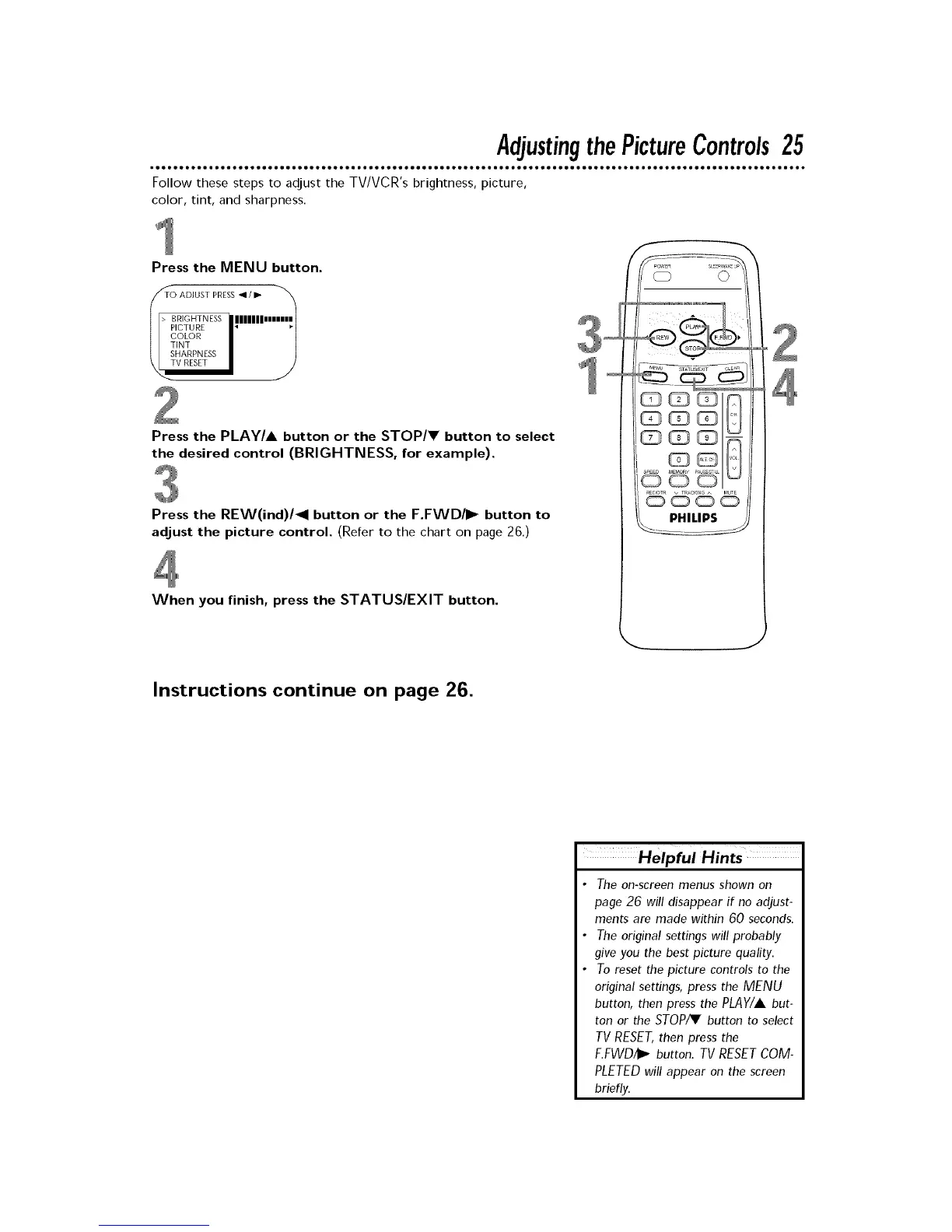
Press the MENU button.
T_T( B ADJUST PRESS• / _ I_
RIGHTNESS /lllllllmn
COLOR
TINT
SHARPNESS
V RESET
Press the PLAY/A button or the STOP/V button to select
the desired control (BRIGHTNESS, for example).
Press the REW(ind)/_l button or the F.FWD/I_ button to
adjust the picture control. (Refer to the chart on page 26.)
When you finish, press the STATUS/EXIT button.
Instructions continue on page 26.
Helpful Hints
• The on-screen menus shown on
page 26 will disappear if no adjust-
ments are made within 60 seconds.
• The original settings will probably
give you the best picture quality.
• To reset the picture controls to the
original settings, press the MENU
button, then press the PLAY/A but-
ton or the STOP_ button to select
TV RESET, then press the
E.FWD4_ button. TV RESET COM-
PLETED will appear on the screen
briefly.










 To Next Page