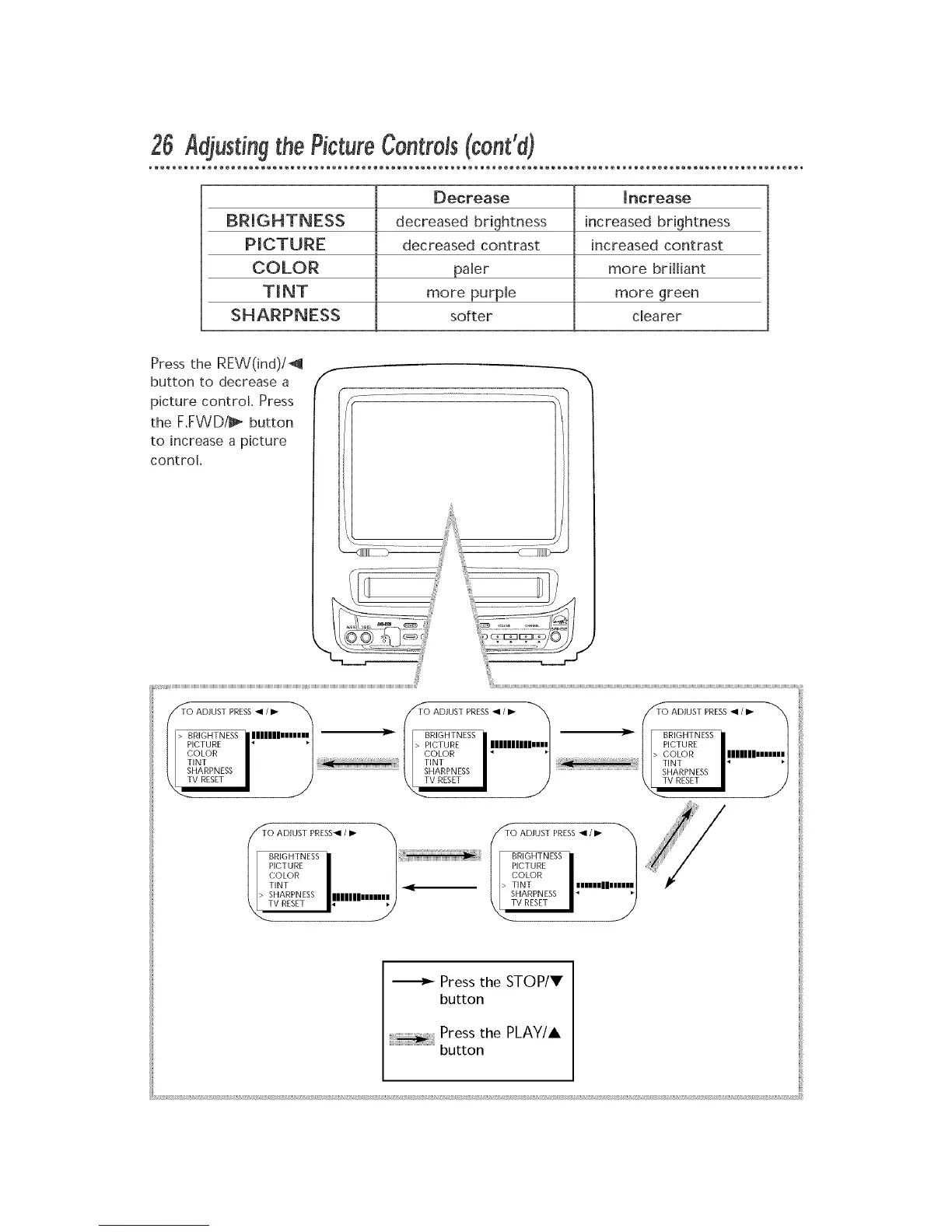
Decrease _ncrease
BRIGHTNESS decreased brightness increased brightness
PICTURE decreased contrast increased contrast
COLOR paler more brilliant
more purple more green
SHARPNESS softer dearer
Press the REW(ind)/_
button to decrease a
picture control Press
the F.FWDi_- button
to increase a picture
control.
f
TiO ADIUST PRESS • /_ i_iii_
BRIGHTNESS i lllllllmmI }i
CI)
COLOR
TINT
SHARPNESS
TV RESET
TO ADJUST PRESS• /III_ .............................................................................................T_>T(IIITADJ UST PR EBi • /III_ iii_ii _
BRIGHTNESS NRIC_HTN ESS
PICTURE PICTURE
COLOR COLOR
_.
">SHARPNESS1111111 s\ _ARPNEBS I"
_ TSHA_NTESSIIIIIIIII_ _- VRESET
Press the STOP/V
button
Press the PLAY/A
button










 To Next Page