18
3
.
.
.
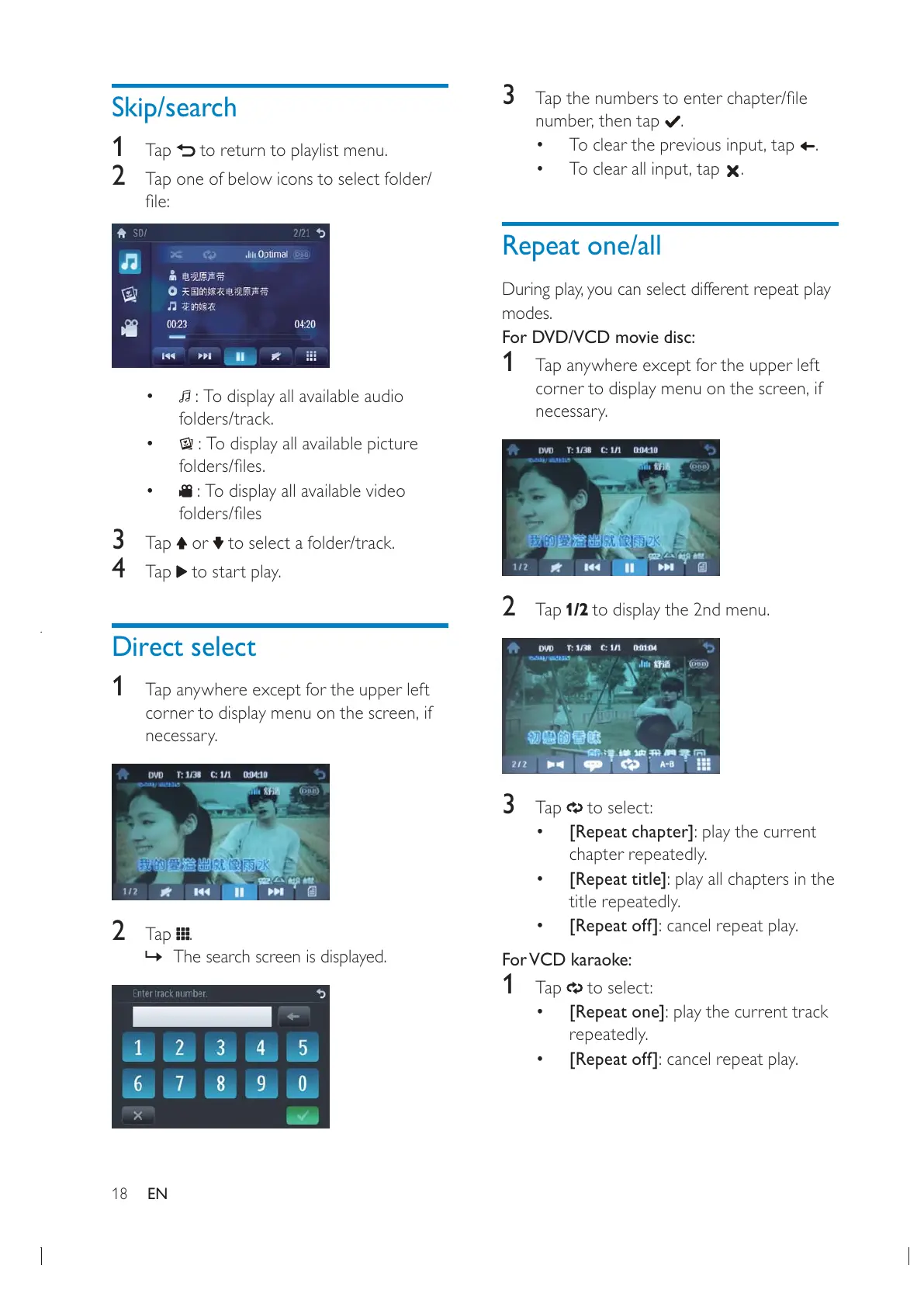
Repeat one/all
modes.
For DVD/VCD movie disc:
1 Tap anywhere except for the upper left
necessary.
2 Tap to display the 2nd menu.
3 Tap to select:
[Repeat chapter]: play the current
chapter repeatedly.
[Repeat title]: play all chapters in the
title repeatedly.
[Repeat off]: cancel repeat play.
For VCD karaoke:
1 Tap to select:
[Repeat one]: play the current track
repeatedly.
[Repeat off]: cancel repeat play.
Skip/search
1
Tap to return to playlist menu.
2 Tap one of below icons to select folder/
: To display all available audio
folders/track.
: To display all available picture
: To display all available video
3 Tap or to select a folder/track.
4 Tap to start play.
Direct select
1
Tap anywhere except for the upper left
necessary.
2 Tap .
» The search screen is displayed.
EN


 To Next Page