8
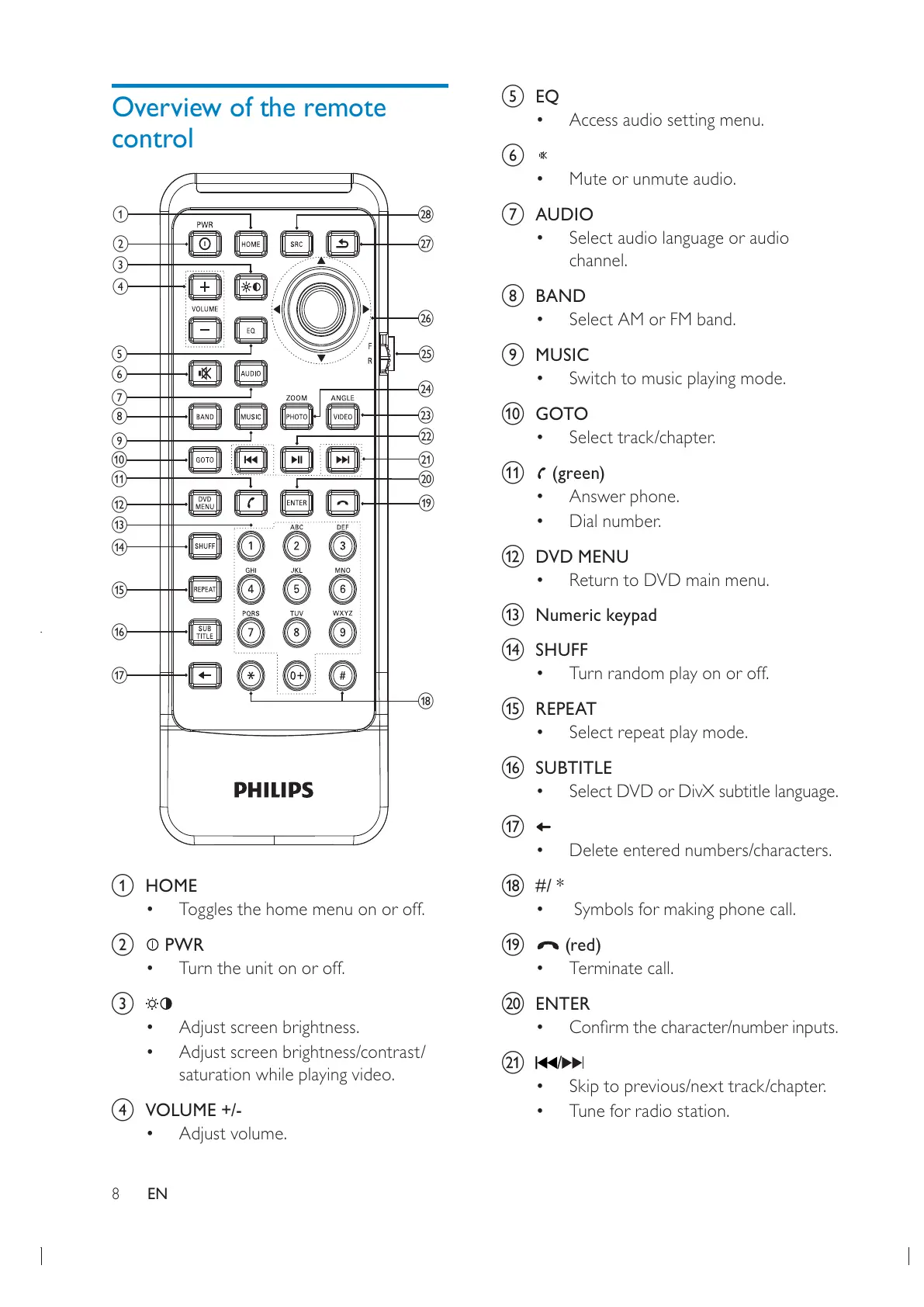
e EQ
Access audio setting menu.
f
Mute or unmute audio.
g AUDIO
Select audio language or audio
channel.
h BAND
Select AM or FM band.
i MUSIC
Switch to music playing mode.
j GOTO
Select track/chapter.
k
(green)
Answer phone.
Dial number.
l DVD MENU
Return to DVD main menu.
m Numeric keypad
n SHUFF
Turn random play on or off.
o REPEAT
Select repeat play mode.
p SUBTITLE
Select DVD or DivX subtitle language.
q
Delete entered numbers/characters.
r #/ *
Symbols for making phone call.
s
(red)
Terminate call.
t ENTER
u
/
Skip to previous/next track/chapter.
Tune for radio station.
Overview of the remote
control
a HOME
Toggles the home menu on or off.
b
PWR
Turn the unit on or off.
c
Adjust screen brightness.
Adjust screen brightness/contrast/
saturation while playing video.
d VOLUME +/-
Adjust volume.
a
|
{
z
y
x
w
u
s
r
v
t
b
d
f
g
m
h
i


 To Next Page