EN 6
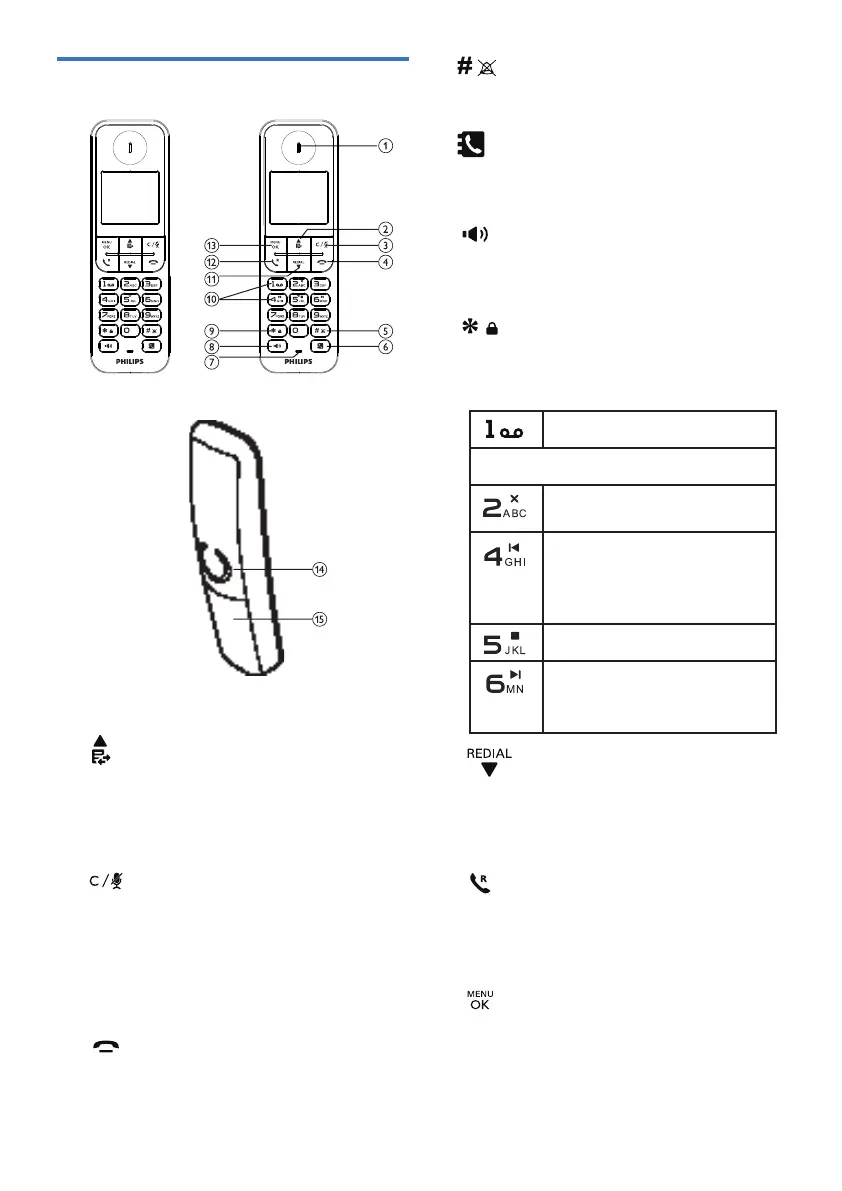
1. Earpiece
2.
• Scroll up on the menu.
• Increase the earpiece or speaker volume.
• Access the call log in standby mode.
• While entering names or numbers, press
to move the cursor to the left.
3.
• Delete text or digits.
• Cancel operation.
• Press to make an intercom call
(for multi-handset version only).
• During a call, press to mute or unmute
the microphone.
• Go back to upper menu during setting
4.
• End a call.
• Exit the menu or operation.
• Press and hold to switch the handset on
or o.
5.
• Press to enter #.
• Mute or unmute the ringing.
6.
• Press to access the phonebook
7. Microphone
8.
• Turn the speaker phone on or o.
• Make and receive calls through the
speaker.
9.
• Press and hold to lock or unlock the
keypad in standby mode.
10. Message Keys
• Access voice mails.
D275 Only
• Delete messages in the
answering machine.
• Repeat current message
during message playback.
• Press twice to skip to
previous message.
• Stop message playback.
• Forward current message
during message playback.
• Skip to next message.
11.
• Scroll down on the menu.
• Access the redial list.
• Decrease the earpiece or speaker
volume.
12.
• Make and receive calls.
• Press to activate Recall for use with
Telephone Network Services such as
Call Waiting during a call.
13.
• Access the main menu.
• Conrm selection.
• Enter the options menu.
14. Loudspeaker
15. Battery door
Overview of the phone
D275D270



 To Next Page