7
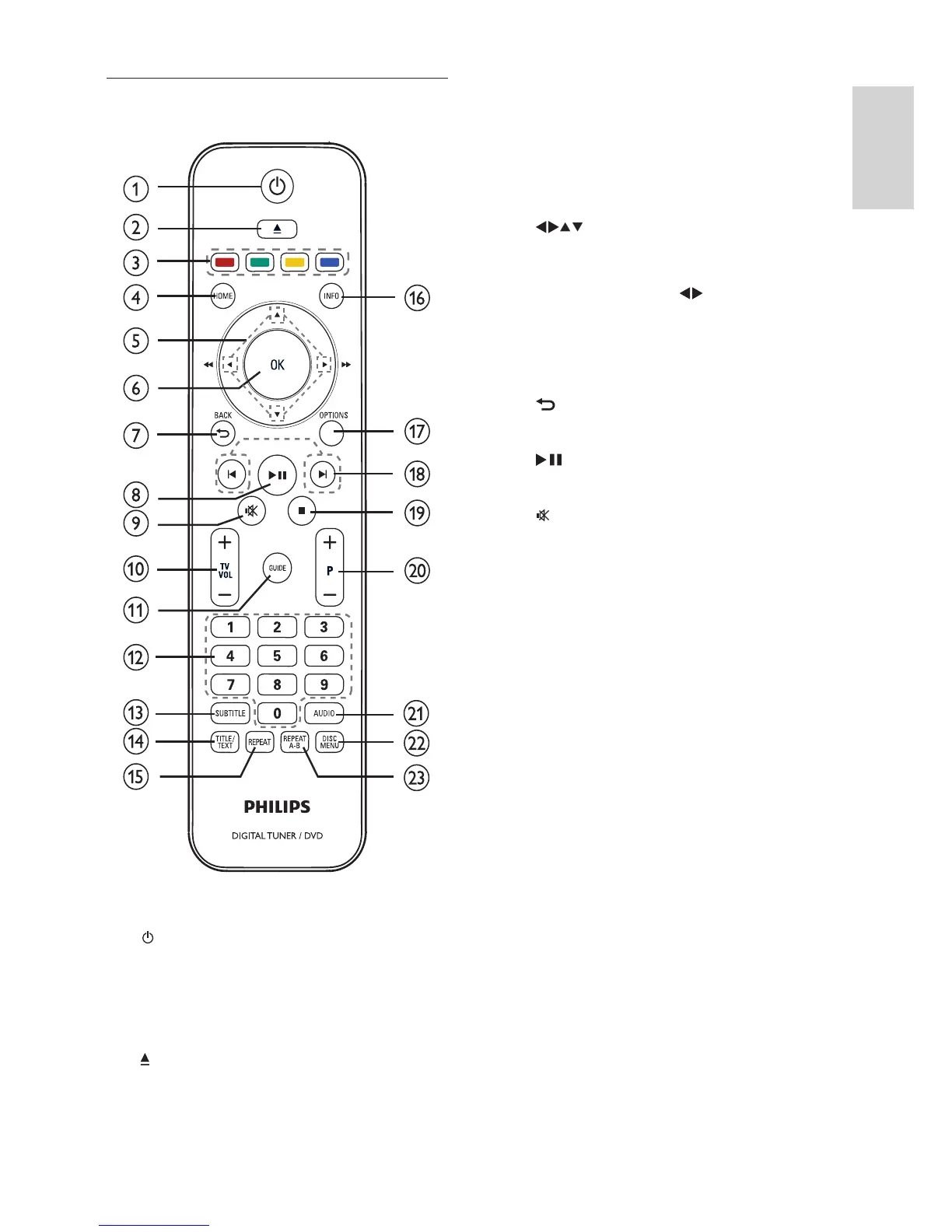
c Colour buttons
Selects tasks or options. (For •
teletext mode only).
d HOME
Toggles the home menu on or off.•
e
( Navigation buttons )
Navigate through the menus.•
Press to search backwards or •
forwards. (For
only).
f OK
Confi rms an entry or selection.•
Displays the list of channels.•
g
BACK
Returns to the previous menu.•
h
( Play/Pause )
Starts, pauses or resumes disc play.•
i
( Mute ) (For Philips TV only).
Mutes or restores audio output.•
j TV VOL +/-
Increases or decreases volume. (For •
Philips TV only.)
k GUIDE
Toggles the programme guide on or •
off. For digital channels only.
l 0-9 ( Numeric buttons )
Selects a channel or setting.•
Selects an item to play.•
Enter the number of a preset radio •
station.
m SUBTITLE
Selects DVD, DivX or DVBT •
subtitles language.
n TITLE/TEXT
In DVD mode, toggles the disc title •
menu display on or off.
In Live TV mode, toggles the teletext •
information display on or off.
o REPEAT
Selects or turns off repeat or shuffl e •
mode.
Remote control
a ( Standby-On )
Switches the product to standby if •
it is on.
Switches the product on if it is on •
standby.
b
( Eject )
Opens or closes the disc •
compartment.
English
EN



 To Next Page