9
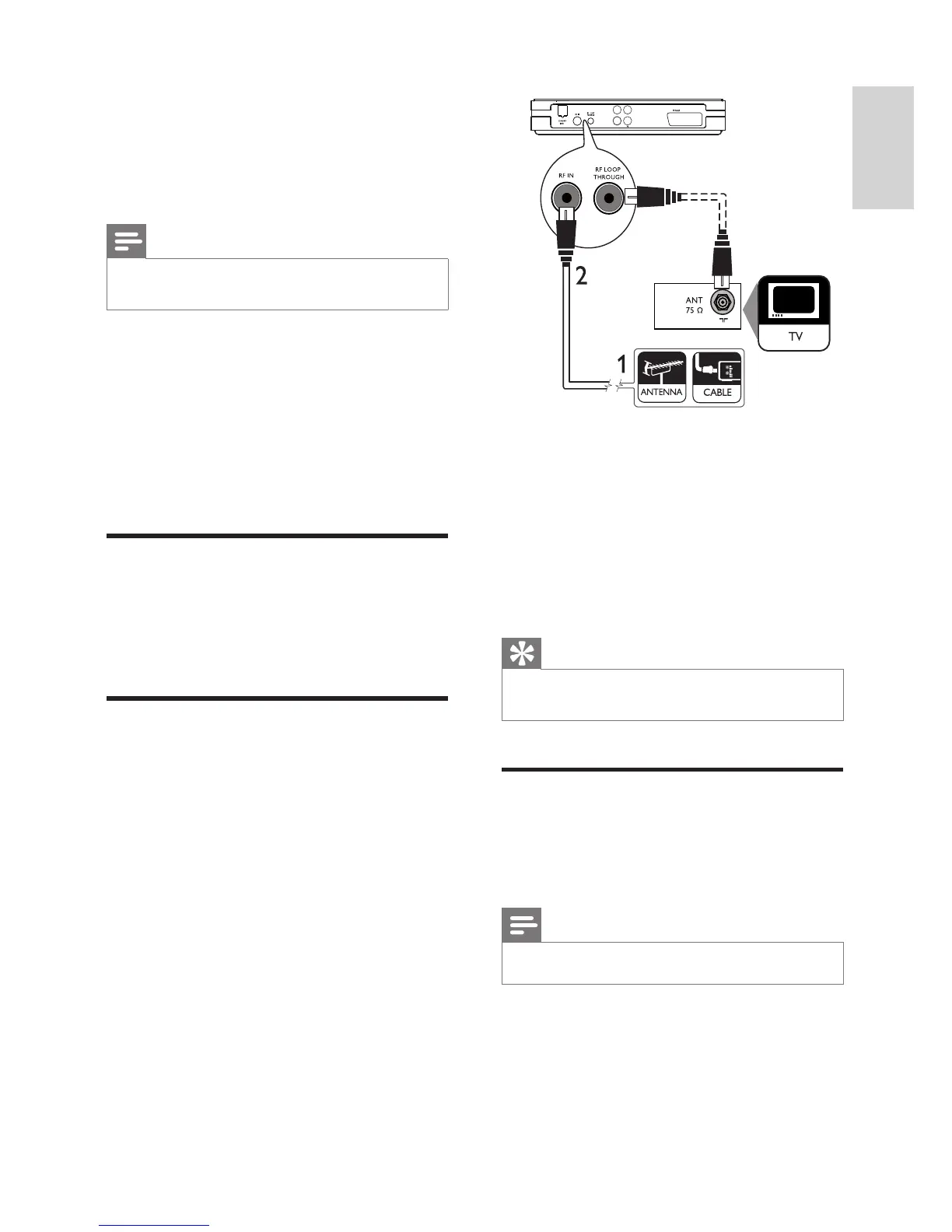
1 Unplug the antenna cable from the TV.
2 Connect the antenna cable to the RF IN
jack.
To receive digital channels after this digital
receiver is switched to standby:
Connect an RF antenna cable (not supplied)
from the RF LOOP THROUGH jack to the
antenna input on the TV.
Tip
The antenna input jack on the TV might be •
labelled ANT, ANTENNA IN or RF IN.
Connect video cables
Connect the digital receiver to your TV to play
discs. Select the best video connection that your
TV supports.
Note
Connect the digital receiver directly to a TV. •
COAXIAL
Audio L
Audio R
CVBS
3 Connect
Make the following connections to use your
digital receiver.
Note
Before you make or change any connections, •
disconnect devices from the socket.
Refer to the type plate on the bottom of the
product for identifi cation and supply ratings.
Basic connections:
Antenna or cable TV•
Video cables•
Audio cables•
Optional connections:
USB device•
Position the product
Place the product on a table.
Place the product near the AC socket where
the AC power plug can be easily reached.
Connect antenna or cable.
Connect the digital receiver to an antenna or a
cable box..
English
EN



 To Next Page