Problem,solving for 'Digital Photo
Manager
PROBLEM SOLUTION
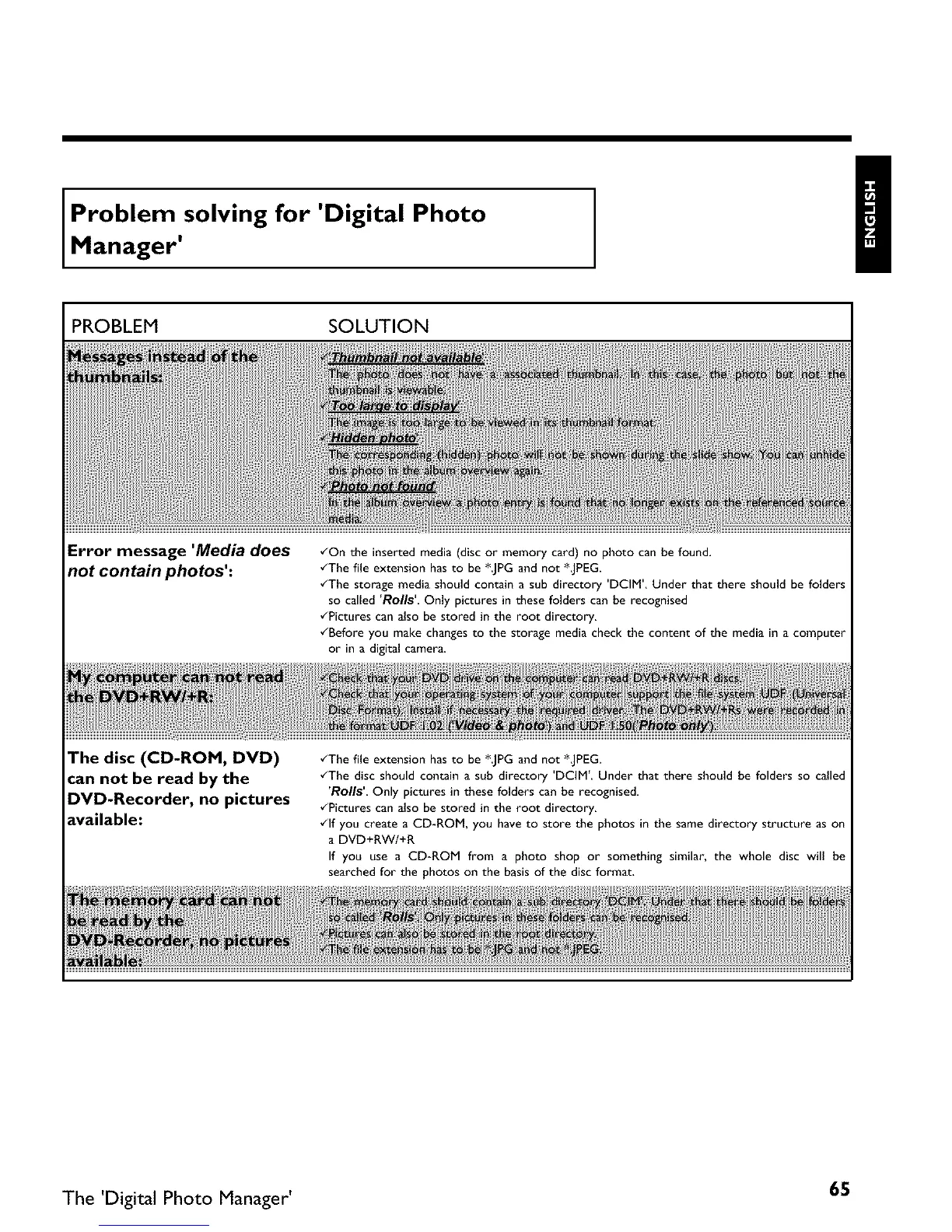
Error message 'Media does
not contain photos':
•_On the inserted media (disc or memory card) no photo can be found.
•_The file extension hasto be *JPG and not *JPEG.
•_The storage media should contain a sub directory 'DCIM', Under that there should be folders
so called 'Roils' Only pictures in these folders can be recognised
•_Pictures can also be stored in the root directory,
•_Before you make changes to the storage media check the content of the media in a computer
or in a digital camera.
The disc (CD-ROM, DVD)
can not be read by the
DVD-Recorder, no pictures
available:
•_The file extension has to be *JPG and not *JPEG.
•_The disc should contain a sub directory 'DCIM'. Under that there should be folders so called
'Rolls' Only pictures in these folders can be recognised.
•_Pictures can also be stored in the root directory.
•_lf you create a CD-ROM, you have to store the photos in the same directory structure as on
a DVD+RW/+R
If you use a CD-ROM from a photo shop or something similar, the whole disc will be
searched for the photos on the basis of the disc format.
The 'Digital Photo Manager' 65



 To Next Page