
 Need help?
Do you have a question about the Philips LFH 9600 and is the answer not in the manual?
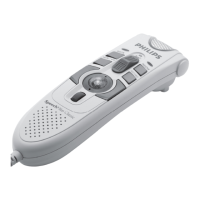
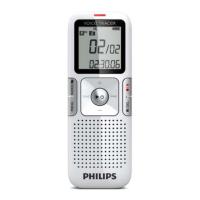
Highlights key features of the Philips Digital Pocket Memo 9600 series, including functionality, design, and security.
Provides essential safety precautions to avoid risks like short circuits, excessive heat, and cable damage during device use.
Identifies and explains the controls and connection ports of the Digital Pocket Memo and its USB docking station.
Explains the various indicators and symbols displayed on the Digital Pocket Memo screen for both models.
Step-by-step instructions for installing AAA batteries into the Digital Pocket Memo, including polarity and compartment closure.
Details the process of recharging the device's batteries using the provided docking station and its indicator lights.
Explains how to recharge the Digital Pocket Memo batteries using a USB cable connected to a PC or notebook.
Covers the essential steps for creating a new recording, including device activation and starting the recording process.
Details the process of marking a recording as finished and locked, preventing accidental deletion, and assigning priority.
Describes various playback functions like file selection, fast forward/rewind, and adjusting playback speed.
Covers deleting entire files and specific sections within a recording using marking.
Instructions on how to delete all dictation files from the device, with a caution about finished files.
Lists and describes options available in the main menu, such as deleting dictations, setting priority, and managing index marks.
 Connectivity
| docking connector | 8-pin female |
|---|---|
| USB | Mini USB 2.0 female (full speed, 12 Mbit/s) |
| DC in voltage | 6 V |
| microphone impedance | 2 kΩ |
| earphone impedance | 8 Ω or more |
 Display
| display type | TFT-Transreflective |
|---|---|
| diagonal screen size | 1.71 " / 44 mm |
| resolution | 128 × 128 pixels |
 Power
Power| power supply | 6V DC / 850 mA |
|---|---|
| power consumption | 800 mA maximum |
| battery type | two Philips AAA Ni-MH rechargeable batteries (LFH 9154) or two AAA batteries (LR03 or R03) |
| battery life with Philips Ni-MH rechargeable battery | 17 hours |
| battery life with Philips alkaline battery | 15 hours |
| charging time (USB fast charging) | 2.5 hours |
Recording Specifications| recording format | DSS / DSS Pro (Digital Speech Standard) |
|---|---|
| memory type | Secure Digital (SD)/ Multimedia Card (MMC) up to 2 GB |
| recording modes | Quality Play (QP), Standard Play (SP), Long Play mobile (LPm) |
| recording time with 128 MB card | 10.7 / 21.8 / 32.7 hours |
| recording time with 2 GB card | 170 / 349 / 523 hours |
| sampling frequency (Quality Play mode) | 16 kHz |
| sampling frequency (Standard Play mode) | 12 kHz |
| sampling frequency (Long Play mode) | 8 kHz |
| compression rate (Quality Play mode) | 26 kbit/s |
| compression rate (Standard Play mode) | 13.5 kbit/s |
| compression rate (Long Play mode) | 9 kbit/s |
| frequency response (Quality Play mode) | 200 to 7 500 Hz |
| frequency response (Standard Play mode) | 200 to 5 500 Hz |
| frequency response (Long Play mode) | 200 to 3 500 Hz |
Speaker| built-in speaker | 30 mm round dynamic speaker |
|---|---|
| output power | 200 mW |
Operating Environment| operating temperature | 5° - 45° Celsius / 41° - 113° Fahrenheit |
|---|---|
| humidity | 10 % - 90 % |
 Weight and Dimensions
| product dimensions (W x D x H) | 50 x 116 x 17 mm / 2.0 x 4.6 x 0.7 inch |
|---|---|
| weight | 106 g / 3.7 oz, including two Philips AAA Ni-MH rechargeable batteries (LFH 9154) |








 To Next Page

