Delete4.3
D Note
Before deleting a file, make sure that it is not
marked finished and that the memory card is not
set to read-only (locked). If the file is marked fin-
ished, unlock it by pressing the
EOL button once.
4.3.1 Delete a file
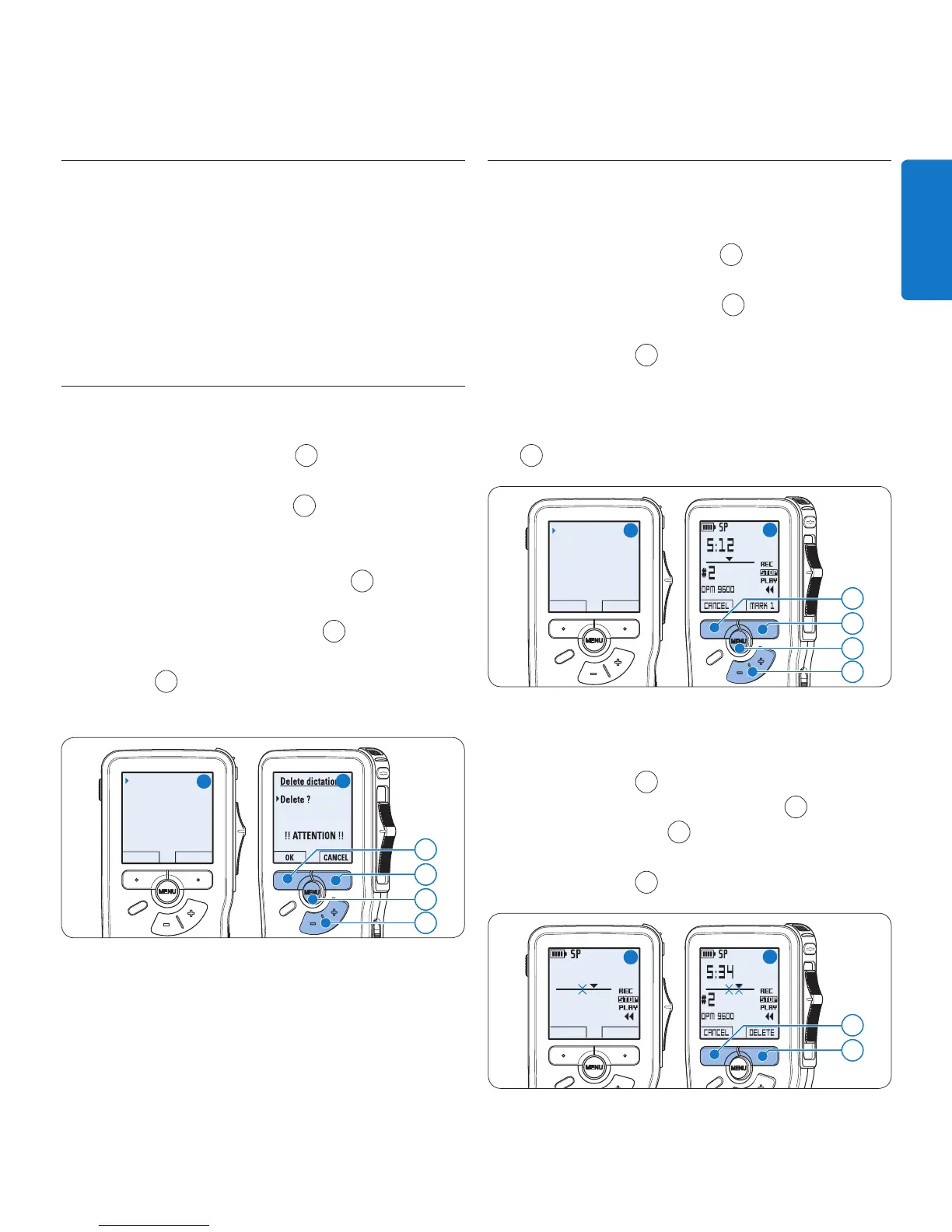
Follow these steps to delete a file entirely:
Press the 1 + or – button
1
while in the stop
position to select the file to be deleted.
Press the 2
MENU button
2
to open the
menu. The Delete dictation
menu item is
selected.
Press the 3
ENTER smart button
3
to enter
the sub menu.
Press the 4
OK smart button
4
to delete the
file permanently. Press the
CANCEL smart
button
3
to cancel the operation and leave
the recording intact.
Delete dictation
Insert mode
Keywords
Setup
Delete ?
BACK ENTER
4
3
2
A
B
1
4.3.2 Delete part of a recording
Follow these steps to delete a section from a
recording:
Press the 1
MENU button
1
while in the stop
position to open the menu.
Press the 2 + or – button
2
to select the
Delete section menu item and press the
OK
smart button
3
.
Using the play, forward or rewind functions, 3
navigate to the beginning of the section to
be deleted. Press the
MARK smart button
4
. A cross symbol appears on the screen.
Delete section
Delete dictation
Priority high
Index set
OK CANCEL
3
4
1
A
B
2
Navigate to the second mark position using 4
playback, forward or rewind. Press the
MARK 2
smart button
5
. The second cross appears.
Press the 5
DELETE smart button
5
and the
OK smart button
6
to confirm the deletion
of the marked section, or press the
CANCEL
smart button
5
to exit without deleting.
DPM 9600
CANCEL MARK 2
5:34
#2









 To Next Page