Get started3
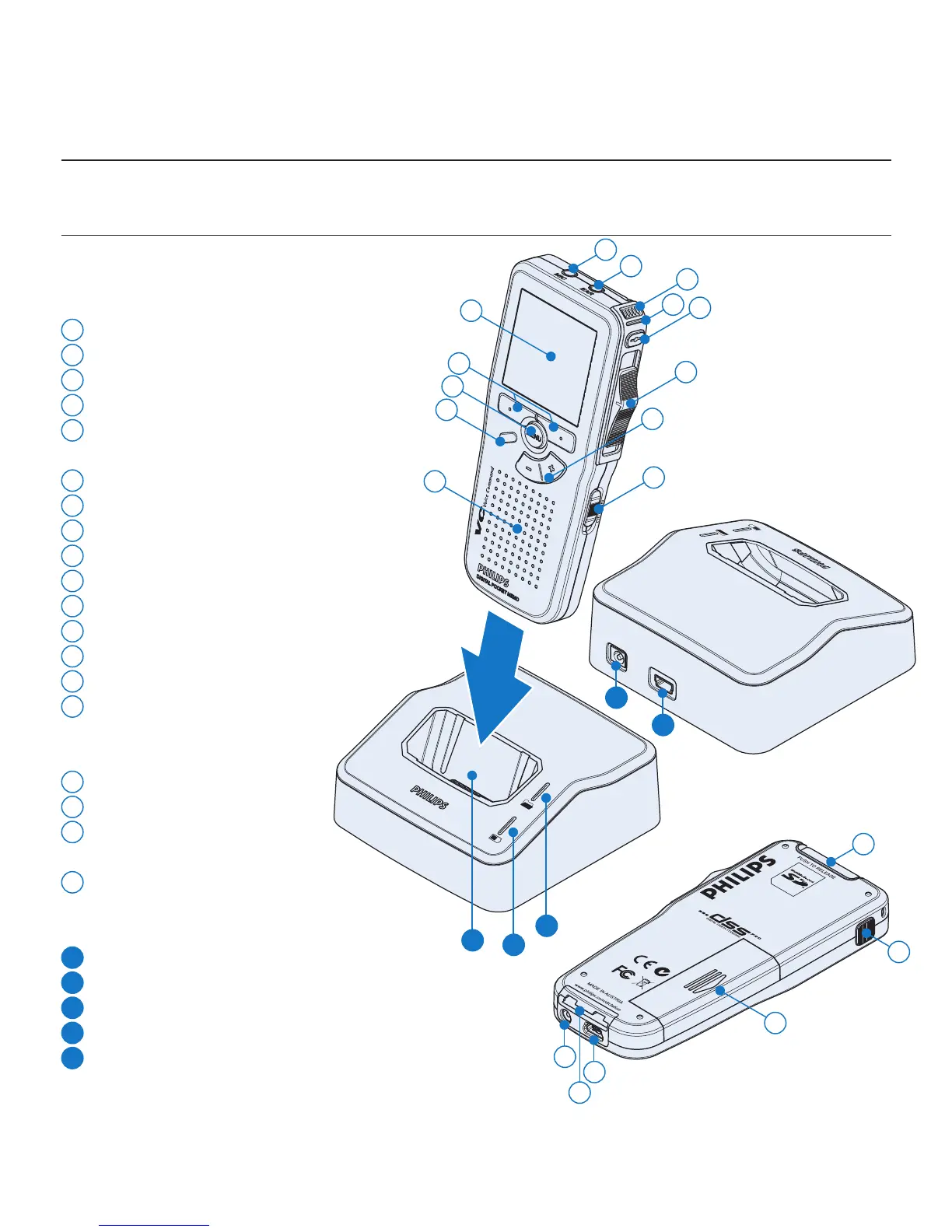
Overview – controls and connections3.1
Digital Pocket Memo
1
Microphone socket
2
Headphone socket
3
Built-in microphone
4
Status LED
5
LFH 9600: EOL (end-of-letter) button
LFH 9620: REC (record) button
6
Slide switch
7
+/–, menu navigation and volume control
8
On/o switch
9
Speaker
10
Function button (programmable)
11
Menu button
12
Smart buttons
13
Display
14
Memory card slot
15
LFH 9600: FWD (forward) button
LFH 9620: EOL (end-of-letter)
button
16
Battery compartment
17
USB connection slot
18
Docking station
connection slot
19
Power supply socket
USB Docking Station
20
Power supply socket
21
USB connection slot
22
Download indicator LED
23
Charge indicator LED
24
Docking slot for the Digital Pocket Memo
1
3
5
4
6
8
9
10
11
13
12
14
15
16
17
19
22
23
24
20
21
18
7
2









 To Next Page