EasyManua.ls Logo

Philips LFH 9600 - Delete All Dictations

Philips LFH 9600
148 pages
Print Icon
To Next Page IconTo Next Page
To Previous Page IconTo Previous Page
Loading...
18 User manual
4.3.3 Delete all dictations
C Caution
Files marked finished (EOL) are deleted when
the delete-all-dictations function is used.
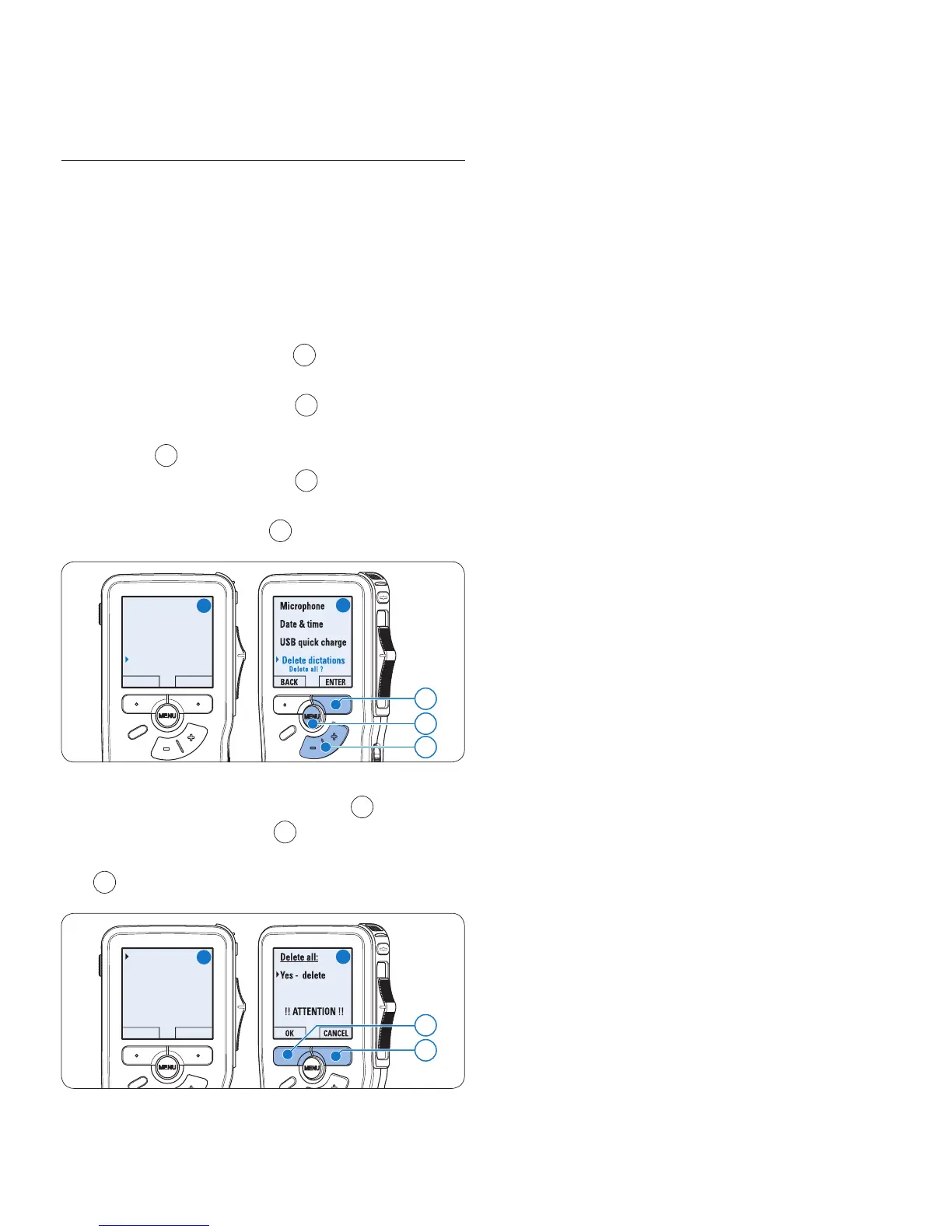
Follow these steps to delete all recordings:
Press the 1
MENU button
1
while in the stop
position to open the menu.
Press the 2 + or button
2
to select the
Setup menu item and press the
ENTER smart
button
3
.

Press the 3 + or button
2
to select the
Delete dictations menu item and press the
ENTER smart button
3
.

Delete dictation
Insert mode
Keywords
Setup
Language
BACK ENTER
3
1
A
B
2
Press the 4 ENTER smart button
4
and
the
OK smart button
5
to confirm the
deletion, or press the
CANCEL smart button
4
to exit without deleting.
Delete all ?
All dictations
will be lost !
Yes - delete
BACK ENTER
5
4
C
D

Table of Contents

Other manuals for Philips LFH 9600

Related product manuals