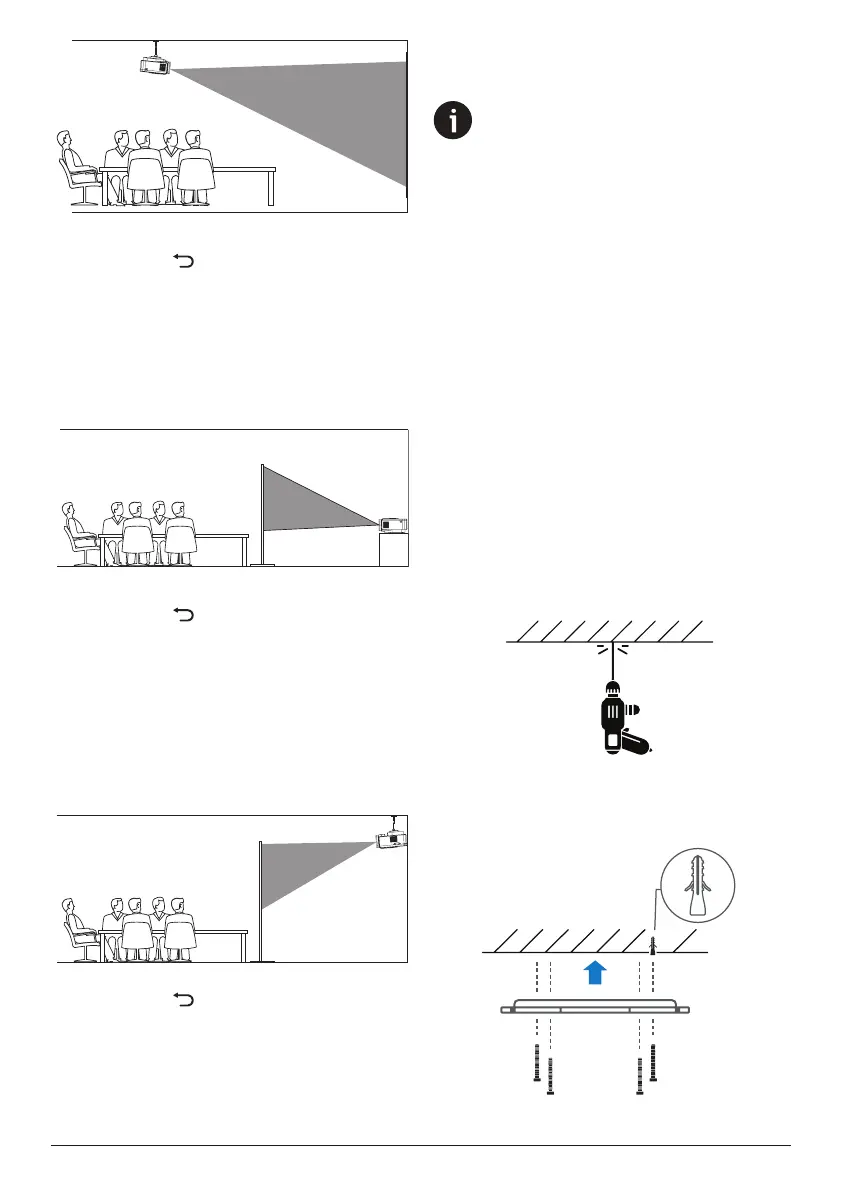
8 Philips · NeoPix 230
2 From the Home screen, open the sidebar
by pressing on the remote control.
Then select Image > Projection Direction >
Ceiling Front.
Rear
1 Place the projector on a table behind the
projection screen. A special rear projection
screen is required.
2 From the Home screen, open the sidebar
by pressing on the remote control. Then
select Image > Projection Direction > Rear.
Ceiling Rear
1 Mount the projector on the ceiling behind
the projection screen. A special rear
projection screen is required. To learn how
to mount the projector on a ceiling, see
Mount the projector on a ceiling, page
8.
2 From the Home screen, open the sidebar
by pressing on the remote control.
Then select Image > Projection Direction >
Ceiling Rear.
Mount the projector on a ceiling
Notice
Before mounting on the ceiling, make
sure the ceiling can support the weight
of the projector and mounting kit.
For ceiling installation, this product
must be securely attached to the ceiling
in accordance with the installation
instructions. An improper ceiling
installation may result in accident, injury
or damage.
We recommend that you hire an
installation professional to complete the
mounting for you.
This projector is packed with a ceiling hanging
metal plate, 4 wall anchors, 4 sharp-tipped
screws, and 2 flat-tipped screws in the box.
To mount the projector on a ceiling, follow the
following steps:
1 Choose a ceiling and a location on the
ceiling for mounting the projector.
2 Use the holes in the ceiling hanging metal
plate as a template to mark 4 hole locations
for attaching the metal plate to the ceiling.
3 Use a suitable drill bit to drill the 4 holes in
the ceiling. The depth of each hole should
be approximately 3 cm.
4 Insert the wall anchors into the holes. You
may have to use a hammer to gently tap
the anchors fully into the ceiling.



 To Next Page