26 EN
Philips sound options
On the video play screen, tap
and select [Settings] > [Philips Sound
Options].
Surround Sound Surround sound effect
Play from Gallery
1
From the Home screen, go to .
» Pictures and videos folders are
displayed.
2 Tap a folder.
» Pictures and videos in the folder are
displayed.
a Tap repeatedly to go to the main
menu of Gallery.
b Tap to sort images and videos in
different ways.
c Tap to select media type, images and
videos, images only, or videos only.
d Tap to go to the camera.
abcd
To browse through the pictures or videos,
Swipe left/ right on the screen.
Play videos
1
2 Tap a video to start play.
» The play screen is displayed.
On the play screen,
To pause/resume play, tap
/ .
To search within the video, drag the
progress bar.
Play pictures
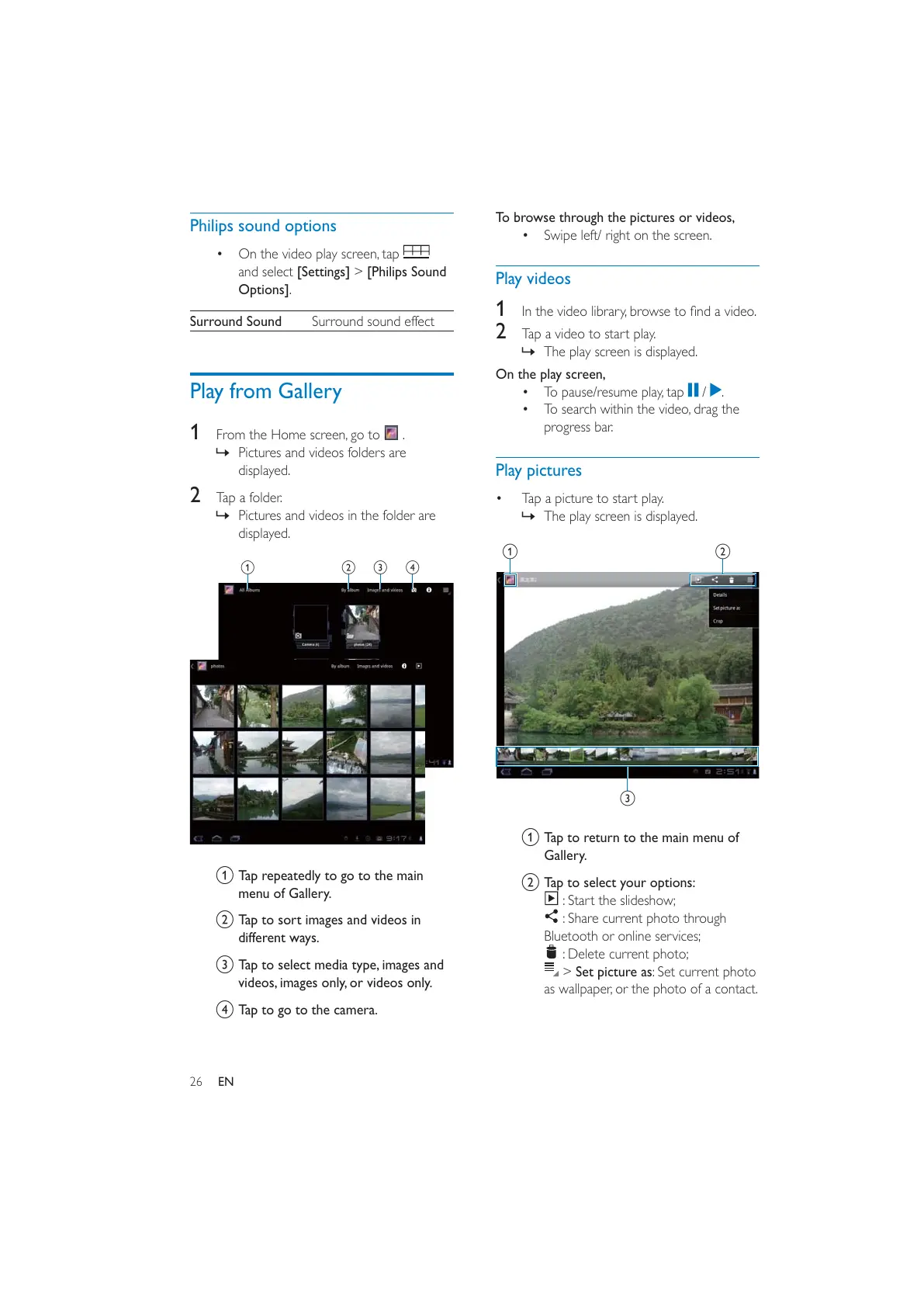
Tap a picture to start play.
» The play screen is displayed.
a Tap to return to the main menu of
Gallery.
b Tap to select your options:
: Start the slideshow;
: Share current photo through
Bluetooth or online services;
: Delete current photo;
> Set picture as: Set current photo
as wallpaper, or the photo of a contact.
c
b
a



 To Next Page