MOLTIO 03 BRIEF INSTRUCTIONS
4/5
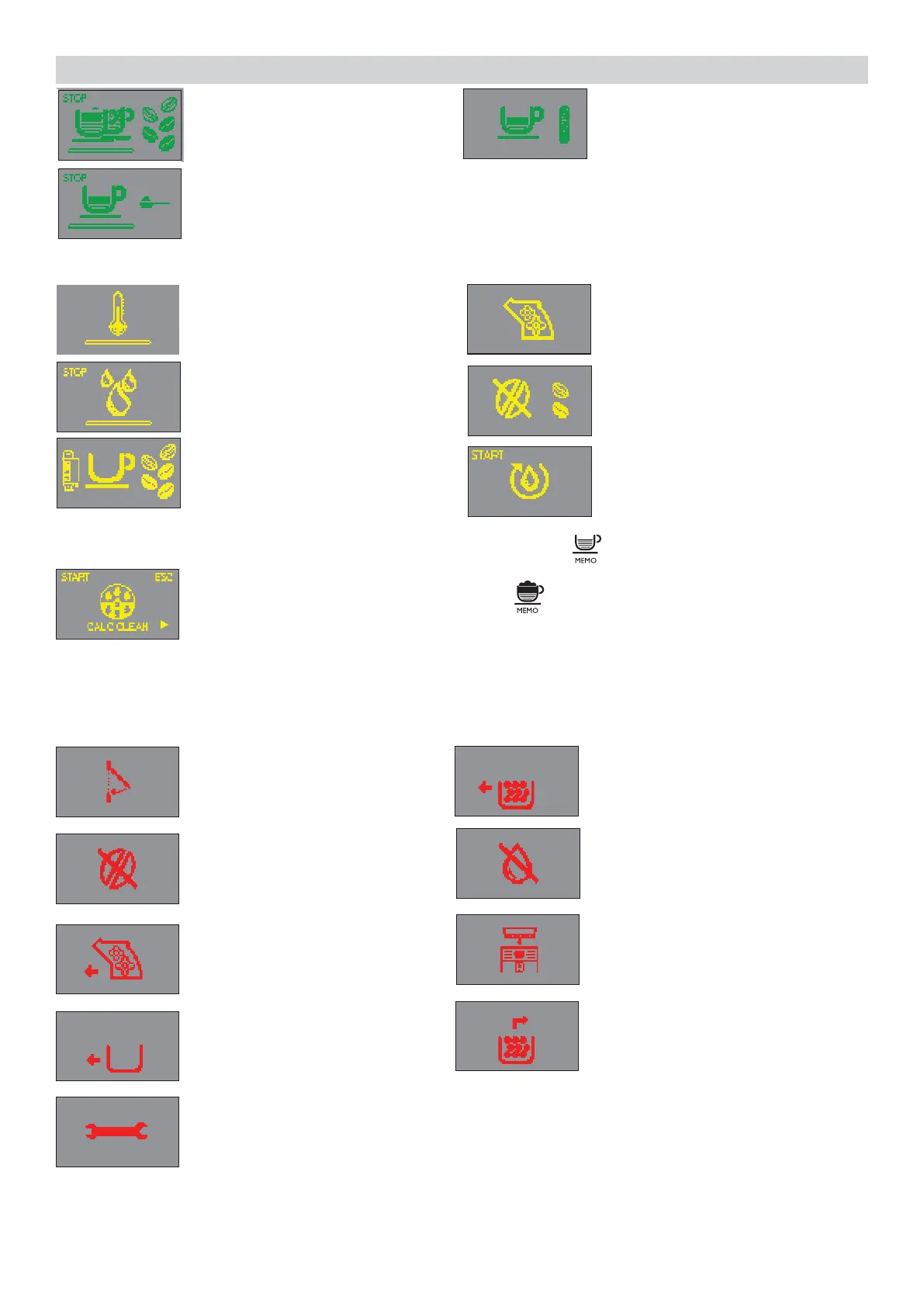
The machine is brewing two
cups of coffee.
Coffee brewing using pre-ground
coff ee in progress.
The machine is programming
the amount of coffee to brew.
Machine ready signals (YELLOW colour)
Re ll the coffee bean hopper
with coffee beans and restart the
cycle.
Prime the circuit.
The brew group is being reset
due to machine reset.
The machine needs to be descaled. Press the “ ” button to start the descaling
process. Follow the steps described in the descaling chapter of this manual.
If you want to descale later, press the “ ” button to continue using the
machine.
Please note that not descaling your machine will ultimately make it
stopworkingproperly.InthiscaserepairisNOTcoveredunderyour
warranty.
The machine is heating up to
brew beverages or dispense hot
water.
The machine is performing the
rinse cycle. Wait until the machine
has completed the cycle.
The machine needs the
“INTENZA+” water lter to be
replaced.
Machine ready signals (RED colour)
Close the service door.
Fully insert the coffee grounds
drawer before turning the
machine off.
Fill the water tank.
Insert the coffee bean hopper.
Turn off the machine. After 30-seconds, turn it back on. Try this 2 or 3 times.
If the machine does not start, contact the Philips SAECO hotline in your
country and communicate the Error-code which you see on the display.
Fill the coffee bean hopper.
The brew group must be inserted
into the machine.
Insert the coffee grounds
drawer.
Empty the coffee grounds drawer
and the coffee residues drawer.




 To Next Page