EasyManua.ls Logo

Pioneer PD-M430 - Advanced Playback Operations; Disc and Track Searching

Pioneer PD-M430
18 pages
Print Icon
To Next Page IconTo Next Page
To Previous Page IconTo Previous Page
Loading...
>
oe
B630
CI"
oe¢eeee
PDP
9
15
|
CI"
eeeGee
me
i
eas
hue
C4"
eeeeee
Abe
19:5
|
Ci"
eeeeee
VARIOUS
OPERATIONS
BASIC
OPERATION
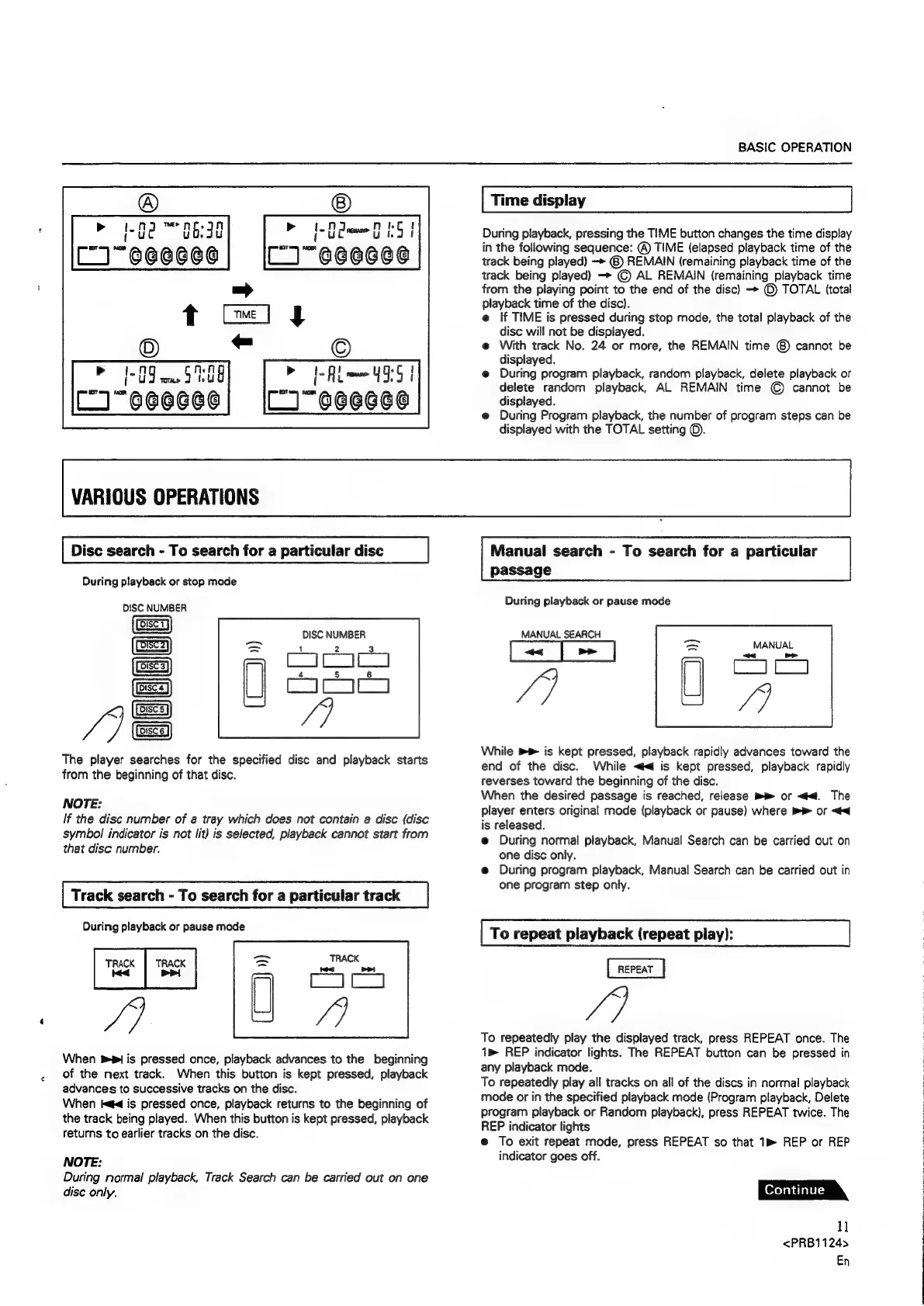
Time
display
During
piayback,
pressing
the
TIME
button
changes
the
time
display
in
the
following
sequence:
®
TIME
(elapsed
playback
time
of
the
track
being
played)
—>
@)
REMAIN
(remaining
playback
time
of
the
track
being
played)
—>
©)
AL
REMAIN
(remaining
playback
time
from
the
playing
point
to
the
end
of
the
disc)
>
©
TOTAL
(total
playback
time
of
the
disc).
e
If
TIME
is
pressed
during
stop
mode,
the
total
playback
of
the
disc
will
not
be
displayed.
@
With
track
No.
24
or
more,
the
REMAIN
time
@)
cannot
be
displayed.
e@
During
program
playback,
random
playback,
delete
playback
or
delete
random
playback,
AL
REMAIN
time
©
cannot
be
displayed.
e@
During
Program
playback,
the
number
of
program
steps
can
be
displayed
with
the
TOTAL
setting
©.
Disc
search
-
To
search
for
a
particular
disc
During
playback
or
stop
mode
DISC
NUMBER
DISC
NUMBER
|
|
oe
|
|B
je
1
The
player
searches
for
the
specified
disc
and
playback
starts
from
the
beginning
of
that
disc.
DUCEEE
NOTE:
If
the
disc
number
of
a
tray
which
does
not
contain
a
disc
(disc
symbol
indicator
is
not
lit)
is
selected,
playback
cannot
start
from
that
disc
number.
Track
search
-
To
search
for
a
particular
track
During
playback
or
pause
mode
TRACK
TRACK
Kid
Pi
oi
When
1
is
pressed
once,
playback
advances
to
the
beginning
of
the
next
track.
When
this
button
is
kept
pressed,
playback
advances
to
successive
tracks
on
the
disc.
When
iad
is
pressed
once,
playback
returns
to
the
beginning
of
the
track
being
played.
When
this
button
is
kept
pressed,
playback
returns
to
earlier
tracks
on
the
disc.
NOTE:
During
normal
playback,
Track
Search
can
be
carried
out
on
one
dise
only.
Manual
search
-
To
search
for
a
particular
passage
During
playback
or
pause
mode
MANUAL
SEARCH
MANUAL
Lctaall
«<4
/3
CIC
While
»®
is
kept
pressed,
playback
rapidly
advances
toward
the
end
of
the
disc.
While
<4
is
kept
pressed,
playback
rapidly
reverses
toward
the
beginning
of
the
disc.
When
the
desired
passage
is
reached,
release
>
or
<4.
The
player
enters
original
mode
(playback
or
pause)
where
>>
or
<4
is
released.
e@
During
normal
playback,
Manual
Search
can
be
carried
out
on
one
disc
only.
e@
During
program
playback,
Manual
Search
can
be
carried
out
in
one
program
step
only.
To
repeat
playback
(repeat
play):
/]
To
repeatedly
play
the
displayed
track,
press
REPEAT
once.
The
1m
REP
indicator
lights.
The
REPEAT
button
can
be
pressed
in
any
playback
mode.
To
repeatedly
play
all
tracks
on
all
of
the
discs
in
normal
playback
mode
or
in
the
specified
playback
mode
(Program
playback,
Delete
program
playback
or
Random
playback),
press
REPEAT
twice.
The
REP
indicator
lights
@
To
exit
repeat
mode,
press
REPEAT
so
that
1m
REP
or
REP
indicator
goes
off.
1]
<PRB1124>
En

Related product manuals