EasyManua.ls Logo

Pioneer PD-M430 - Deleting Tracks from Playback Programs; Delete Program Playback Procedure; Clearing Delete Program Settings

Pioneer PD-M430
18 pages
Print Icon
To Next Page IconTo Next Page
To Previous Page IconTo Previous Page
Loading...
TO
PLAY
ONLY
DESIRED
TRACKS/DISCS
14
<PRB1124>
En
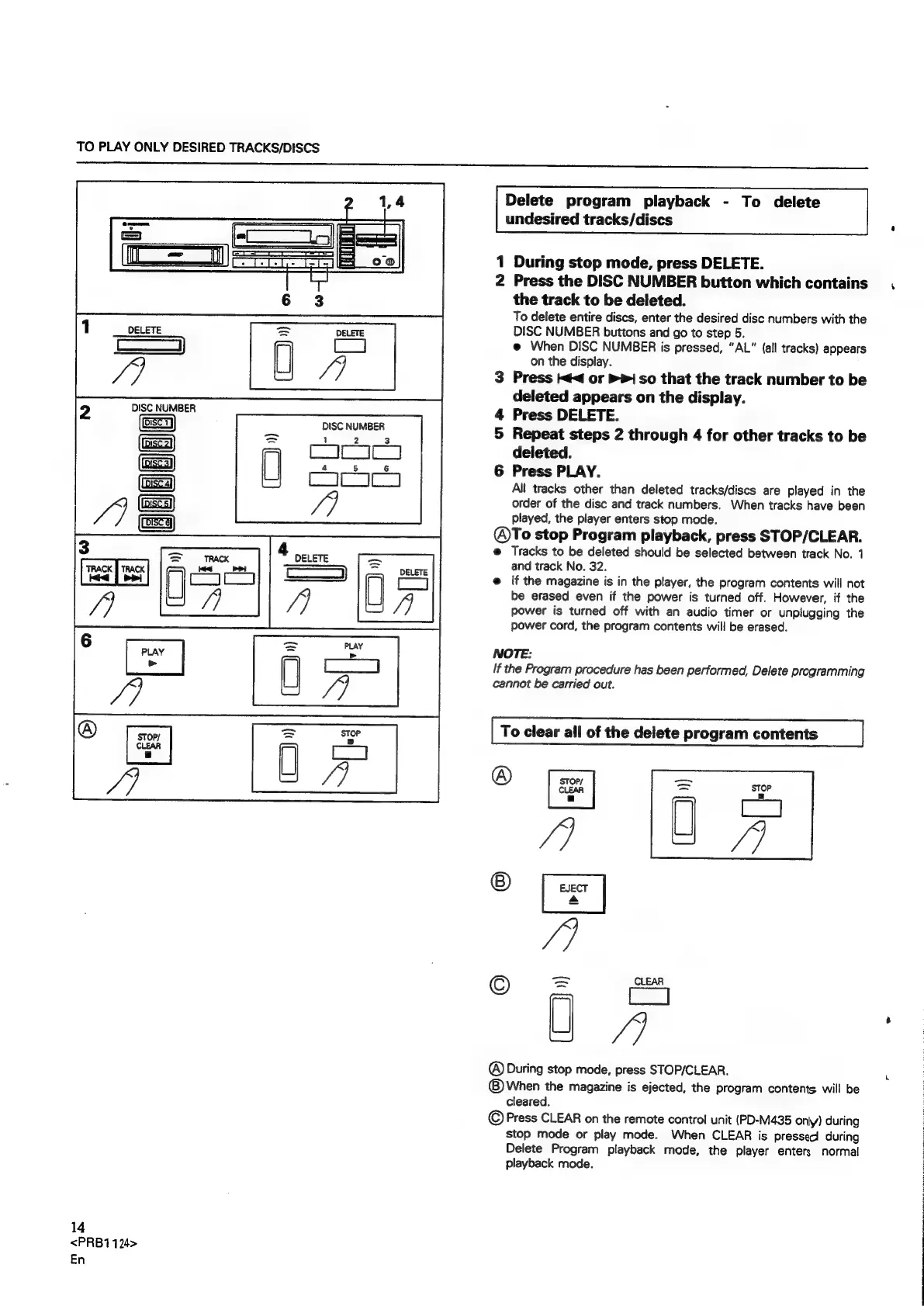
Delete
program
playback
-
To
delete
undesired
tracks/discs
1
During
stop
mode,
press
DELETE.
2
Press
the
DISC
NUMBER
button
which
contains
the
track
to
be
deleted.
To
delete
entire
discs,
enter
the
desired
disc
numbers
with
the
DISC
NUMBER
buttons
and
go
to
step
5.
@
When
DISC
NUMBER
is
pressed,
“AL”
{all
tracks)
appears
on
the
display.
3
Press
¢<
or
>i
so
that
the
track
number
to
be
deleted
appears
on
the
display.
4
Press
DELETE.
5
Repeat
steps
2
through
4
for
other
tracks
to
be
deleted.
6
Press
PLAY.
All
tracks
other
than
deleted
tracks/discs
are
played
in
the
order
of
the
disc
and
track
numbers.
When
tracks
have
been
played,
the
player
enters
stop
mode.
@To
stop
Program
playback,
press
STOP/CLEAR.
@
Tracks
to
be
deleted
should
be
selected
between
track
No.
1
and
track
No.
32.
@
If
the
magazine
is
in
the
player,
the
program
contents
will
not
be
erased
even
if
the
power
is
turned
off.
However,
if
the
power
is
turned
off
with
an
audio
timer
or
unplugging
the
power
cord,
the
program
contents
will
be
erased.
NOTE:
If
the
Program
procedure
has
been
performed,
Delete
programming
cannot
be
carried
out.
To
clear
all
of
the
delete
program
contents
STOP/
©
(C9)
A
of
SS
88
@
©
Pal
J)
@®)
During
stop
mode,
press
STOP/CLEAR.
©
When
the
magazine
is
ejected,
the
program
contents
will
be
cleared.
©
Press
CLEAR
on
the
remote
control
unit
(PD-M435
only)
during
stop
mode
or
play
mode.
When
CLEAR
is
presseci
during
Delete
Program
playback
mode,
the
player
enters
normal
playback
mode.

Related product manuals