EasyManua.ls Logo

Pioneer PD-M430 - Recording Assistance: Fade Editing; Time Fade Editing Function

Pioneer PD-M430
18 pages
Print Icon
To Next Page IconTo Next Page
To Previous Page IconTo Previous Page
Loading...
CONVENIENT
OPERATION
FOR
RECORDING
=
=
dl
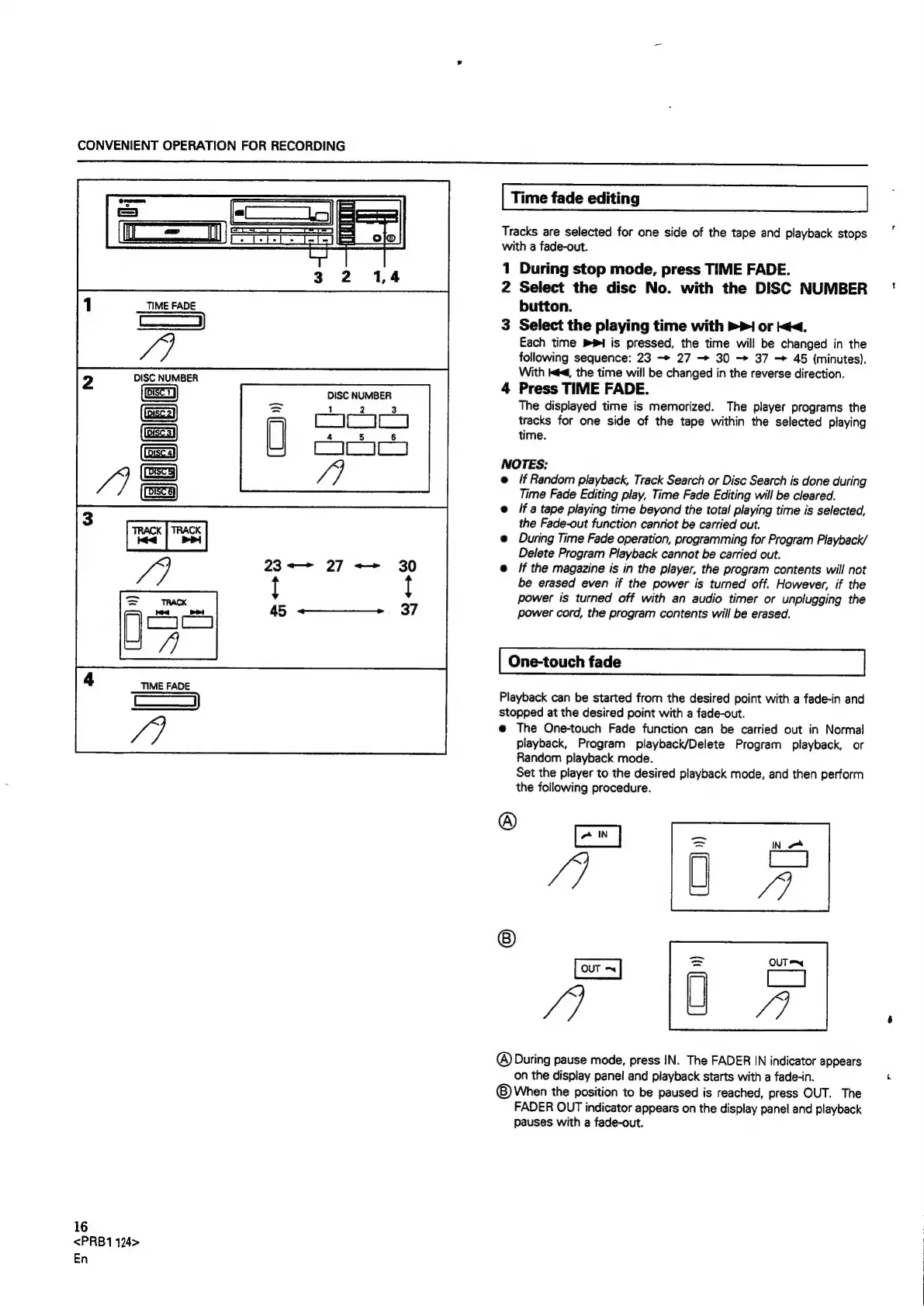
TIME
FADE
eet
f7
DISC
NUMBER
CoC
AIC4
i]
23<—
27
++
30
!
{
45
«+
_
37
TIME
FADE
i
Vai
16
<PRB1
124>
En
Time
fade
editing
Tracks
are
selected
for
one
side
of
the
tape
and
playback
stops
with
a
fade-out.
1
During
stop
mode,
press
TIME
FADE.
2
Select
the
disc
No.
with
the
DISC
NUMBER
button.
3
Select
the
playing
time
with
>>
or
<<.
Each
time
Pi
is
pressed,
the
time
will
be
changed
in
the
following
sequence:
23
27
30
37
45
(minutes).
With
ké<,
the
time
will
be
changed
in
the
reverse
direction.
Press
TIME
FADE.
The
displayed
time
is
memorized.
The
player
programs
the
tracks
for
one
side
of
the
tape
within
the
selected
playing
time.
>
NOTES:
e
/f
Random
playback,
Track
Search
or
Disc
Search
is
done
during
Time
Fade
Editing
play,
Time
Fade
Editing
will
be
cleared.
@
/f
a
tape
playing
time
beyond
the
total
playing
time
is
selected,
the
Fade-out
function
canriot
be
carried
out.
e
During
Time
Fade
operation,
programming
for
Program
Playback/
Delete
Program
Playback
cannot
be
carried
out.
If
the
magazine
is
in
the
player,
the
program
contents
will
not
be
erased
even
if
the
power
is
turned
off.
However,
if
the
power
is
turned
off
with
an
audio
timer
or
unplugging
the
power
cord,
the
program
contents
will
be
erased.
One-touch
fade
Playback
can
be
started
from
the
desired
point
with
a
fade-in
and
stopped
at
the
desired
point
with
a
fade-out.
@
The
One-touch
Fade
function
can
be
carried
out
in
Normal
playback,
Program
playback/Delete
Program
playback,
or
Random
playback
mode.
Set
the
player
to
the
desired
playback
mode,
and
then
perform
the
following
procedure.
®
me
A
iy
&
@
is
eS
/
U4
®
During
pause
mode,
press
IN.
The
FADER
IN
indicator
appears
on
the
display
panel
and
playback
starts
with
a
fade-in.
©
When
the
position
to
be
paused
is
reached,
press
OUT.
The
FADER
OUT
indicator
appears
on
the
display
panel
and
playback
pauses
with
a
fade-out.

Related product manuals