EasyManua.ls Logo

Pioneer PD-M430 - Connecting the Player; Audio Component Connections

Pioneer PD-M430
18 pages
Print Icon
To Next Page IconTo Next Page
To Previous Page IconTo Previous Page
Loading...
CONNECTIONS
@
Make
sure
that
all
of
the
components
are
turned
off
before
making
connections.
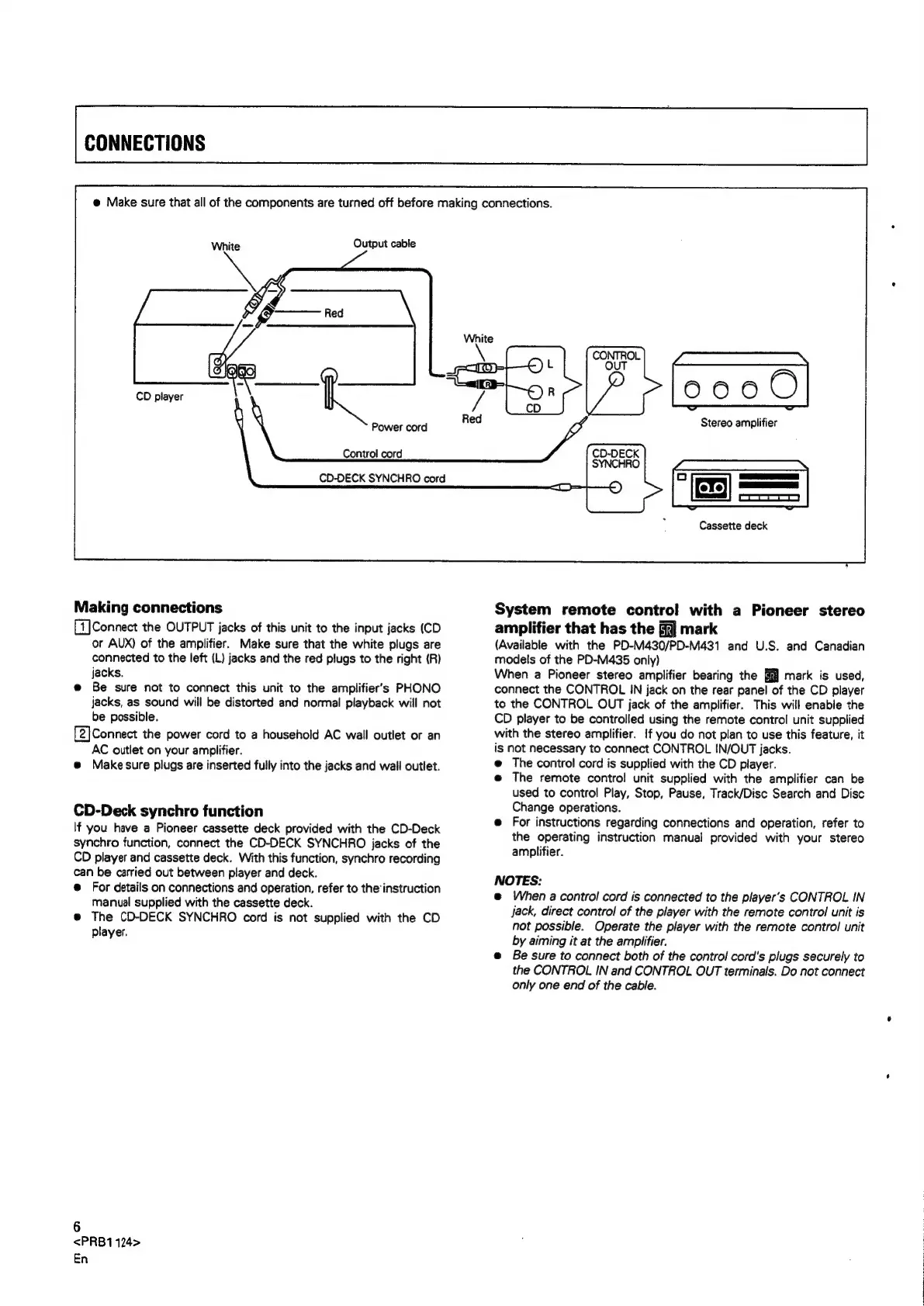
White
Output
cable
CD
player
Power
cord
Control
cord
CD-DECK
SYNCHRO
cord
Making
connections
[1]
Connect
the
OUTPUT
jacks
of
this
unit
to
the
input
jacks
(CD
or
AUX)
of
the
amplifier.
Make
sure
that
the
white
plugs
are
connected
to
the
left
(L)
jacks
and
the
red
plugs
to
the
right
(R)
jacks.
e@
Be
sure
not
to
connect
this unit
to
the
amplifier’s
PHONO
jacks,
as
sound
will
be
distorted
and
normal
playback
will
not
be
possible.
[2]Connect
the
power
cord
to
a
household
AC
wall
outlet
or
an
AC
outlet
on
your
amplifier.
@
Make
sure
plugs
are
inserted
fully
into
the
jacks
and
wail
outlet.
CD-Deck
synchro
function
If
you
have
a
Pioneer
cassette
deck
provided
with
the
CD-Deck
synchro
function,
connect
the
CD-DECK
SYNCHRO
jacks
of
the
CD
player
and
cassette
deck.
With
this
function,
synchro
recording
can
be
carried
out
between
player
and
deck.
@
For
details
on
connections
and
operation,
refer
to
the
instruction
manual
supplied
with
the
cassette
deck.
@
The
CD-DECK
SYNCHRO
cord
is
not
supplied
with
the
CD
player.
6
<PRB1124>
En
Stereo
amplifier
Cassette
deck
System
remote
contro!
with
a
Pioneer
stereo
amplifier
that
has
the
§@]
mark
(Available
with
the
PD-M430/PD-M431
and
U.S.
and
Canadian
models
of
the
PD-M435
only)
When
a
Pioneer
stereo
amplifier
bearing
the
mark
is
used,
connect
the
CONTROL
IN
jack
on
the
rear
panel
of
the
CD
player
to
the
CONTROL
OUT
jack
of
the
amplifier.
This
will
enable
the
CD
player
to
be
controlled
using
the
remote
control
unit
supplied
with
the
stereo
amplifier.
If
you
do
not
plan
to
use
this
feature,
it
is
not
necessary
to
connect
CONTROL
IN/OUT
jacks.
e
The
control
cord
is
supplied
with
the
CD
player.
e@
The
remote
contro!
unit
supplied
with
the
amplifier
can
be
used
to
control
Play,
Stop,
Pause,
Track/Disc
Search
and
Disc
Change
operations.
@
For
instructions
regarding
connections
and
operation,
refer
to
the
operating
instruction
manual
provided
with
your
stereo
amplifier.
NOTES:
@
When
a
control
cord
is
connected
to
the
player's
CONTROL
IN
Jack,
direct
control
of
the
player
with
the
remote
control
unit
is
not
possible.
Operate
the
player
with
the
remote
control
unit
by
aiming
it
at
the
amplifier.
e@
Be
sure
to
connect
both
of
the
control
cord's
plugs
securely
to
the
CONTROL
IN
and
CONTROL
OUT
terminals.
Do
not
connect
only
one
end
of
the
cable.

Related product manuals