EasyManua.ls Logo

Pioneer PD-M430 - Recording Assistance Features; Compu Program Editing for Recording

Pioneer PD-M430
18 pages
Print Icon
To Next Page IconTo Next Page
To Previous Page IconTo Previous Page
Loading...
CONVENIENT
OPERATION
FOR
RECORDING
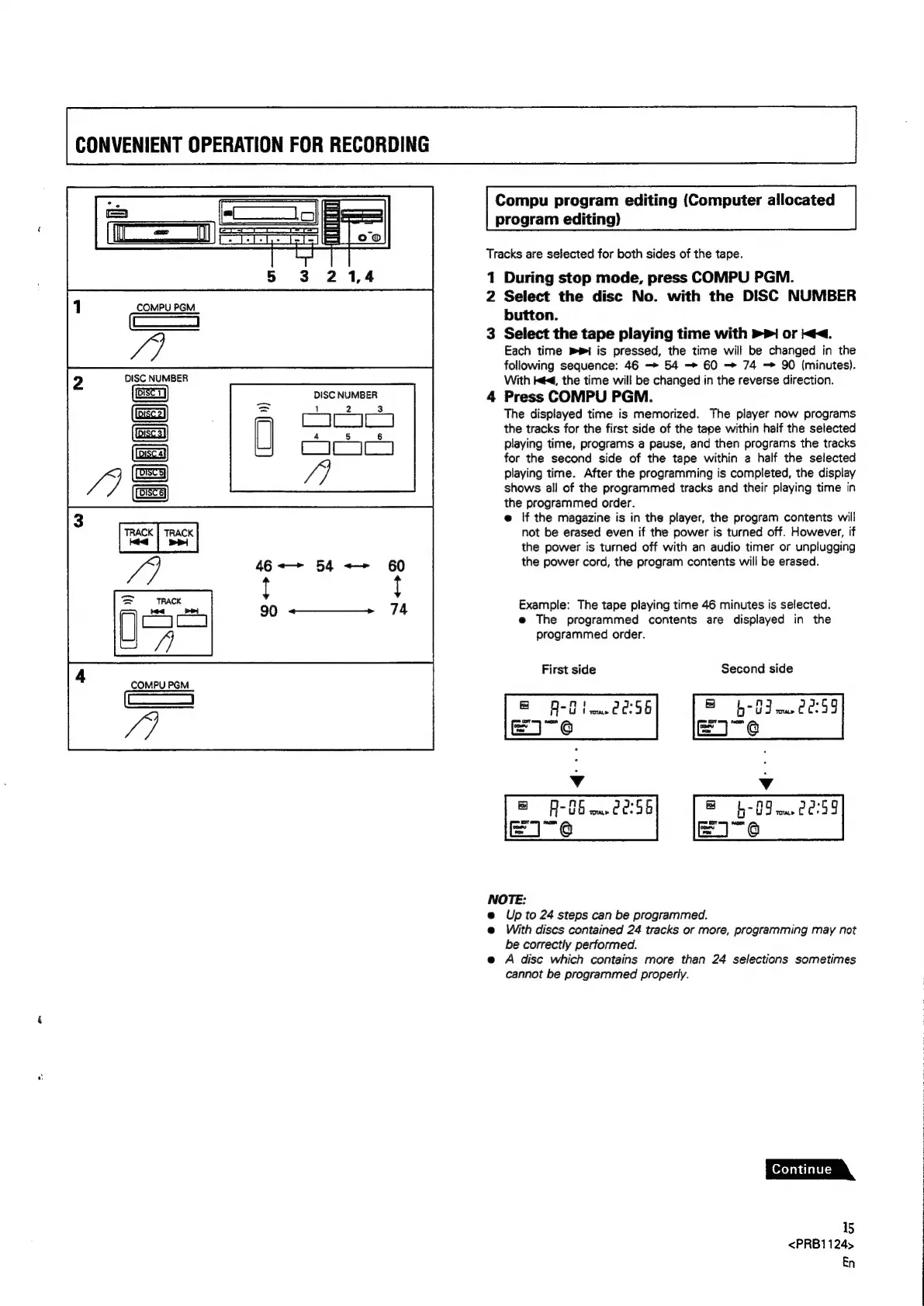
Compu
program
editing
(Computer
allocated
program
editing)
Tracks
are
selected
for
both
sides
of
the
tape.
1
During
stop
mode,
press
COMPU
PGM.
2
Select
the
disc
No.
with
the
DISC
NUMBER
button.
3
Select
the
tape
playing
time
with
>>
or
<<.
Each
time
mi
is
pressed,
the
time
will
be
changed
in
the
following
sequence:
46
—>
54
-—>
60
74
90
(minutes).
With
ed,
the
time
will
be
changed
in
the
reverse
direction.
DISC
NUMBER
4
Press
COMPU
PGM.
The
displayed
time
is
memorized.
The
player
now
programs
the
tracks
for
the
first
side
of
the
tape
within
half
the
selected
playing
time,
programs
a
pause,
and
then
programs
the
tracks
for
the
second
side
of
the
tape
within
a
half
the
selected
playing
time.
After
the
programming
is
completed,
the
display
shows
all
of
the
programmed
tracks
and
their
playing
time
in
the
programmed
order.
e@
If
the
magazine
is
in
the
player,
the
program
contents
will
not
be
erased
even
if
the
power
is
turned
off.
However,
if
the
power
is
turned
off
with
an
audio
timer
or
unplugging
the
power
cord,
the
program
contents
will
be
erased.
COMPU
PGM
al
m
2
Example:
The
tape
playing
time
46
minutes
is
selected.
e@
The
programmed
contents
are
displayed
in
the
programmed
order.
First
side
Second
side
COMPU
PGM
c—
@
f-tin02s6)
b-0}0859
Ve
EI-¢
EI-¢
v v
@
A-86
00:56
b-
09
ww
20:99
Ud
NOTE:
@
Up
to
24
steps
can
be
programmed.
e@
With
discs
contained
24
tracks
or
more,
programming
may
not
be
correctly
performed.
e
A
disc
which
contains
more
than
24
selections
sometimes
cannot
be
programmed
properly.
15
<PRB1124>
En

Related product manuals