PDP-506PE
42
1234
1234
C
D
F
A
B
E
6.2 RS-232C COMMAND
SYSTEM
CABLE
WHITE
BLACK
MDR
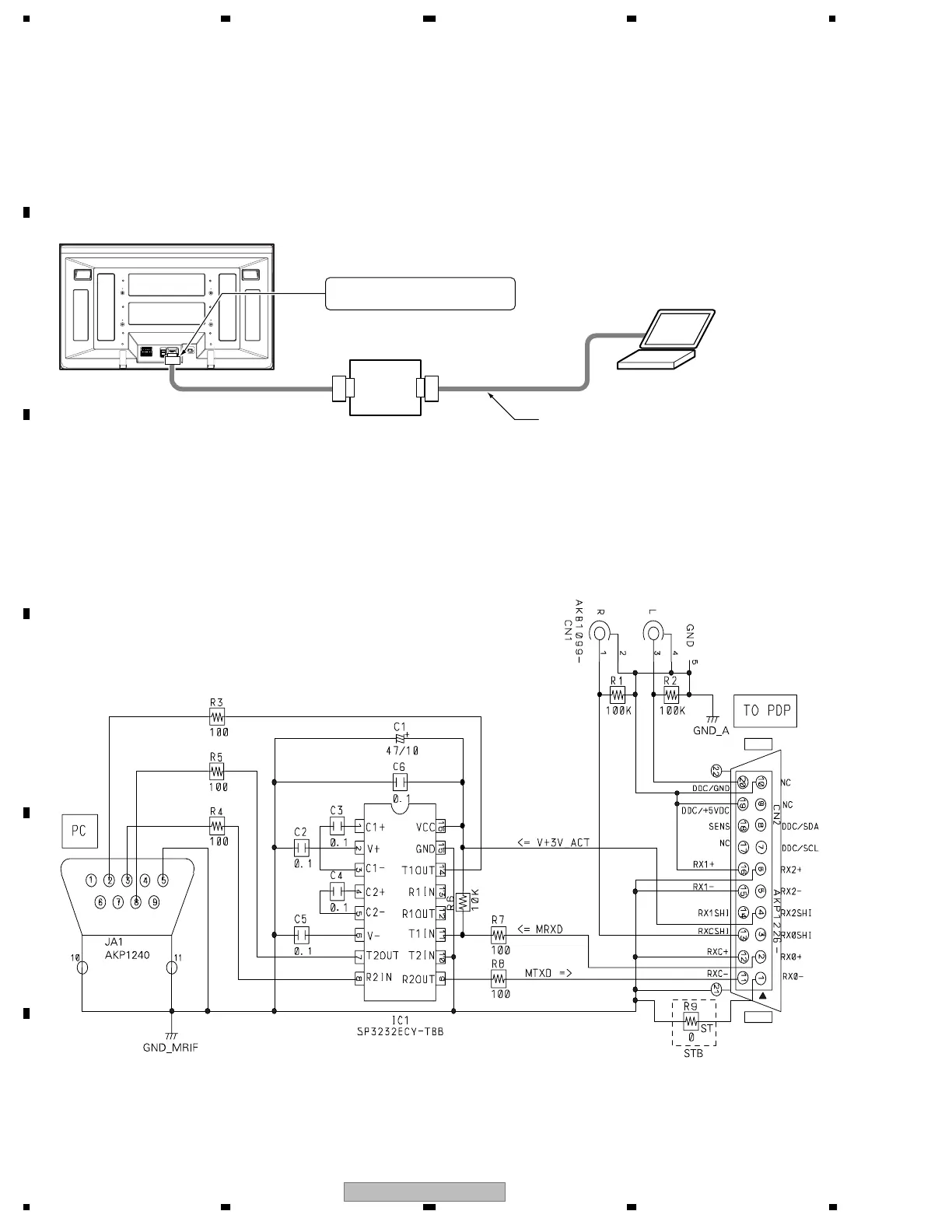
• The panel control items for the PDP-506PE, PU / PDP-436PE, PU systems can be controlled with the RS-232C commands by connecting
a PC through the GGF1475 special communication device when the Media Receiver is not connected with the PDP.
Note: The special communication device for the PDP-503P cannot be used with this unit, because the control lines within the MDR cable are
different.
GGF1475 special
communication device
D-SUB 9-pin straight cable
PC for control
Connect to the D-SUB 9-pin connector.
Communication line:
Connect the system cable.
1. Connection
• Schematic diagram of the special communication device


 To Next Page
 Loading...