EasyManua.ls Logo

Pioneer SA-708 - Adjustments; Idle Current Adjustment; Output Indicator Adjustment

Pioneer SA-708
21 pages
Print Icon
To Next Page IconTo Next Page
To Previous Page IconTo Previous Page
Loading...
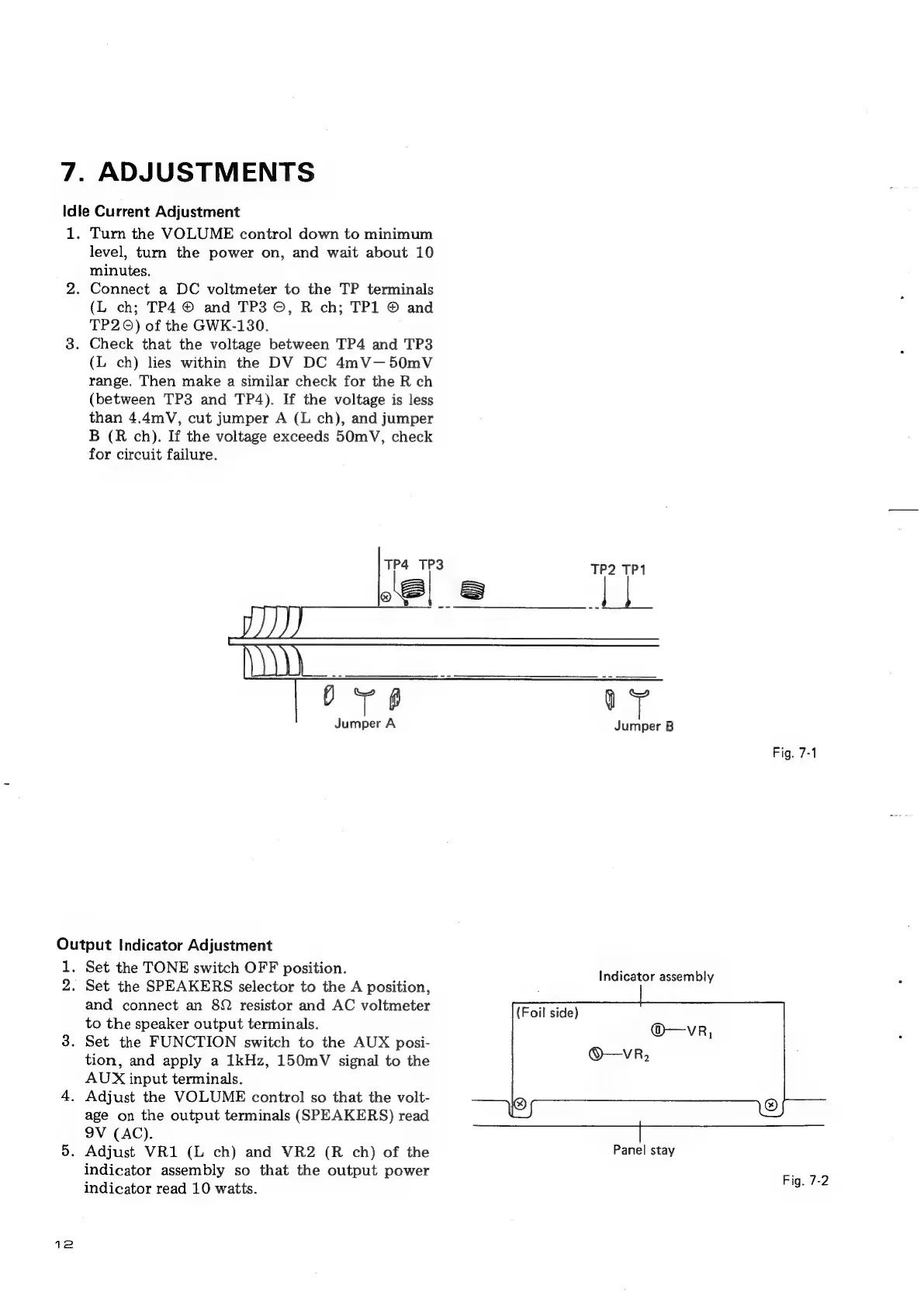
7.
ADJUSTMENTS
Idle
Current
Adjustment
L.
Turn
the
VOLUME
control
down
to
minimum
level,
turn
the
power
on,
and
wait
about
10
minutes.
.
Connect
a
DC
voltmeter
to
the
TP
terminals
(L
ch;
TP4
©
and
TP3
©,
R
ch;
TP1
©
and
TP2
0)
of
the
GWK-130.
.
Check
that
the
voltage
between
TP4
and
TP3
(L
ch)
lies
within
the
DV
DC
4mV—50mV
range.
Then
make
a
similar
check
for
the
R
ch
(between
TP3
and
TP4).
If
the
voltage
is
less
than
4.4mV,
cut
jumper
A
(L
ch),
and
jumper
B
(R
ch).
If
the
voltage
exceeds
50mV,
check
for
circuit
failure.
6
Jumper
A
Output
Indicator
Adjustment
1.
2.
12
Set
the
TONE
switch
OFF
position.
Set
the
SPEAKERS
selector
to
the
A
position,
and
connect
an
8
resistor
and
AC
voltmeter
to
the
speaker
output
terminals.
.
Set
the
FUNCTION
switch
to
the
AUX
posi-
tion,
and
apply
a
1kHz,
150mV
signal
to
the
AUX
input
terminals.
.
Adjust
the
VOLUME
control
so
that
the
volt-
age
on
the
output
terminals
(SPEAKERS)
read
9V
(AC).
.
Adjust
VR1
(L
ch)
and
VR2
(R
ch)
of
the
indicator
assembly
so
that
the
output
power
indicator
read
10
watts.
TP2
TP1
——
Os
"
Jumper
B
Fig.
7-1
Indicator
assembly
Panel
stay
Fig.
7-2

Other manuals for Pioneer SA-708

Related product manuals