EasyManua.ls Logo

Pioneer SA-708 - Front Panel Facilities; Power, Speaker & Muting Controls; Volume, Headphone & Indicators

Pioneer SA-708
21 pages
Print Icon
To Next Page IconTo Next Page
To Previous Page IconTo Previous Page
Loading...
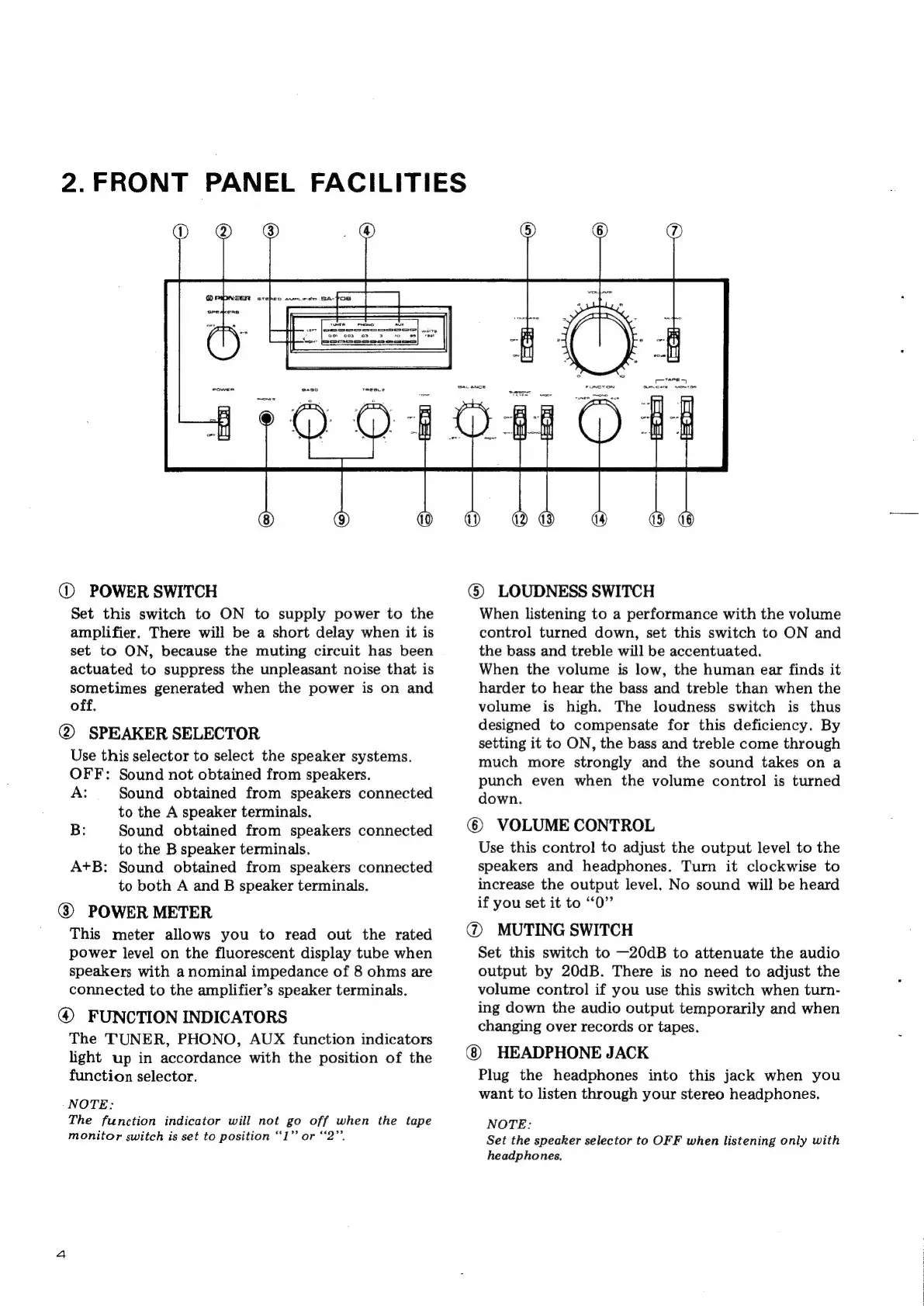
2.FRONT
PANEL
FACILITIES
@
POWER
SWITCH
Set
this
switch
to
ON
to
supply
power
to
the
amplifier.
There
will
be
a
short
delay
when
it is
set
to
ON,
because
the
muting
circuit
has
been
actuated
to
suppress
the
unpleasant
noise
that
is
sometimes
generated
when
the
power
is
on
and
off.
@
SPEAKER
SELECTOR
Use
this
selector
to
select
the
speaker
systems.
OFF:
Sound
not
obtained
from
speakers.
A:
Sound
obtained
from
speakers
connected
to
the
A
speaker
terminals.
B:
Sound
obtained
from
speakers
connected
to
the
B
speaker
terminals.
A+B:
Sound
obtained
from
speakers
connected
to
both
A
and
B
speaker
terminals.
@
POWER
METER
This
meter
allows
you
to
read
out
the
rated
power
level
on
the
fluorescent
display
tube
when
speakers
with
a
nominal
impedance
of
8
ohms
are
connected
to
the
amplifier’s
speaker
terminals.
@
FUNCTION
INDICATORS
The
TUNER,
PHONO,
AUX
function
indicators
light
up
in
accordance
with
the
position
of
the
function
selector.
NOTE:
The
function
indicator
will
not
go
off
when
the
tape
monitor
switch
is
set
to
position
“1”
or
‘‘2”’.
@
LOUDNESS
SWITCH
When
listening
to
a
performance
with
the
volume
control
turned
down,
set
this
switch
to
ON
and
the
bass
and
treble
will
be
accentuated.
When
the
volume
is
low,
the
human
ear
finds
it
harder
to
hear
the
bass
and
treble
than
when
the
volume
is
high.
The
loudness
switch
is
thus
designed
to
compensate
for
this
deficiency.
By
setting
it
to
ON,
the
bass
and
treble
come
through
much
more
strongly
and
the
sound
takes
on
a
punch
even
when
the
volume
control
is
turned
down.
VOLUME
CONTROL
Use
this
control
to
adjust
the
output
level
to
the
speakers
and
headphones.
Turn
it
clockwise
to
increase
the
output
level.
No
sound
will
be
heard
if
you
set
it
to
“0”
@
MUTING
SWITCH
Set
this
switch
to
—20dB
to
attenuate
the
audio
output
by
20dB.
There
is
no
need
to
adjust
the
volume
control
if
you
use
this
switch
when
turn-
ing
down
the
audio
output
temporarily
and
when
changing
over
records
or
tapes.
HEADPHONE
JACK
Plug
the
headphones
into
this
jack
when
you
want
to
listen
through
your
stereo
headphones.
NOTE:
Set
the
speaker
selector
to
OFF
when
listening
only
with
headphones,

Other manuals for Pioneer SA-708

Related product manuals