Page 34 of 37
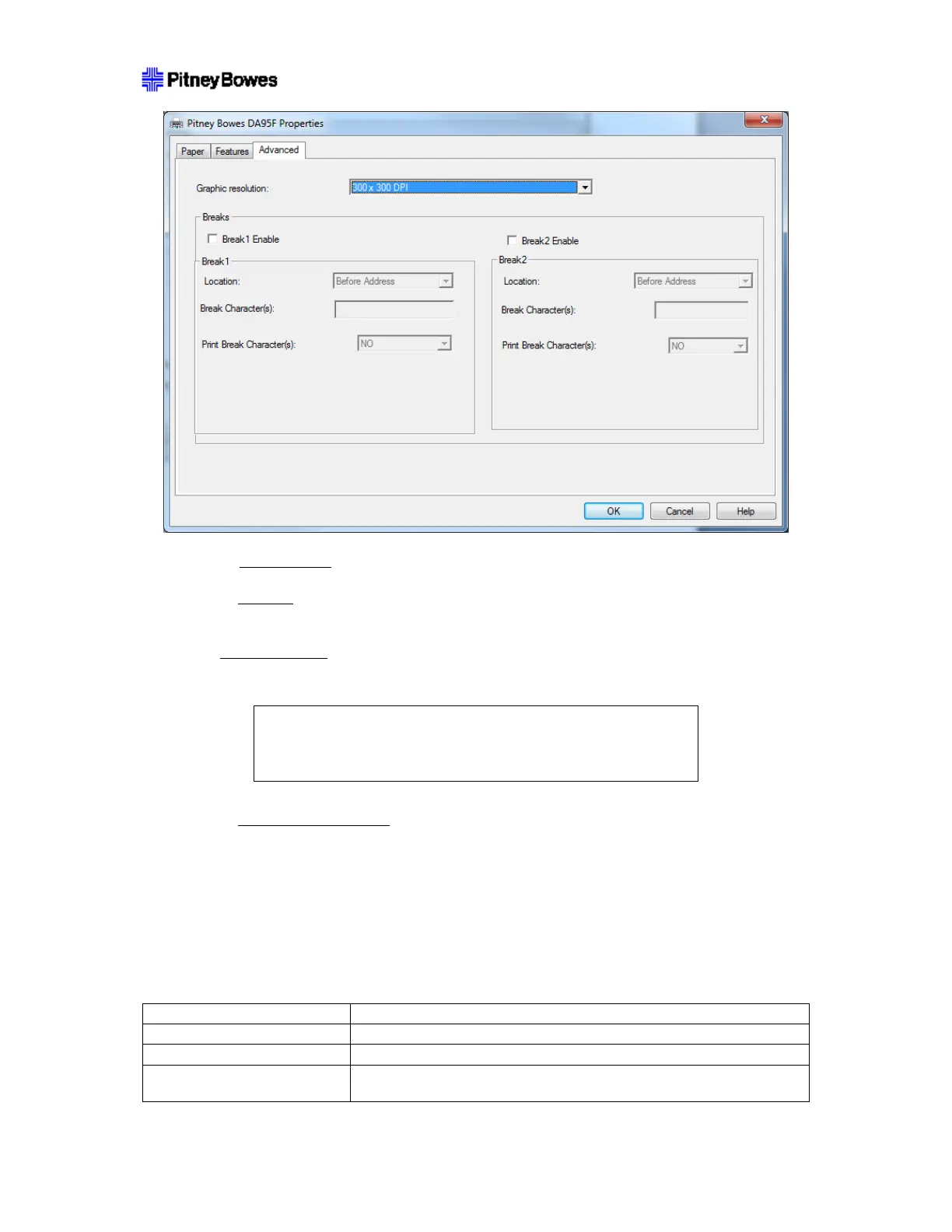
3. Check Break1 Enable
.
4. Select Location
– stop before break piece is printed (Before Address) or stop after break piece is
printed (After Address).
5. Set Break Characters
. Enter exact break string that will appear as characters in print stream.
Table 1 – Allowable Break Characters
! | “ | # | $ | % | & | ( | ) | * | + | , | - | . | / | : | ; | < | = | > | ? | @
0 through 9 AND A through Z
6. Select Print Break Character(s)
. Select whether the break characters should be printed on the
output (YES) or not (NO).
7. If both breaks are needed, setup second break (Break2 Enable) in the same manner as the first.
8. Press OK when done.
10. Glossary
Term Definition
9 DIGIT BARCODE POSTNET™ barcode using only 9 digits.
Activate Polarity
Address Buffer The memory location where addresses are stored for address
recovery operations.



 To Next Page