7-10 SV61311 Rev. E
7 • Add-On Modules
Loading the
Attached Printer
To load sheets into the Attached Printer:
1. Adjust side guides to accommodate the length and width of the material
2. Load the material no more than the fill line.
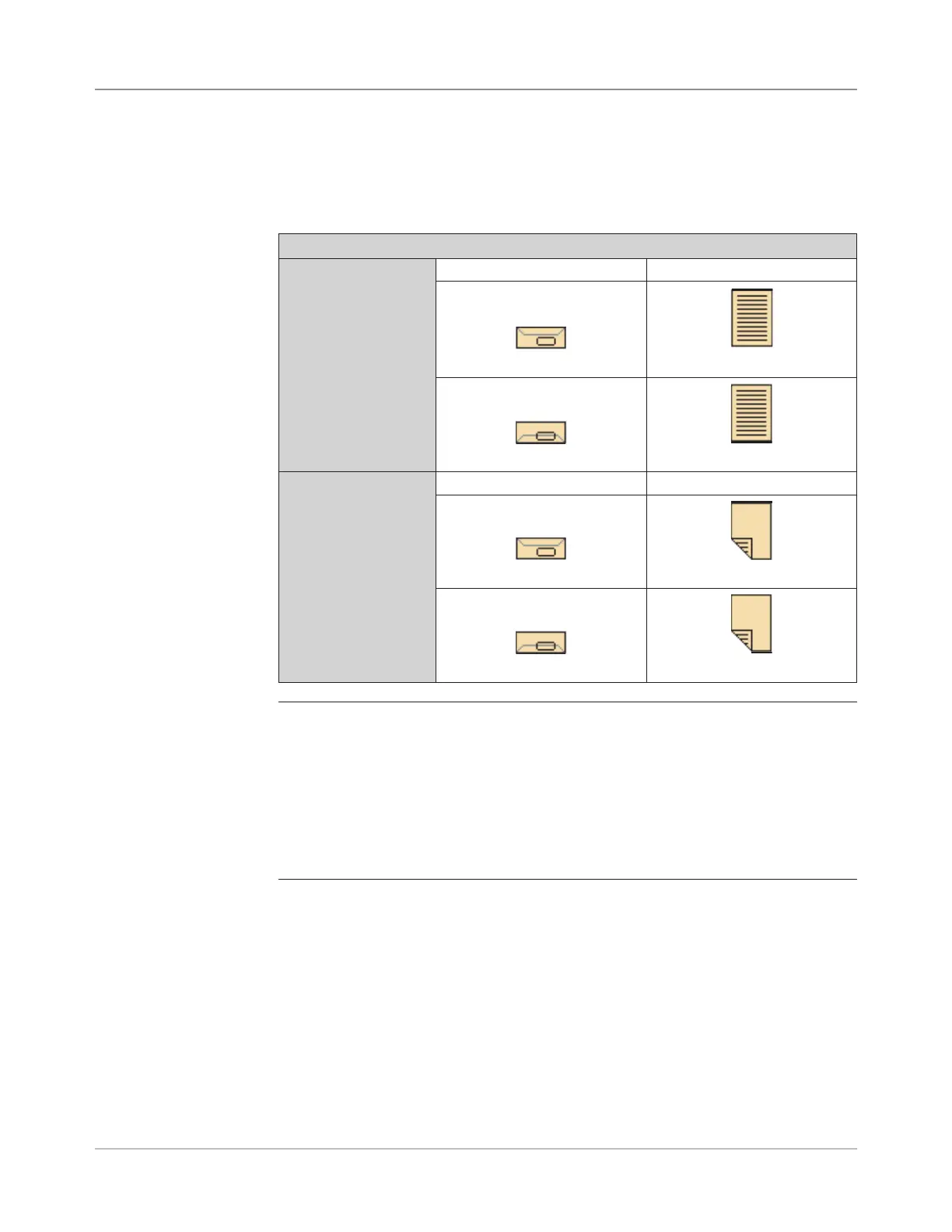
Attached Printer Loading Instructions
Color Printer Envelope Type Sheet Orientation
Standard Flap Face up, top first.
Bottom Flap Face up, bottom first.
Monochrome Printer
Envelope Type Sheet Orientation
Standard Flap Face down, bottom first.
Bottom Flap Face down, top first.
NOTES:
• Do not fan sheets when loading the Attached Printer. Fanning sheets can cause static
electricity, which can cause sheets to stick together.
• If your are loading letterhead or check stock, find the paper direction for the desired
fold type on the label in printer or on the Loading Instructions screen.
• To view a demo of the Attached Printer loading process : go to the Home screen and
select “Loading Instructions and Pre-Run Adjustments”. Use the UP/DOWN arrow keys
to select a Sheet (being fed by the Attached Printer) from the Mail Piece Icon Tree,
then select “Feeders Setup Demo”.



 To Next Page