62 J693
5.6.3 Application Update Problems
;
;
Note:
If experiencing trouble when attempting to download the file to the
printer, try the following alternate methods:
1) Use the download procedure in Section 5.6.2.
2) Windows
users – try restarting the computer in MS-DOS mode.
3) Use a Windows
Driver – ‘Send File to Printer Function’.
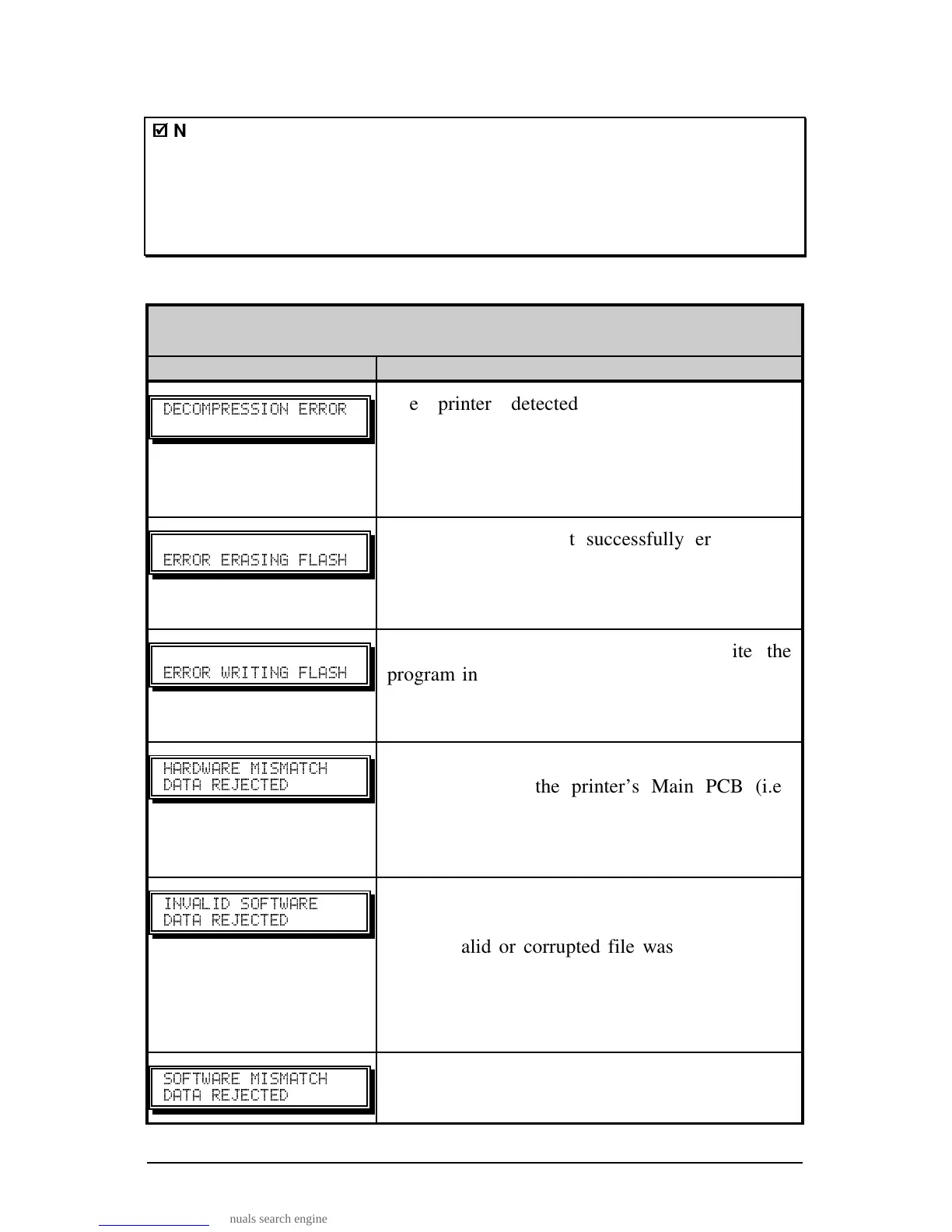
The following is list of possible update error messages:
Application Update Error Messages
Displayed Message Descriptions / Causes / Solutions
The printer detected an error during the
decompression and transfer of file data from
cache storage into the Flash memory. Confirm the
version and retry the download; however, if the
problem continues call for service.
" "
The printer could not successfully erase Flash
memory. The possible cause is defective Flash
memory. Try the download again; however, if the
problem continues call for service.
"
The printer could not successfully write the
program into Flash memory. A possible cause is
defective Flash memory. Try the download again;
however, if the problem continues call for service.
"" "
""
Application Firmware downloaded was not
compatible with the printer’s Main PCB (i.e.,
firmware used was for a different model and not
supported by this boot loader version). See
Section 4.1.4 – Configuration Level.
" "
""
The printer detected an error in the download. The
possible causes include:
• An invalid or corrupted file was downloading;
try saving the file to the host and then download
again.
• Communications error. Recheck cabling and
port setting.
" "
""
Reserved for future use. If this message is
consistent, call for service.



 To Next Page