Installation, use and maintenance
M0546
28 /6 0
15.2 CONFIGURATION VIA APP AND WEBAPP
FOREWORD Initially it is necessary to assign the purchased SYSTEM CODE to the
controller.
To do this, your smartphone must be connected to the 3/4G or Wi-Fi
network, so check the status at the bottom left of the screen:
OFFLINE: APP/smartphone not connected to 3/4G or
Wi-Fi
ONLINE: APP/ smartphone connected to 3/4G or Wi-Fi
1 From your smartphone, go to the Play Store or App Store and search for
PIUSI APP.
The icon is:
. Download and install the application.
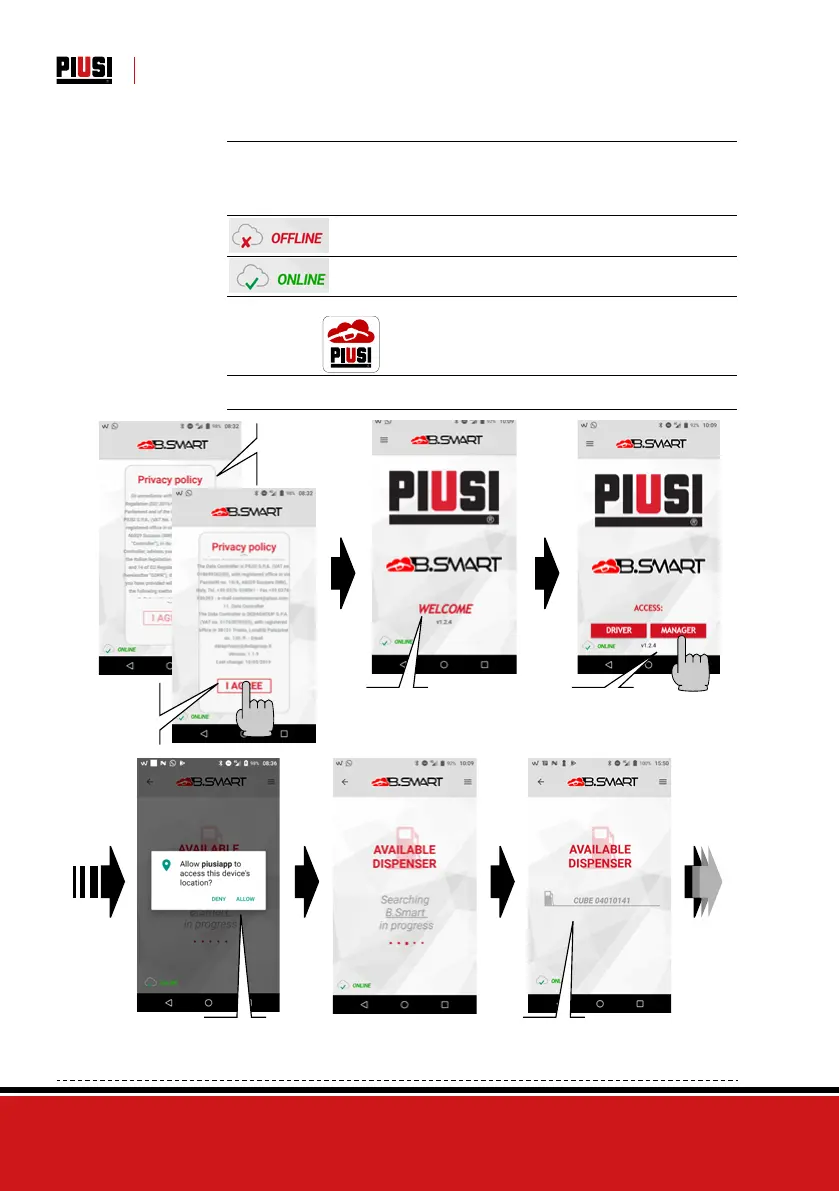
2 Activate your smartphone’s Bluetooth and GPS and open the APP.
Then follow the steps described below:
The conditions
of use are
shown at the
opening
Scroll through
the conditions
of use to the
end and then
press I ACCEPT
Temporary welcome start
screen
Press
MANAGER
If not already accepted
before, you are asked to
accept the use of the position
by pressing I CONSENT
List of dispensers within
Bluetooth range.


 To Next Page