37/124
EN
37 /6 0
This manual belongs to PIUSI S.p.A. The reproduction of all or parts is prohibited.
CUBE
EN (translated from Italian)
19 DRIVER ACCESS
19.1 FIRST DRIVER ACCESS FROM APP
FOREWORD To use the APP as a driver, the manager must have created the driver profile
via WebAPP, (see WebAPP manual, chapter 1, section 1.1 under ADD NEW
DRIVER).
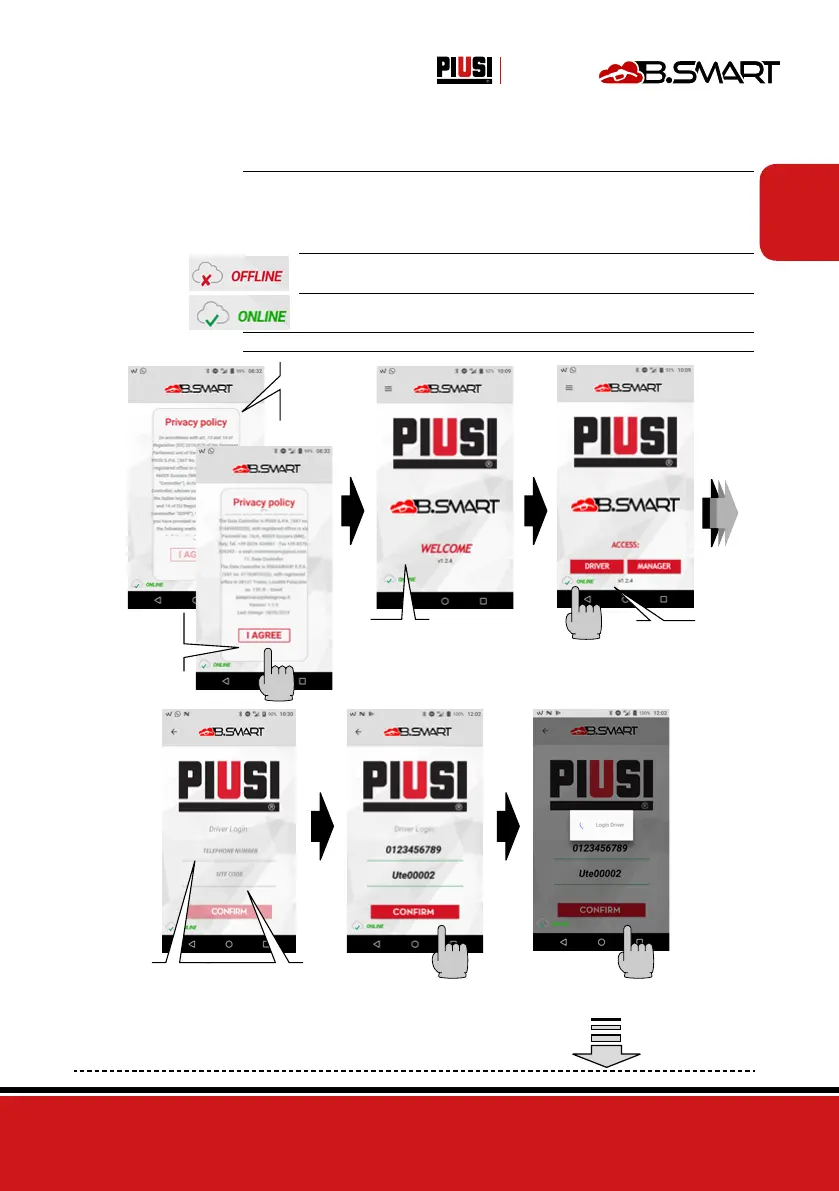
Furthermore, to do this, your smartphone must be connected to the 3/4G or
Wi-Fi network, so check the status at the bottom left of the screen:
OFFLINE: APP/smartphone not connected to 3/4G or Wi-Fi
ONLINE: APP/ smartphone connected to 3/4G or Wi-Fi
Afterwards the driver can authenticate himself in the APP:
If the APP has
just been in-
stalled, the con-
ditions of use
are shown at
the first opening
Scroll through
the conditions
of use to the end
and then press
I ACCEPT
Welcome start
screen
Press
DRIVER
1 - Enter the MOBILE
PHONE NUMBER (in the
same way as communicated
to the site manager for the
user’s cloud registration)
2 - Enter the
SITE CODE
Press
CONFIRM
Wait for the driver login to
be completed


 To Next Page