16
2.4 HD MediaBox Remote Control
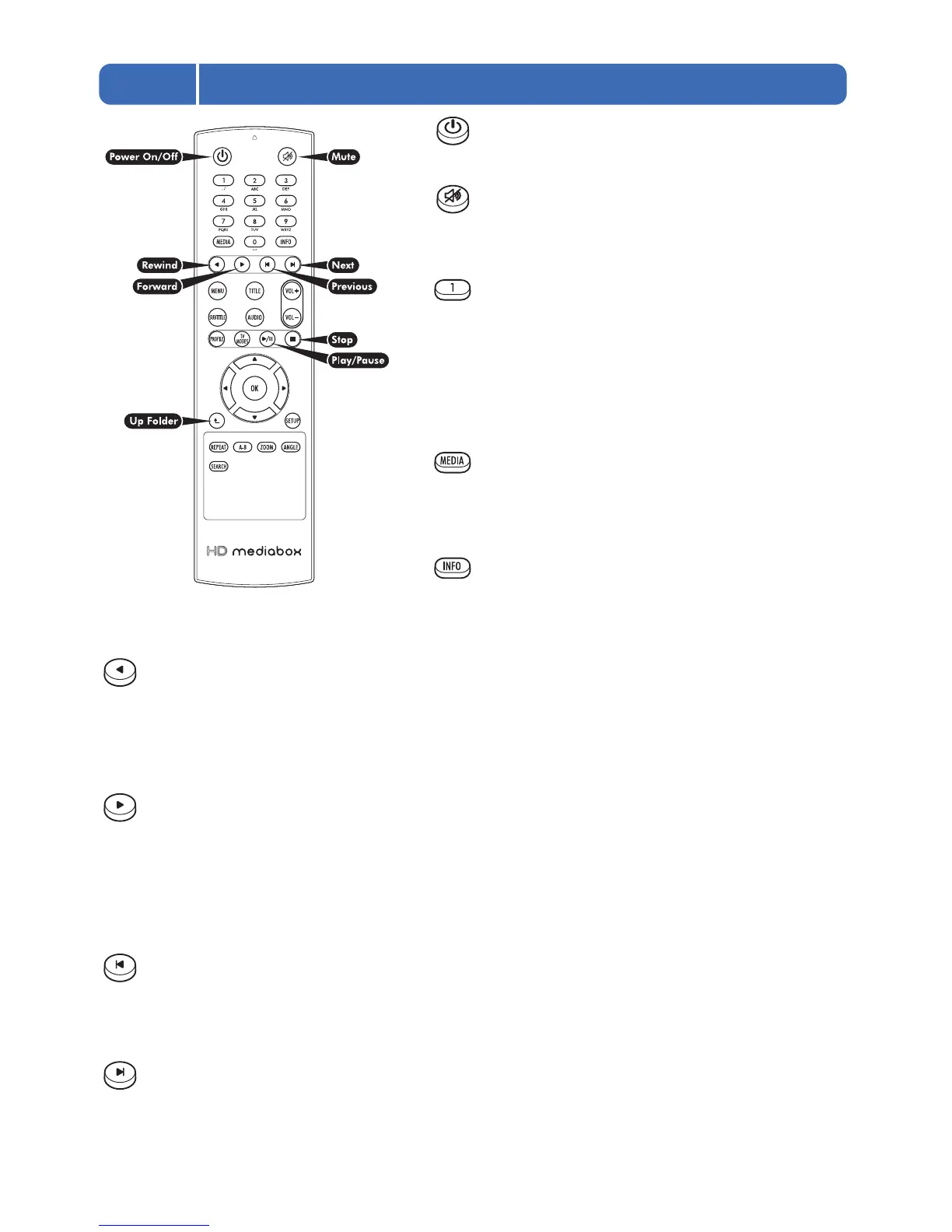
Power On/Off
Pressing this key toggles the power of HD MediaBox on/off.
Mute
Pressing this key toggles the audio output of HD MediaBox
on/off.
Alpha/Numeric keys
These keys enter alpha/numeric values in appropriate areas
(e.g. during a Time Search).
In Media Playing Mode, pressing the numeric keys during
playback will access different parts of the file. Pressing 0 will
jump to the start of the file; 1 will jump to a point 10% of the total
playing time; 2 will jump to 20%; 3 will jump to 30%; etc
MEDIA
In File Browsing Mode, pressing this key cycles through the
“Display file type:” options Video/Photo/Music/All
(see section 6.1).
INFO
In Media Playing Mode and DVD playing Mode, pressing this
key displays an info panel displaying information about the file being played (see section 7.1 for Media Playing
Mode and section 8.2 for DVD Playing Mode).
Rewind / Rotate Photo Counter-clockwise
When viewing video, pressing this key rewinds the media being played. Pressing it multiple times will increase the
speed of the rewind. An icon is displayed on the screen, to indicate the current speed. The Play/Pause key must be
pressed to stop rewinding.
When viewing a photo, pressing this key will rotate the image 90 degrees counter-clockwise.
Forward / Play Folder / Rotate Photo Clockwise
In File Browsing Mode, pressing this key plays the media files in the currently highlighted folder.
When viewing video, pressing this key forward winds the media being played. Pressing it multiple times will
increase the speed of the forward wind. An icon is displayed on the screen, to indicate the current speed. The
Play/Pause key must be pressed to stop rewinding.
When viewing a photo, pressing this key will rotate the image 90 degrees clockwise.
Previous
In File Browsing Mode, pressing this key goes back one page of the file list.
In Media Playing Mode, pressing this key plays the previous media file.
In DVD Playing Mode, pressing this key plays the previous chapter.
Next
In File Browsing Mode, pressing this key goes forward one page of the file list.
In Media Playing Mode, pressing this key plays the next* media file.
In DVD Playing Mode, pressing this key plays the next chapter.
* In Media Playing Mode, the sequence of next media file depends on the Repeat Mode setting (see section 7.2 for more information)


 To Next Page