19
3. Getting Started
3.1 Connecting Power
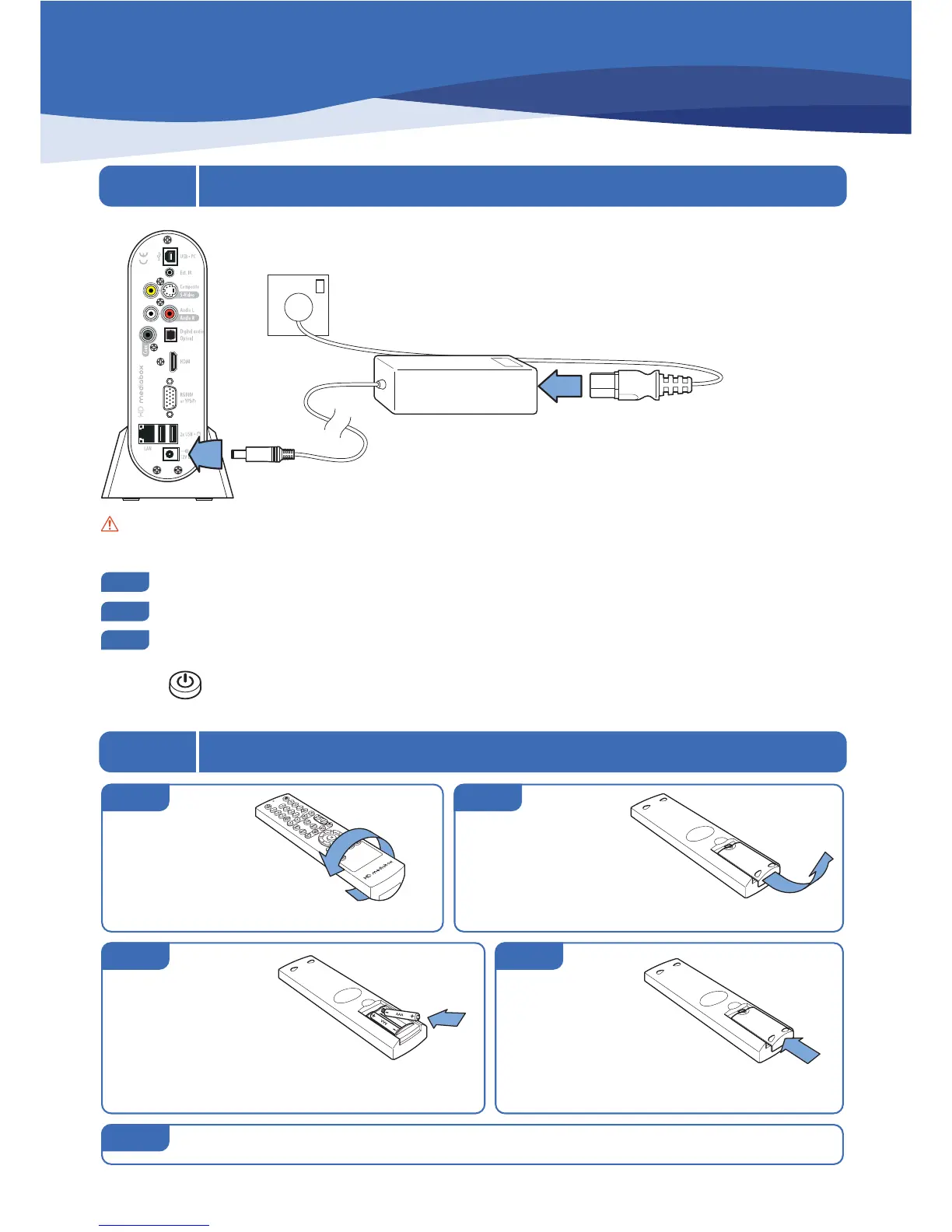
Caution: Use the 12v auto-sensing unit supplied with HD MediaBox. Ensure that the cable provided is suitable
for the power supply in your country. Contact your dealer immediately if you require an alternative power connector.
Connect the standard IEC power cord into the back of the auto-sensing power supply.
Then connect the 12v power connector to the back of HD MediaBox as shown in the diagram.
Plug the power cord into your power outlet and switch on.
You will see a green light on the power supply and a red LED on the front of HD MediaBox to confirm power.
Press the key on the Remote Control to turn HD MediaBox on.
3.2 Fitting the Remote Control Batteries
Turn the Remote Control over
step 1
Remove the battery
compartment cover by
placing your thumb in the indent,
and carefully sliding it backwards.
step 2
Insert 2 AAA
batteries (provided)
in the slots taking special
care to line the positive (+) and
negative (-) ends of the batteries with
the diagram inside the compartment.
Replace the
cover by sliding it
horizontally from the
back of the Remote Control.
It will click firmly into place.
step 3
step 5
step 4
Quickly test your batteries by pressing any key - all the keys should light blue.


 To Next Page