22
3.3.2 Initializing and Formatting an Internal HDD
Caution: Formatting a disk will erase all data currently stored.
If your HDD is NEW, you may need to do one or more of the following tasks
• Initialize
• Partition
• Format
Under Windows XP, you can make a partition and format the HDD using the Disk Manager utility.
• HD MediaBox can only read the first (Primary) partition on an internally fitted HDD.
• HD MediaBox can read file systems formatted in either FAT32 or NTFS. NTFS is recommended, as FAT32
systems are limited to files less than 4GB in size and High Definition video files very frequently exceed this.
First follow the steps in section 4.3.1 to connect HD MediaBox to your computer.
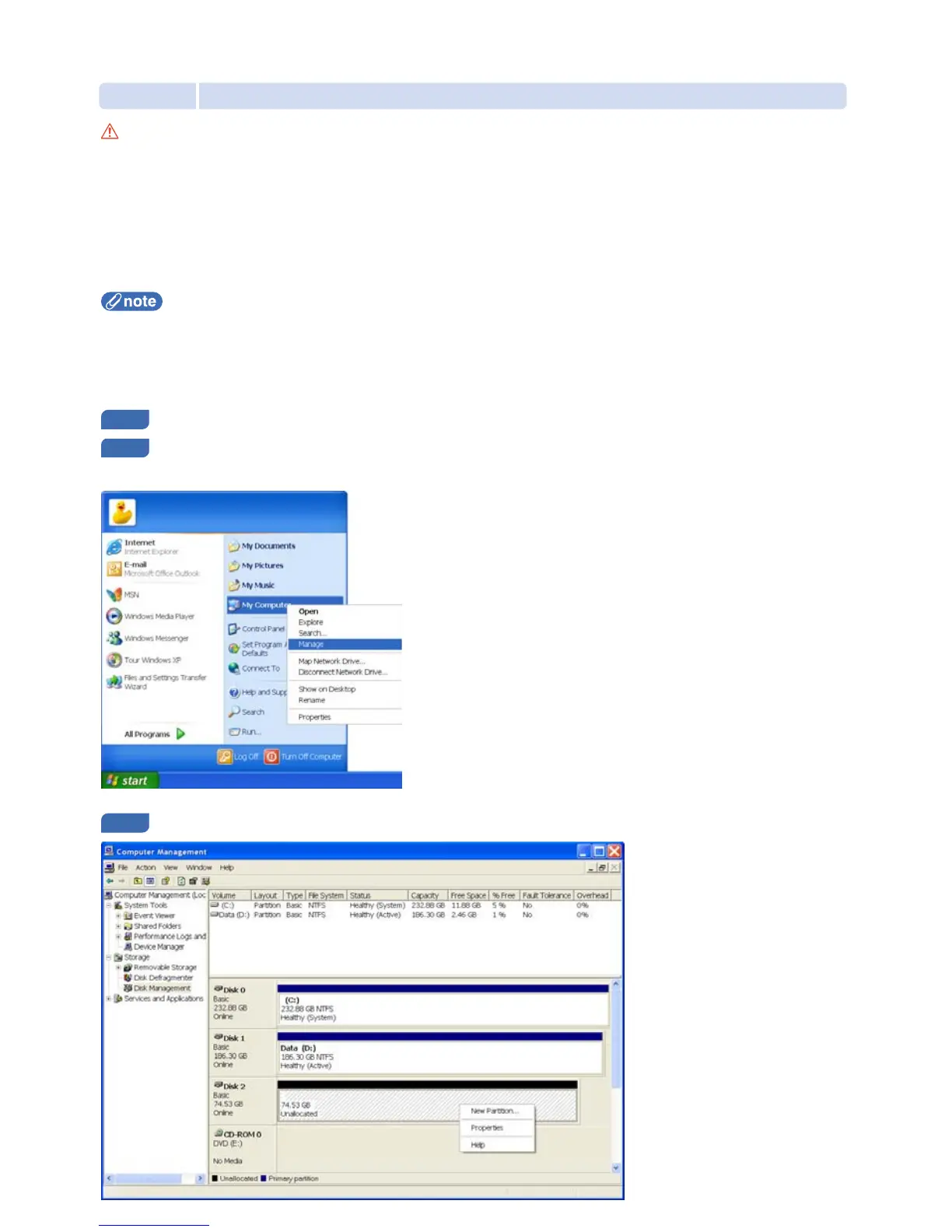
Press the Start button, right-click My Computer and select Manage from the pop-up menu -
the Computer Management utility will appear
In the left hand menu choose Disk Management and you will see a list of Hard Disks appear on the right.


 To Next Page